
×

What is an Octothorpe?

Octothorpe is a number sign with other names and is referred to as a hash mark or pound sign. Octothorpe is known to everyone with the hashtags that are often used in social media and thus the hashtags initiated their popularity.

What is an Octothorpe

The symbol of octothorpe is "#". The symbol got its name from the structure. The word "octo" means the eight points on the symbol. The symbol is made by crossing two horizontal lines over two vertical(up-standing) lines.

The hash symbol is commonly used in printing, telephone keypads along with its usage in computers.

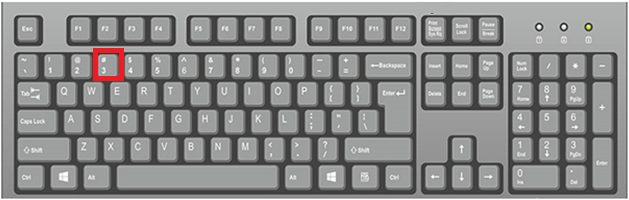
The octothorpe is found in computers and laptop QWERTY keyboards. The position of the symbol is with the 3 number.

The page gives more information about the hash symbol by discussing:

  • How to type the octothorpe?
  • Position of octothorpe on the keyboard.
  • Typing the # symbol on a smartphone.
  • Typing # symbol on keyboards outside the U.S
  • Uses of the hash symbol.

How to type the octothorpe?

To type the “#” symbol in Windows, macOS, or Linux, press the shift and 3 number keys on the keyboard simultaneously.

Position of Octothorpe on the keyboard

As said before "#" symbol is found in the number 3 key in the QWERTY keyboards. The keyboard, along with the hash symbol, is as below.
What is an Octothorpe

Typing the # symbol on a smartphone

To type the hash symbol on the smartphone or tablet operating on the Android Operating System, click on the keyboard that is present on the mobile phone, then click on the numbers section. After that, access the symbols section in that tap on the "#" symbol.

Typing # symbol on keyboards outside the U.S

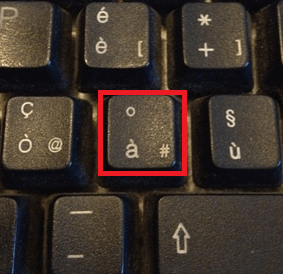
Computers and laptops in other countries that do not use QWERTY keyboards will have octothorpe symbols in different positions. For example, the# symbol is found in the Italy keyboard along with the à and ° keys. To type the # symbol, press Alt and key at once.
What is an Octothorpe

Uses of the hash symbol

Hash symbol is used for the following purposes in computers, tablets, and smartphones.

  • The pound symbol(#) is used for defining the hashtags. For example, #movie, #computersciencebooks.
  • The pound symbol is used in social media(like Twitter, Facebook, Instagram, and youtube), and hashtags are used to categorize the text written after the symbol.
  • The hash symbol represents a nonexecutable statement before the code lines.
  • In the Internet Relay Channel(IRC) hash symbol is used to represent a chat channel. Example  #channel_name makes an identifier of a chat channel.
  • When a hash is written before that number is used to indicate a number as an ordinal, consider #2 for "number two" or second in some comparison.

Related Topics

What is a Program

A program can be defined as an application used to perform a specific function. It constitutes stepwise instructions to perform a dedicated task. Multiple programs working together can form a...

4 minutes read.

Block Diagram of Computer

Computer Block Diagram System: Mainly computer system consists of three parts, that are central processing unit (CPU),Input Devices, andOutput Devices. The Central Processing Unit (CPU) is divided into two parts...

5 minutes read.

What is RDIMM?

Servers use the RDIMM (registered memory) kind of memory chip most frequently. By reducing the electrical strain on a memory controller, it helps systems running on a server be more...

3 minutes read.

Microsoft Word Shortcut Keys

Microsoft word shortcut keys are the keys that are used to work rapidly. These shortcuts are used to perform major tasks quickly in Microsoft word. Users of Microsoft word have...

7 minutes read.

What does Alt+E do?

Computer keyboard shortcut keys play a very important role in every computer user. We can do anything from the mouse and keyboard, but shortcut keys provide data in a time-efficient...

3 minutes read.

Uninstalling Software or Apps in Windows

How to uninstall software in Windows? Unwanted software can be removed from your computer's hard drive using several third-party programs and the built-in tools that Windows 10 and Windows 11 provide. Applications...

4 minutes read.

What is boot menu?

When we turn on our computer, the machine goes through a process known as booting that is carried out automatically. This could be accomplished by the CPU's circuitry, software, or...

3 minutes read.

How to edit the registry from the command line

Editing from the command line is one of the ways of editing the registry. Still, before editing the registry, it is always recommended to back up the registry and computer...

4 minutes read.

What is an Executable File?

An executable file (EXE file) contains a set of instructions, when the user clicks on the file icon, the system can immediately execute. The file extension for an executable file...

4 minutes read.

What is a Punch Card?

Paper cards with holes punched into them to represent computer data and instructions are known as punch cards (or "punched cards"), Hollerith cards, or IBM cards. They were a common...

6 minutes read.

What is a multicore processor?

A multi-core processor is an electronic component that has two or more processors attached to it for increased performance, more efficient power use, and rapid and parallel processing of multiple...

6 minutes read.

Input devices of Computer

Computer Input Devices : The input device is the hardware device that connects to the computer system. The user can give the instructions to the computer with the help of...

11 minutes read.

How to Connect and Install a Computer Keyboard?

The wired keyboards used nowadays are linked to the computer using the USB interface. The older computers used the Personal System/2(PS/2), also called the mouse or keyboard port, to connect...

7 minutes read.

How to installation or uninstallation Microsoft Paint

Instead of Microsoft Paint, we can also call it MS paint. Sometimes, it is also known as Paint. Dan McCabe programmed the first version of Microsoft Paint and also introduced...

3 minutes read.

Mouse not detected or working in Windows

One or more issues could be blocking the mouse from functioning properly in Microsoft Windows if it stops moving or doesn't appear on your monitor. Solutions on this page may...

5 minutes read.

Internet Explorer Shortcut Keys

While using internet explorer, when we use shortcut keys, our work will be done faster when compared to the job done without using them. The reason is internet explorer is...

23 minutes read.

What is Case Badge?

A case badge is a small label or symbol fixed to the outside of a computer case, typically on the front panel that displays the manufacturer's name or logo. Some...

6 minutes read.

Difference between Hard Copy and Soft Copy

Hard copy: A hard copy is a printed version of a computer-generated digital document file on paper or another transparent medium. The result is physically printed on paper and is...

4 minutes read.

What is VDU?

In this article, we shall discuss the VDU- visual display unit. VDU states visual display unit. This is a British term. And this is used to display pictures and text on...

4 minutes read.

Extended Reality

The extended reality, XR, specifically, has been creeping into, for all intents and purposes, modern life for pretty many years in a particularly big way. According to statista, the global...

8 minutes read.