
What is a Joystick?
An input device known as a joystick is frequently used to control gaming programs and, sometimes, used in graphics applications.
Every game requires a controller to play. Suppose a game like pubg, which has simulation, shooting, and aiming, requires a joystick to play comfortably on a PC or Laptop. This Joystick gives full control over the game. For a computer, the Joystick always acts as an output device, which means it needs to be connected via connector or Bluetooth or any other way.
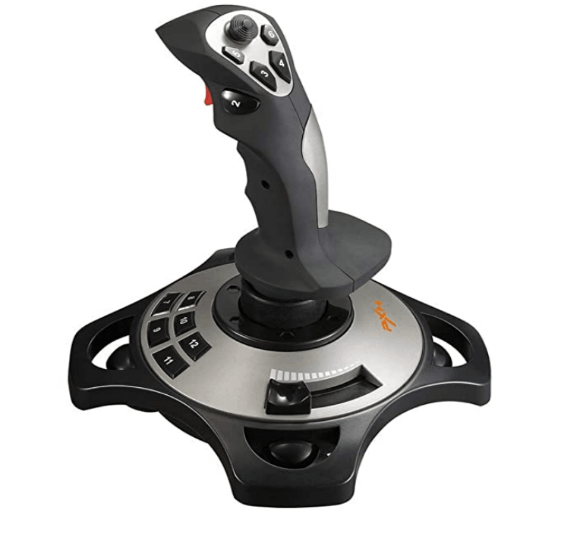
The Joystick, sometimes also known as a flight stick, consists of a stick that pivots on a base and communicates its angle or direction to the device it is controlling. In the cockpit of many commercial and military aircraft, a joystick—also referred to as the control column—serves as the primary center or side stick. It frequently features additional switches to regulate different parts of the flight of the aircraft. But the Joystick has become old technology nowadays. Most people are using controller gamepads on PS5 and Xbox. There are different types of joysticks like digital, analog, paddle controller, Bluetooth gaming controller, etc.
History of Joystick
A joystick consists of a stick that pivots on a base and communicates its angle or direction to the object it is controlling. Most frequently, they are employed to manage video games.
The Joystick was first created by C. Naval Research Laboratory and copyrighted in 1926 by B. Mirick. It was a two-axis electronic joystick that was initially created for remotely operating airplanes, just like the joysticks we use today.
Most of the joysticks can be connected to their PCs by a USB Type-A port where this port is available most of the time.
Several buttons read their states from the computer. A joystick is also frequently used for steering vehicles like wheelchairs, cranes, and lorries. The first one, known as Bleriot VIII, was constructed in 1908 and utilized for an aircraft's flight control in communication with the wings. Despite numerous rival claims, French pilot Robert Esnault-Pelterie is credited with coining the term "joystick" in the early 20th century.
Although some joysticks are constructed in three dimensions, most are typically two-dimensional and have two axes of movement. Typically, they are set up so that moving the stick up and down signals movement in the Y axis while moving it left or right signals movement in the X axis. The roll, pitch, and yaw of an airplane are determined by the x, y, and z axes. An analog stick created for numerous video gaming consoles is another significant concept. These joysticks are constructed with continuous states and often use potentiometers to return an angle measurement of movement in any direction of the specified plane. Hence this is the origin of the Joystick.
The Joystick also has triggers, which are buttons akin to mouse buttons. The primary distinction between a joystick and a mouse is that a mouse prohibits the cursor from moving until it is moved, but a joystick allows the cursor to travel in the direction of the Joystick even when it is not held upright.
Fast interactions are crucial in gaming applications, which the Joystick can deliver. The Joystick gives a better gaming experience than other input devices. It is simple to use and understand and frequently isn't more expensive. However, it is not a useful method when choosing alternatives from a screen, and it is not as simple to use in confined spaces.
It can provide more control than keyboard keys because of its fluid motions. For those with impairments who need an input device, a joystick may be more advantageous. Most joysticks include at least one button for the trigger at the front of the stick and another button on top of the stick. Several joysticks feature additional buttons on the base. A hand that is not controlling the stick can be utilized to operate these buttons.
The Joystick often includes software that enables users to assign the purpose of each button. Joysticks also link to your computer through a serial port or a rudimentary USB connection. Joysticks are better suitable for flight simulators and flying action games since they mimic the controls of airplanes and other types of aircraft. But other players also utilize joysticks for different genres of video games, such as first-person shooters and fighting games. Some people also utilize the keyboard and mouse that they are accustomed to using.
Structure of Joystick:
Although the parts listed are simply for a dual axis and return to the center joystick, there are many components that go into making a joystick. Each component of a joystick fits together like a jigsaw and needs to be used exactly in order to get the desired result. Building a joystick can be done in a variety of methods, each specializing in a certain area of need. Some pay attention to the rotational range, handle control, or resistive forces within a specific direction.
Below is a list of every component of the Joystick, along with a photo of the component. Each component's function and outward appearance are briefly detailed, as well.
Handle or top: Where the user holds the Joystick, the handle or top is typically shaped like a ball or a bat.
Stick/Shaft: forms a rod-like connection between the Joystick's handle and body.
Pivot: A mechanism's pivot is the center shaft, pin, or point around which it rotates or oscillates.
Spring: This device is used to return the Joystick to its center position, which is situated beneath the pivot.
Actuator: Provides additional space and accuracy for pressing the switches at the bottom of the shaft.
E-rings: These are a particular kind of fastener that attaches to the shaft's bottom and are used to align and secure items there.
Mounting Plate: a mounting plate that is firmly and immediately attached to the control panel.
Guide/Dust Washer/Disk/Cover: Form a flat disc around the shaft on top of the control panel.
Restrictor Gate: Limits the movement of the Joystick, the creation of a plate with drilled holes.
Other Components: This group includes the wire harness that manages the switches positioned all around the Joystick's base. Additional plates, other pivot options, or securers along the shaft are examples of other configurations.
A person can make his own Joystick with this all the components as a project, and it is fun. It is interesting and gives knowledge of consoles. Most of the institutes give this a project for their students.
The most famous companies that manufacture Joystick are Logitech, Play Station, Xbox, etc.
We also need to discuss of paddle controller before discussing the different types of Joysticks.
Usually used to control the movement of the player object along one axis of the video screen, a paddle is a gaming controller featuring a circular wheel and one or more fire buttons. A paddle controller stops at either end and revolves around a set arc (often around 330 degrees).
In order to provide an output voltage level that changes with the angle of the paddle wheel concerning a fixed reference point, the paddle wheel is often mechanically linked to a potentiometer. Consequently, a paddle is a controller for the absolute position. In other words, the sensor may be read without any prior information, and the outcome clearly shows where the paddle knob should be. In contrast, a "spinner" is a device that uses rotary encoders.
Different types of Joystick:
The joysticks are classified following types:
- Simple Joystick
- Paddle controller
- Analogue Joystick
Simple Joystick:
Most people use this Joystick, and this Joystick is also known as an Atari-Style Joystick. This Joystick usually has commands like up, down, left, and right. In this Joystick, there is an option of firing bullets (According to the game that you were playing). It is very handy. This Joystick was first introduced by Atari video games. It is an arcade game company. The Joystick was introduced in Atari 2600. It is a game console having 524 games that are classified into 3 categories.
Paddle Controller:
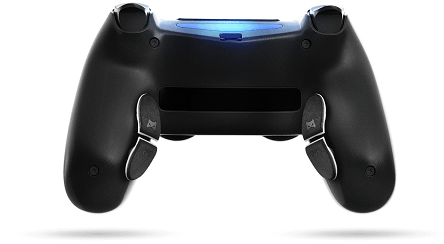
Nowadays, most gaming companies focus on these paddle controllers. It has many numbers of options than a normal joystick. This paddle controller first appeared with the Atari games. Now, these paddle controllers come with Bluetooth options also.
Analogue Joystick:
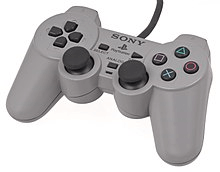
Most of the techy companies used this type of Joystick Apple and IBM. This Joystick comes with a wire which is more responsive than the Bluetooth model joystick. An Analog joystick is a combination of both digital and paddle joystick.
Advantages of Joystick:
A joystick is meant for gaming which has lot more advantages while comparing it with a control pad. A joystick is for controlling an object or simulation of a game. The following are the advantages related to the Joystick while gaming.
- It is very handy, while on a computer we have to use the keyboard for controlling it is very having to find the buttons so quickly, but in Joystick it is very easy to find the buttons. If you play a flight simulation game, it will give you the feeling of driving a flight.
- I feel that a joystick can replace a mouse because of the function that it can offer. It is more intuitive while controlling your character in your game. The directions can be changed very easily using the Joystick of the character.
- In the games like fighting and in games of flight simulation, a joystick is more compatible than any other device. In Joystick, we have suitable buttons, and we can sit on our consoles for a long amount of time than usual because of this Joystick.
Disadvantages of Joystick:
For a joystick, there are disadvantages also because, after all, it is a device:
- Some of the companies offer cheaper buttons which is a built-quality issue. It is not compatible with all the devices that we use, and this is compatible with only gaming consoles and the latest systems. Sometimes a joystick may not have a port that is suitable for our laptops. All joysticks won’t have USB inputs.
- If you put more pressure on a joystick in the direction you want, then it may break because it is made up of plastic, and plastic, after a long time, starts decomposing.
- A long-time joystick user may have the syndrome of carpal tunnel. It is a kind of stress injury it is caused if you put more pressure on a particular part of your body. You need to consult a doctor. If you want, it may lead to operation.
- A joystick is only suitable for games only. It is not suitable for all types of games. But nowadays, all people are using control pads. We cannot trust joysticks because most joysticks have cheap qualities you need to browse before buying a joystick.
Joystick ports:
Joysticks offer different kinds of ports that are suitable for some devices and not suitable for some devices.
Serial port:
It is also known as the asynchronous port; it is an older technology introduced by IBM. Usually, these ports are capable of transferring one bit of information at a particular time.
USB:
Many devices offer this USB port it is become more common to have a USB. USB, there are many types like Type-A, Type-C, etc. With this USB, we can transfer files very fast compared to that serial ports.
Bluetooth:
It is a wireless option we come to see in modern laptops and computers. For this connection, you will not need any type of wire. It reduces the plastic usage in a joystick.
Game Port:
It was introduced by IBM computers; it is a 15-pin connector port it has the capability of converting analog signals to digital signals. It is also known as a game control adapter. We can install this port on a motherboard.
Joysticks are a great option for people who only have one hand or who want to prevent conditions like carpal tunnel syndrome from using a mouse and keyboard setup because many of them also have a lot of customizable buttons. The extra buttons are also a practical, user-friendly substitute for controllers.
Conclusion:
This is all about the Joystick has been around for a while and has completely changed how we precisely and steadily control objects. We can demonstrate how else to construct a dual axis and return to the center gamepad with all the elements necessary. Because there is no standard design for joysticks, they are extremely different from other devices.
People can alter their desires in specific ways. It has been demonstrated that modifying the outer housing and internal components, such as the spring/restrictor gates, is now an efficient option to create an item for any usage.