
What is Cable Modem?
A common piece of gear that links computers to your ISP is the cable modem. A cable modem, unlike other types of modems, uses coax cable to proxy that connection rather than a phone or DSL line, the same infrastructure that transports television programming to our businesses or homes.
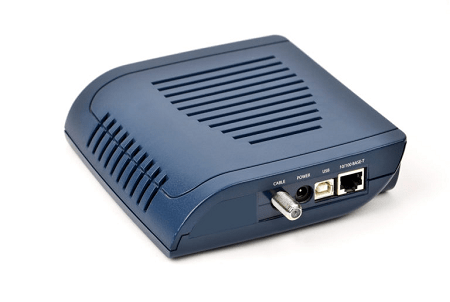
A cable modem can offer multi-channel telephony, internet, and television access in the home and commercial settings, typically under a single, consolidated service contract.
How Does a Modem Work?
Essentially cable modem is acting as digital translators. They quickly transform the data signals received from your ISP's network into a digital "language" that your routers may then send out across a cable or wireless link to the rest of your local network.
Through coaxial cables and an Ethernet cord that plugs directly into computers or a network router, cable modems carry out that crucial translation. However, some contemporary cable modems include an integrated router, eliminating the requirement for two separate devices to be linked to the internet through Ethernet cables and ports. Both tasks are simultaneously carried out by the same machine. Your modem uses the same types of cables used to relay TV signals to access the internet, whether it is a dual unit or a separate cable modem and router.
To transfer data using cable lines, this delivery ecosystem mandates that local and even neighborhood hubs are established by national cable providers or operators. People share bandwidth equally within these hubs, and cable operators impose data caps to prevent any single user (even companies) from using excessive amounts of it. Due to the technology's extensive acceptance, cable providers have decided to separate their residential and commercial clients. As a result, business traffic is isolated from residential neighbors while still using the same platform. A higher tier SLA (service level agreement) for business services will also provide a quicker turnaround and higher priority for service interruptions or outages.
Greater bandwidth is available to your firm with more expensive levels. Many individuals believe that boosting your bandwidth can speed up your internet connection. This is a misconception, though, as bandwidth actually refers to the quantity of data that may be transferred to you every second in megabits (Mbps). Simply put, increased bandwidth enables you to receive more megabits of data. This gives the idea that data speed has improved but really improves data volume.
What we think of as faster internet is actually only possible with cable modems and other network infrastructure. What effects does a modem have on your internet speed, and how does it operate? These transmission measurements are relayed by the DOCSIS standard, also known as the Data over Cable Service Interface Specification standard. There is a DOCSIS speed for every cable modem, and these speeds vary widely across different modem models. Older DOCSIS modem types (such as DOCSIS 1, 1.1, and 2) typically have download rates of 30 to 100 Mbps. However, the most modern ones are capable of upload speeds of up to 10 gigabits per second (Gbps).
What Is a Cable Modem Used For?
Business cable modems are an essential piece of hardware for internet networks and effective data transmission. To fully enable communication, it's essential to find a device having the following features:
1. Accessing the ISP: A cable modem's ability to connect to your ISP's network is its most fundamental function. Since it relies on a physical cable network that spans the entire nation, a cable modem is one of the most well-liked and dependable forms of ISP connectivity.
2. Using and bundling services: Voice services, internet access, and television can all be bundled under a single subscription when using delivery networks based on cable modems. Bundling services from one source can frequently reduce your provider bills, saving your company money. Each service is delivered through a separate physical cable line when it is packaged, reducing lag and service interruptions. Voice services, internet access, and television can all be bundled under a single subscription when using delivery networks based on cable modems.
3. Upgrading internet speeds: Less than 100 Mbps to a gigabit are among the internet download servicing speeds that ISPs and cable companies offer. The internet speeds you can access are substantially impacted by your cable modem. Your firm might suffer reduced internet connections in the absence of a DOCSIS model with a related speed standard.
What is the Difference Between a Modem and a Router?
Both a modem and a router are necessary to connect your devices to the internet. Although they resemble one another almost exactly and occasionally combine to form a unit, they serve diverse purposes.
The modem establishes a connection between your company and your ISP so that your network can access the internet. It includes two ports, one for connecting to your ISP and the other for router connectivity. The modem transforms the digital signals from your ISP to your PC for a wired internet connection. Features of modems include:
- Ethernet ports
- Public IP address
- Wide area network (WAN)
The following describes how a modem and router team up to connect your company to the internet: -
1. To access the larger internet, the modem makes a connection with your ISP.
2. The WAN port on the router is where the modem is connected.
3. Your devices connect through the router to your Wi-Fi network or company network to access the internet.
How to Choose the Right Cable Modem for a Business?
When choosing your ISP or communication devices or when updating your cable modem, keep in mind these suggestions.
1. ISP COMPATIBILITY: Your ISP must be able to work with your modem. If you rent modems and routers straight from carriers, they normally provide you with matching equipment. However, you must make sure your modem is compatible with both your service provider and your internet bandwidth tier when you buy your own devices.
2. HIGH-SPEED INTERNET ACCESS: New versions of DOCSIS modems, typically a DOCSIS 3 or 3.1, are required for upgraded internet tiers, including bundles with bandwidth beyond 100 Mbps. Older equipment won't be able to sustain these service speeds, so if you upgrade your entire internet package, you'll probably also need to get a new cable modem in order to use the connection you're paying for.
3. UPLOAD AND DOWNLOAD SPEEDS: The maximum download speeds of several internet service providers are used to market specific packages (in Mbps). Normal download speeds depend on a variety of things, including your service provider, location, hardware condition, package tier type, and others.
However, the maximum upload speeds must also be taken into account when choosing your cable modem internet subscription. Because cable modems use asynchronous delivery, the upload rates will be far slower than the advertised download speeds. However, the synchronous nature of commercial activities necessitates a continuous stream of sent and received data, documents, Internet communications, cloud access, and more. Fast upload rates are just as necessary for each of these tasks as they are for swift retrievals and download. Because of this, organizational leaders need to consider upload speed in addition to the advertised downloading speed.
Insider tips: As a general rule, upload speeds for most packages will be roughly 15% lower than their advertised download rates. For instance, if your internet package's maximum download speed is advertised as 200 Mbps, the upload speed is probably going to be in the range of 30 Mbps.
4. ACTUAL EMPLOYEE USAGE: It's not always great to have more Mbps. Business owners should consider the actual internet usage of their employee user group and classify the specific apps that their team uses the internet for before selecting a premium bandwidth package.
- Moderate and high usage: Workers that need constant data exchange, frequent access to cloud-hosted services, or substantial amounts of VoIP or videoconferencing fall under the moderate to high usage group. For these levels of staff utilization, experts recommend a 2:1 bandwidth ratio, or 1 Mbps of bandwidth for two employees.
- Low or casual usage: Employees who use the internet only for email and simple online searches are considered low- or casual-usage users. For this tier, experts recommend a 3-to-1 ratio or one megabit per second of package bandwidth for every three employees.
- FIREWALL THROUGHPUT: When you upgrade your modems or internet packages, it's a wonderful time to examine your firewall throughput, or the volume of traffic that can pass through your firewall (also measured in Mbps or Gbps).
Earlier firewall technology might not be able to keep up with your improved cable speeds since it lacks the RAM, CPU, and other characteristics necessary to do so, just like older DOCSIS modems. Consider upgrading your firewalls and other similar network defenses along with your choice of Internet service plan to get the most out of your new coax service and to reach its full potential.
Find the Best Cable Modem Solutions
You can ensure you are receiving the internet, telecom, and data services you need at the speeds you are paying for by doing a free bill audit. Alternatively, get in contact with us to learn more about our unified business communications system consultations and how they can help you find the right communication solution for your needs right away.