
Generation of Computer
History of computer
The abacus was initially used for the mathematical tasks in the history of the computer. It is also known as counting frame and a calculating tool that was used in Europe, China, and Russia a few centuries before.
The beginning of the computer is related to the 19th century. There was an English mathematics professor named Charles Babbage. He has developed the Analytical Engine. There are five generations of computer history. Every generation is a symbol of the development of significant technology. All five generations of computer are given below:
First Generation
The period of the first-generation was from 1946 to 1959. J.P.Eckert and J.W.Mauchy developed the first successful electronic computer. The name of the first computer is ENIAC, which, stands for "Electronic Numeric Integrated and Calculator."
These computers used vacuum tubes as circuitry and magnetic drums for memory. These computers are taking up the space of the entire room. These types of computers were inefficient material which produced a lot of heat and sucked a huge amount of electricity.
The first generation of computers used machine language or binary code as the programming language. These computers are limited to solving one problem at a time, and means that they are not multitasking systems.
The ENIAC was not the stored-program computer. It is the collection of electronic adding machines and other arithmetic units which were initially controlled by the web of large electrical cables.
This computer was programmed by the combination of plug board wiring and three portable functions. Every function table has 1200 ten-way switches used for entering the table of numbers. It was 150 feet wide with the existence of 20 banks of flashlights and about 300 times faster than the Harvard mark1 computer in addition.
Some examples of first-generation computers
- ENIAC Computer
- EDVAC Computer
- UNIVAC Computer
- IBM-701
- IBM-650
The computers of the first generation were costly, and only large organizations can afford it. The batch processing operating systems are used in this generation. The punch cards, paper tape, and the magnetic tape were used as input and output devices. The ENIAC computer contains 18,000 vacuum tubes.
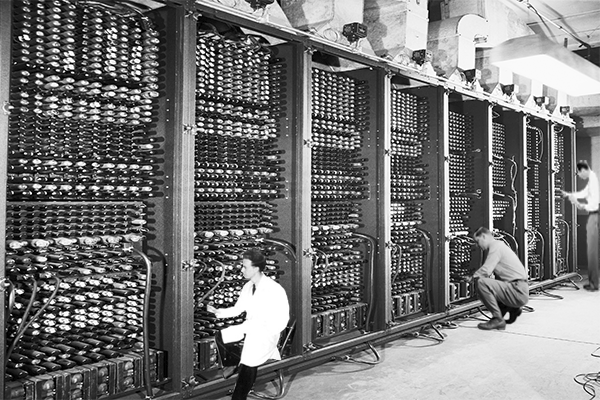
Fig. Two programmers are working on the ENIAC computer.
Advantage:
- These computers were capable of calculating the data in few milliseconds.
- The computer of the first generation use the vacuum tubes, which was the only electronic component available.
Disadvantage:
- The computer of this generation is very huge.
- The weight of these computers was about 30 tones.
- These are very costly.
- It could store a small amount of information or data via the presence of magnetic drums.
- These computers have very less efficiency.
- A large amount of energy consumption by the first generation of computers.
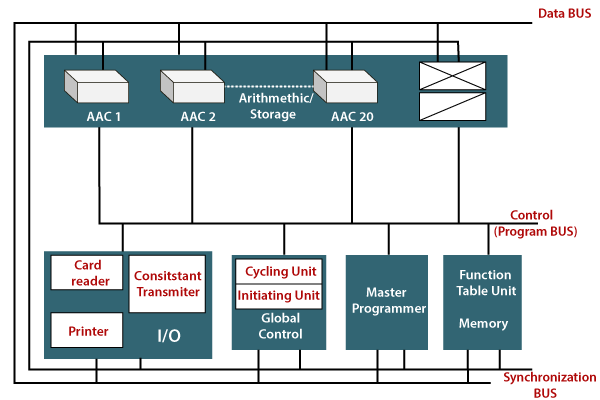
Fig: The Units of ANIAC computer.
- These computers are not reliable and needed constant maintenance.
- The punch cards are used to take inputs, and these computers have limited programming capabilities.
- The first generation of the computer used vacuum tubes, and the vacuum tubes generate a massive amount of heat so, it requires an extensively cooling system.
The output in these computers was displayed on printouts, and the input was based on the paper tape. The UNIVAC Computers was the first commercial computer delivered to the business client, the U.S Census Bureau in 1951.
UNIVAC Computer
The UNIVAC stands for the universal automatic computer. This computer was the first electronic digital computer developed for the use of the business application in the United States. The inventors of the ENIAC computer invented the UNIVAC computers.
The first UNIVAC computer was established by the United States Census Bureau on 31 March 1951. The main purposes of these computers are business and administrative with fast execution of relatively simple arithmetic and data transport operations.
The UNIVAC computer systems were a massive mainframe computer, and it is operated around 10,000 operations per second. This computer represents the birth of modern computers. The weight of these computers is 15 tons. The UNIVAC computer has 5000 vacuum tubes. The storage in this system was magnetic tape reels that held 1 MB of data at the density of 128 CPI (clocks per instruction). The computers of the first-generation consumed a lot of electricity. These computers supported machine language only. These computers have slow input/output devices.
The architecture of UNIVAC Computer
The UNIVAC computers competed directly against punch-card machines. The UNIVAC card to tape converter and the UNIVAC tape to card converter are used to transfer data between cards and UNIVAC magnetic tape. These computers were too expensive for universities.
The main memory of UNIVAC computers consists of 1000 words. The input/output buffers were 60 words in each, consisting of 12 channels of 10- words mercury wait line registers. There are six channels of 10-word mercury wait line registers as spares with reshaped circuitry.
Seven more channels manage the temperature of the seven mercury tanks in the main memory of the UNIVAC computer. One more channel is used for the ten words "Y" register. There is total 126 mercury channels contained in the seven mercury tanks which are divided into the sections MT, MV, MX, NT, NV, NX, and GV. Every mercury tank is divided into 18 mercury channels.
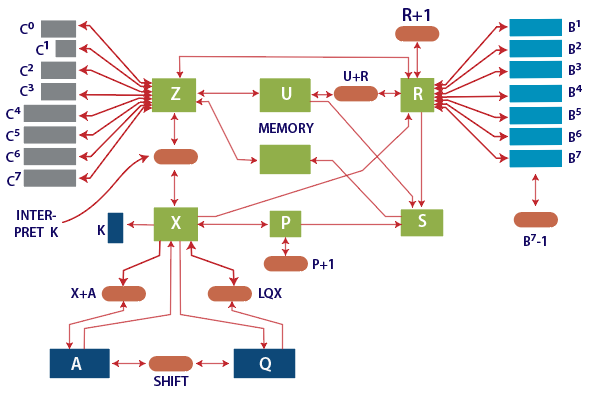
Fig. The Architecture of UNIVAC M-460
The instructions were six alpha-numeric characters, and we can bind the two instructions for each word. The time of addition was 525 microseconds and the multiplication time was 2150 microseconds in these computers. A non-standard modification which is known as "Overdrive" that allowed three or four-character instructions per word under some circumstances.
The digits in the UNIVAC computer were represented internally using excess-3 binary coded decimal arithmetic with six bits per digit using the same value as the digits of the alpha-numeric character set, which allows 11 digits signed magnitude numbers. In the case of the exception of one or two machine instructions, the UNIVAC was considered by coders to be a decimal machine.
The UNISERVO was the first economic computer tape drive. Its data density is 128 bits per inch on the magnetically plated phosphor bronze kind tapes.
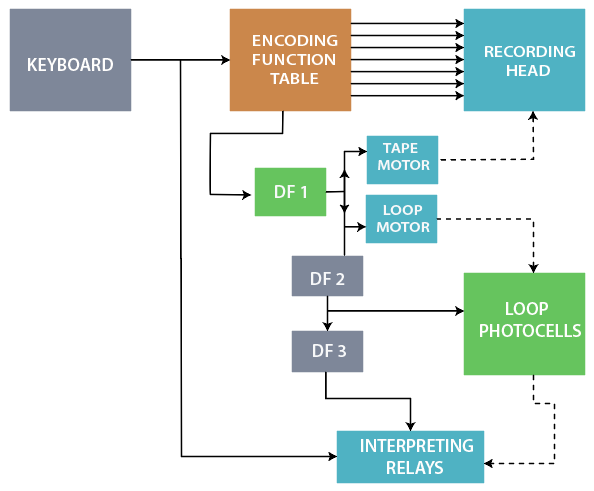
Fig. Simplified diagram of Unityper
The binary representation of the characters was unnecessary. When a non-digit character was encountered in the position during an arithmetic operation, the machine passed unchanged output, and the carry into the non-digit was lost. The Unityper was an offline typewriter used by coders for minor data editing.
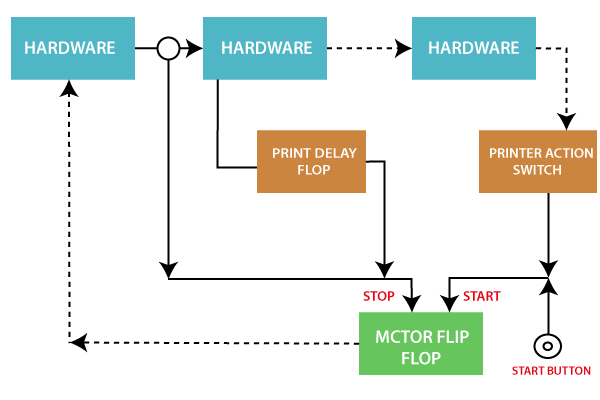
Fig. Simplified diagram of Uniprinter.
The backward and forward tape read and write operations were possible on the UNIVAC printer, and it is overlapped with instruction execution. It is permitted with high system output in typical sort/ merge data processing applications. The large volume of data could be summited as input through magnetic tapes. This type of broad data is created on the offline card to a tape system. The massive data volume made as output through a separate offline tape to printer system.