
×

What is Auto Rotate?

On smartphones and tablets, the auto-rotate feature aligns the screen's alignment with the real orientation of the device. The display is switched to either portrait or landscape mode depending on whether the device is being used vertically or horizontally using the gyroscope. For instance, using a smartphone to browse YouTube is frequently done in portrait mode, which is then flipped to landscape to fit the video's 16:9 aspect ratio.
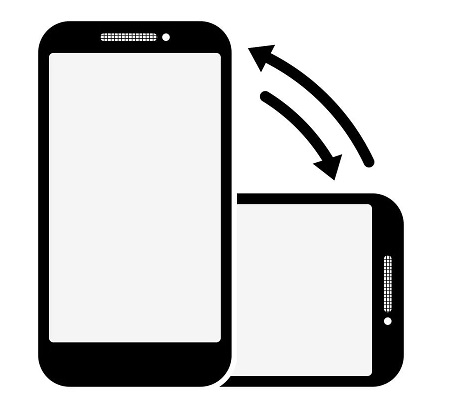
What is Auto Rotate

When orientation lock is enabled instead of auto-rotate, the phone will always be in portrait or landscape mode, regardless of the phone's real position. When the phone's gyroscope data causes auto-rotate to position the screen wrongly, this setting is frequently used. For instance, if someone is lying on their side, the screen may appear horizontal even when the user wants it to be vertical.

Enabling auto-rotate on Android.

When you switch your device between portrait and landscape mode with this accessibility feature enabled, the screen rotates automatically.

Disabling auto-rotate if you are using TalkBack may be a good idea because it can disrupt spoken feedback.

On an Android smartphone or tablet, do the following actions to activate auto-rotate function:

1. To reach the Quick Settings menu, swipe downward from the top of the screen.

2. Locate the icon that shows the orientation of your screen at the moment.

3. To activate auto-rotate, press the orientation indicator once.

4. The Quick Settings menu may be closed by sliding it up from the bottom.

Rotate the screen on your iPhone

Your iPhone's and iPod touch's screens can rotate, allowing you to view apps like Messages and Safari in either portrait or landscape mode. If the function isn't working, get help or discover how to rotate the screen on your iPhone or iPod touch.
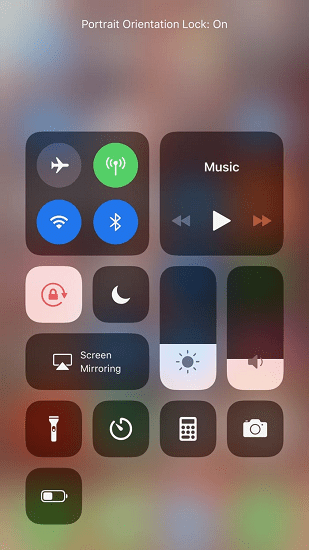
What is Auto Rotate

1. Swipe downward from your screen's upper-right corner to open Control Center.

2. Make sure the Portrait Orientation Lock button is depressed.

3. Turn your iPhone sideways.

Try an alternative app, such as Messages or Safari, which are known to function in landscape orientation if the screen is still not rotating.

How to do auto Rotate in window 8

When the computer is turned into tablet mode, the auto-rotate feature enables the screen orientation to rotate. This page contains information to demonstrate various techniques for activating or deactivating the feature:

With the use of a Windows key shortcut, turn Auto-rotate on or off:

To easily enable or disable auto-rotate, press and hold the Windows key while hitting the "I" key. Toggle Auto-rotate on or off using the charm bar to:

1. Scroll to the right of the screen once the charm bar appears, then select the settings gear symbol.
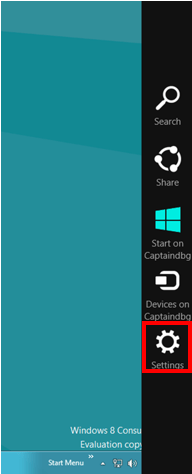
What is Auto Rotate

2. To turn Auto-rotate on or off, select "Screen," then click the symbol at the top of the window (lock means it is off).
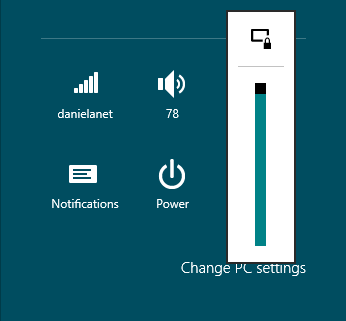
What is Auto Rotate

Turn Auto-rotate on or off using the Screen Resolution option

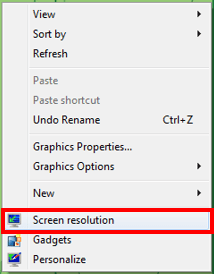
1. On the desktop, simply right-click anywhere.

2. Select "Screen Resolution" from the menu that appears.
What is Auto Rotate

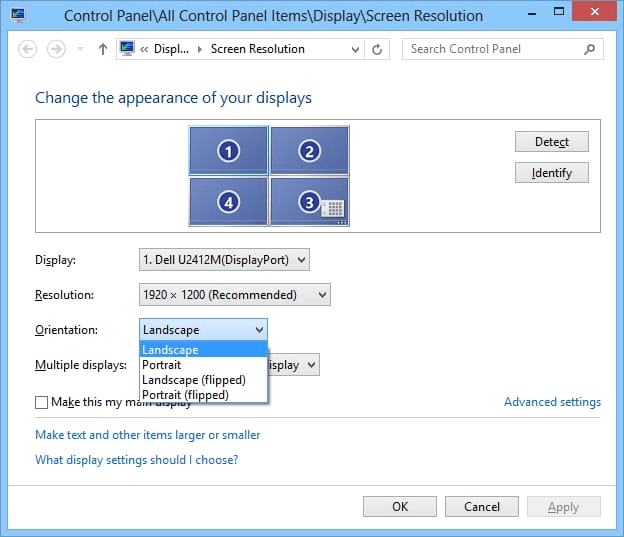
3. Toggle the "Allow the screen to Auto-rotate" box on or off in the new window by checking or unchecking it.
What is Auto Rotate

Rotating the screen when the orientation is wrong:

1. Press Ctrl + Alt + "Up Arrow" for "portrait" orientation or "Right Arrow", "Down Arrow", or "Left Arrow" for other orientations to manually rotate your screen when it is locked in the incorrect direction.

Rotate the screen on your iPad

The screen of your iPad can rotate, allowing you to see programmes like Messages and Safari in either portrait or landscape orientation. Learn how to rotate the iPad screen or ask for assistance if the feature is not working.

How to rotate the screen on your iPad
What is Auto Rotate

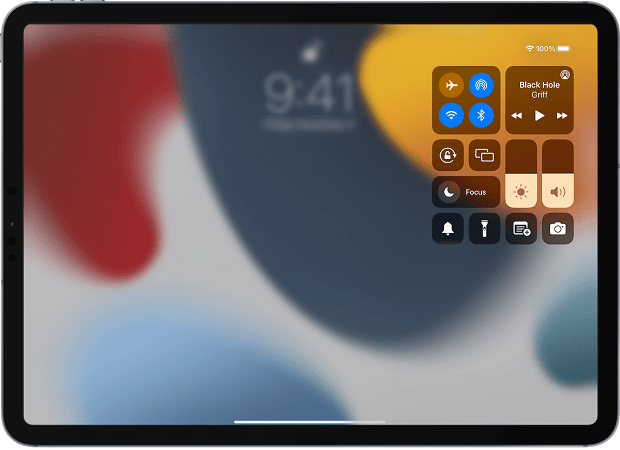
1. Rotation Lock has to be turned off. Swipe downward from your screen's upper-right corner to open Control Center. The Rotation Lock button should now be tapped to turn it off.

2. Turn your iPad sideways.

Whether the issue persists, try another programme that works in landscape modes, such as Messages or Safari.

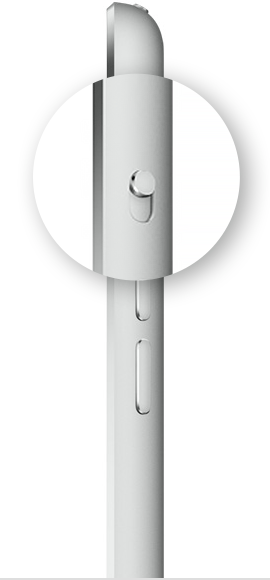
Check to determine if your earlier iPad has a side switch if you have one.
What is Auto Rotate

Check to determine whether your iPad has a side switch if you can't see the Rotation Lock button.An earlier iPad that has a side switch may be configured to act as a rotation lock or mute switch.

Select General under Settings. Choose the desired option under Use Side Switch To.


Related Topics

How to find out how much hard drive space is available?

A certain kind of non-volatile data storage device is a hard disc (called a hard drive, HD, or HDD). It is frequently installed inside a computer and attached directly to...

4 minutes read.

What is Right-Click?

The right-click, often known as RMB (right mouse button), results from depressing the right mouse button. A computer mouse's right-click function can launch extra functionality, typically in the form of...

3 minutes read.

What is Firmware?

Firmware is essential software required to perform all the tasks in your device. It is present in all the hardware equipment, allowing them to perform basic input and output operations....

10 minutes read.

How to fix boot error "PXE-E61" Media Test failure

If your laptop or desktop computer won't start and displays the following message: PXE-E61: Media test failure, check cable Or PXE-M0F: Exiting PXE ROM Your BIOS settings may be incorrect, or your hard disc could...

3 minutes read.

Now that I’ve got a Computer, what can i do?

Most often, people buy a computer to do their job, like students buy a computer to learn, code, etc. But all the users will need to learn their computer's complete...

4 minutes read.

What is a Processing Device?

The computer receives input from input devices such as the keyboard, joystick, and scanner; then it goes through an intermediate stage; here, it manipulates the data and sends it to...

4 minutes read.

What is AM?

AM may refer to any of the following: When referring to audio or a signal, amplitude modulation (AM) is a method of transmitting information using radio waves. In AM, the information...

4 minutes read.

What is a Cold Boot?

A cold boot is a process of starting a computer from a completely powered-off state. It is also known as a hard boot. The computer goes through a series of...

8 minutes read.

High-Level Language in Computer

High-Level Language The high-level language is the programming language such as BASIC,C,C++,COBOL,FORTRAN,Java, Perl,PHP,Python,Ruby, Visual Basic, and Pascal, etc. These languages have strong abstraction, the style and the context which are more...

5 minutes read.

What is a Loosely Typed Language?

Every Programming language can be classified into Strongly and Loosely/Weakly typed. This type defines the strictness of the programming language, and each of these types has its own advantages and...

4 minutes read.

What is the Print Screen Key?

Print Screen is one among many keys which is present on the keyboard. It is abbreviated as PrtScr, Prsc,r, PrtScrn, PRTSC, PrntScrn, Ps/SR. When this key is pressed, it sends...

3 minutes read.

How To Replace the CMOS Battery

CMOS(Complementary Metal Oxide Semiconductor) stores the information, including date, time, and system firmware setting. The CMOS battery is responsible for powering up the BIOS firmware in laptops, and that BIOS is...

3 minutes read.

How do I change my name on Google

What is the profile name on Google? Here, the name on Google refers to the Google profile name, which you have saved while creating an e-mail on Google.   Name on Google...

3 minutes read.

What is BIOS?

BIOS stands for Basic Input/Output System. It is firmware that controls the basic functions of a computer, such as booting the system and communicating with the hardware. It is stored...

7 minutes read.

Computer Hardware

The computer hardware includes the physical parts or components of the computer, such as to monitor, keyboard, mouse, motherboard, etc. We need software for the instructions that can be stored...

5 minutes read.

Top 10 Internet tips and tricks

Internet, in a word, can be defined as global networking, which provides world-class facilities for communication and all other things. It is a vast network that connects things all over...

5 minutes read.

How to shut down a computer

Whenever the Shutdown is done, all the programs, software, files, and operating system are shut down. The RAM is cleared, so before shutting down the device, the user should ensure...

4 minutes read.

What is Access Time?

Access time is when a computer can recover data from a storage device, such as a hard drive or solid-state drive. It is an important factor that can affect the...

7 minutes read.

Advantages and disadvantages of Email

What is Email? A fast method of business communication is email. It is difficult to imagine a workplace where email is not used for internal and external communication. The advantages of...

3 minutes read.

How to open the Windows My Documents or Documents folder

Documents or My Documents (known in earlier versions of Windows such as Windows XP) is basically an in-built directory provided by Microsoft Windows. This is a very valuable directory that...

5 minutes read.