
×

What is a boot device?

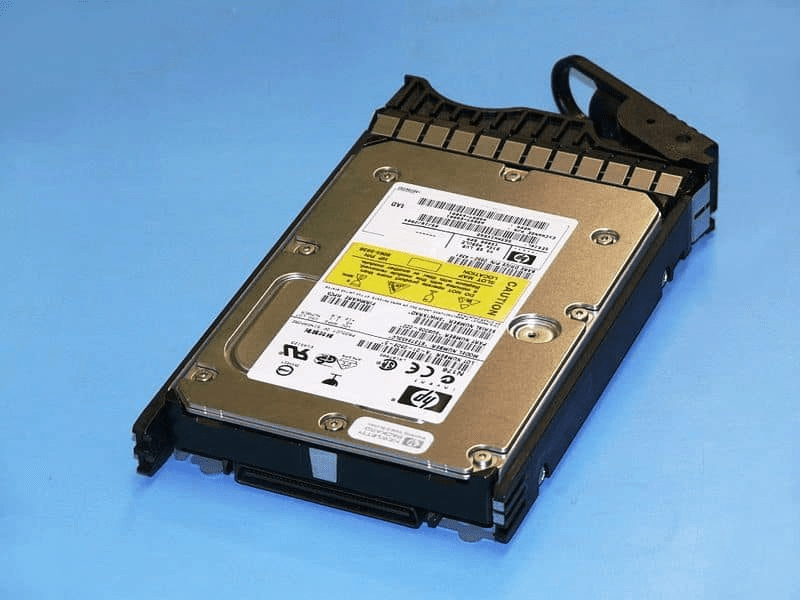
A boot device would be any machinery containing the files required to launch a system. A hard disk, an optical disk drive, a CD - ROMS drive, a Storage device, and a USB jump drive, for instance, all can be a bootable hardware. The pc, however, will not boot from such a device until the essential boot data is stored on the drive, cd, or disc.
What is a boot device?

The hard disc may be the most often utilized bootable device or drive. When you install an operating system on your hard disc, it duplicates the boot programs and drivers you'll need to get Windows up and to run. A bootable disk or setup disk is inserted into the drive while installing a new OS, diagnosing the computer, or starting from another drive. The information of the bootable disc is downloaded if the boot routine is set up appropriately.

The bootable drive recognizes everything to the desktop BIOS as the backup device when you switch it on. To start the pc system, the BIOS looks for instructions on the boot device. The boot device secretly works for you every moment you power on your laptop, enabling the laptop to execute the OS and permitting you to achieve your objectives.

Main reasons for "no bootable device found" errors.

The hard drive boot sector or partition table is corrupted

Your hard disc, or at least the segment containing your Computer System (OS), will seem like a vacant drive if this crucial information on your HDD becomes significantly corrupted or if your drive has faulty segments. However, all of the private information is still on the computer.

Your hard drive is broken

This is a major condition of the error "boot hardware not detected." Hard disc drives normally last 5 to 10 years before failing, while their life expectancy is affected by their usage and the stress level they are subjected to.

The System boot priority has changed

Although this is extremely unusual, configuration management changes, system battery (BBU) failures, or a user picking "recover bios default values" by mistake can trigger the boot sequence of your desktop storage devices to be reconfigured. This could lead the system to attempt to boot from an unbootable storage medium, such as a pen drive, a home network, or a vacant CD/DVD drive.

The SATA/IDE cable connecting your hard drive to the motherboard is loose or doesn't work.

Almost every debugging page on the Internet will mention this as a possible problem. However, this is quite uncommon in practice. If there's a 0.1 probability that SATA cables will fix "boot device not detected" difficulties, you might as well check them.

How can you analyse and solve the "BOOT DEVICE NOT FOUND" error?

There are some options for dealing with a boot device not detected problem. To resolve this at home, follow the below instructions.

Check the hard drive connection

For the start-up device to work, it requires a SATA/IDE connection to join the motherboard to the hard disc. Although these wires seldom break and become detached on their own, it's always worth trying to double-check the connection.

Check your BIOS settings

You must ensure that the BIOS initially searches for the boot drive before any other storage devices. Here's how to do it:

1. Directions for entering the BIOS menu should be displayed on the starting screen with your PC maker's logo.

2. Most manufacturers require you to press a certain key, such as ESC, F1, or F8; however, this varies by vendor. Keep in mind that the period of ability to access the BIOS menu is just a few seconds long.

3. Go to the BIOS settings or device choice menu when you're in the BIOS menu.

4. All attached datastores should be listed in the menu. Make sure the primary hard disc drive of the PC is listed first. If the existing hard drive isn't mentioned first, the hard disc isn't connected to the computer.

Reinstall the OS

Restore your OS if necessary. If you cannot do so, you will almost certainly need to seek expert assistance. However, if you can completely restore your operating system, you may be safe for the time being.

To be secure, take advantage of this second opportunity to back up your data to incorporate any changes from your last regularly scheduled restore. You must regularly save your data to a different device, and a cloud-based ensures that you always have an up-to-date data backup.


Related Topics

What is a Print Preview?

Print Preview is one of the functionalities that helps users to see the pages layout before printing. It gives the users an idea of what pages look like when printed....

3 minutes read.

What does ALT + Q do?

It is a useful shortcut that can open the ‘tell me’ box in recent versions of the Office software. The user has to press the Alt key while holding the...

4 minutes read.

Edge Computing

What is Edge Computing? Topics Covered What is Edge Computing?Need of Edge computingBenefits of Edge ComputingPotential industries using Edge ComputingChallenges of Edge Computing We all know about data existing in the cloud, but...

10 minutes read.

Top 10 online services and applications

It can be difficult to select the best Internet service or application for your needs because there are tens of thousands of them. An online service is a business that...

4 minutes read.

What is Home Page?

The first appearance of the webpage when we search the URL inside the search bar is called the homepage. Every visitor of any website first lands on the home page....

4 minutes read.

What is HDMI: High Definition Multimedia Interface

HDMI is one of the most frequently used audio/video interfaces, which is a connector and cable that can send high-definition, high-bandwidth audio and video streams between devices. It stands for...

3 minutes read.

How does a computer process data into information?

What is data Data is a type of information. Data can be in the form of images, integers, or strings of letters. All data must be entered into the personal computer...

3 minutes read.

Case Sensitive Languages

Every language, system, or program has the capability to differentiate between different case alphabets. If a programming language doesn’t work properly in upper case and lower case letters interchangeably, it...

4 minutes read.

What is Hard Disk Drive (HDD)?

HDD is an electro-mechanical device that enables the user to store data for future use. The device has magnetic storage that is responsible for storing the information. And, this stored...

7 minutes read.

What is URL?

URL or Uniform Resource Locator provides the unique location of the resource. Any element displayed on the world wide web has a unique URL dedicated to that element only. The...

8 minutes read.

What is a Punch Card?

Paper cards with holes punched into them to represent computer data and instructions are known as punch cards (or "punched cards"), Hollerith cards, or IBM cards. They were a common...

6 minutes read.

What is AR lens?

The full form of AR is the anti-reflective lens. AR is a type of optical coating that is applied to the plain of the lenses and other optical elements to...

6 minutes read.

What is a LED Monitor?

An LED monitor, also known as an LED display, is a computer or television with a flat panel and a screen that emits light. The most advanced computer display technology...

5 minutes read.

How To Replace the CMOS Battery

CMOS(Complementary Metal Oxide Semiconductor) stores the information, including date, time, and system firmware setting. The CMOS battery is responsible for powering up the BIOS firmware in laptops, and that BIOS is...

3 minutes read.

Why my computer monitor shows no display or black screen

Often, people face the problem of getting a blank screen or no display on their computer monitor. There might be multiple causes to this, but it all lies around the...

6 minutes read.

What is Cable Modem?

A common piece of gear that links computers to your ISP is the cable modem. A cable modem, unlike other types of modems, uses coax cable to proxy that connection...

7 minutes read.

How to edit the registry from the command line

Editing from the command line is one of the ways of editing the registry. Still, before editing the registry, it is always recommended to back up the registry and computer...

4 minutes read.

Low Level Language in Computer

Low Level Language: The computer languages are those languages by which the user can communicate with the machine. There are various types of programming languages via we can write the...

5 minutes read.

What is Post?

POST can be used to describe any of the following: The POST, an abbreviation for power-on self-test, is a test the computer must pass to ensure that all hardware is functional...

4 minutes read.

What is a Username?

As we know that technology is increasing day by day, so we must have to aware about this. In this modern world, everyone is using computer and the internet. So,...

4 minutes read.