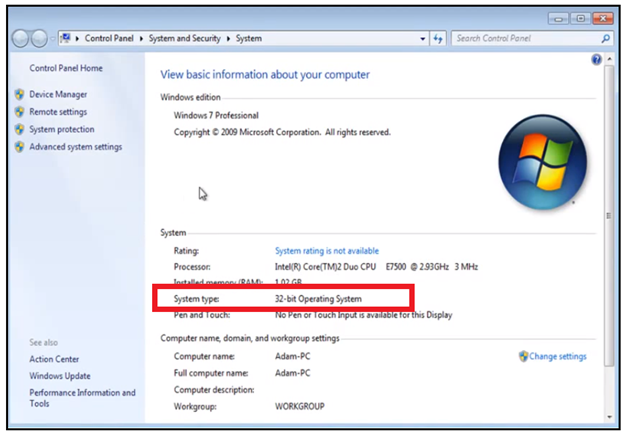
Is my computer 64 bit?
While using computers and smartphones, we have often heard the term ’32-bit’ or ‘64-bit’. But many of us do know what these terms mean. And the first question which arises in our mind is why bits are significant or our computer? Also, why is it mandatory to know whether your system is 32 or 64 bit? The answer is many times; it is required to know about the bit version (32-bit or 64-bit) of the operating system while upgrading the machines.
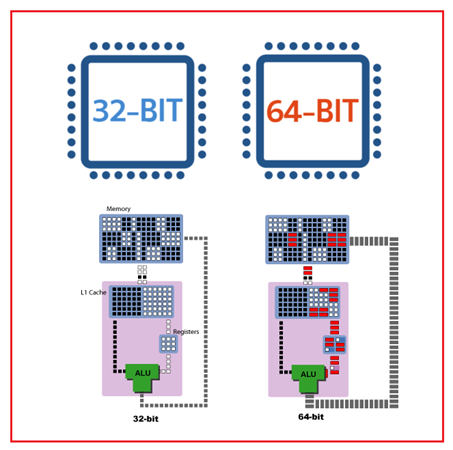
It's basic info that everybody should have at hand. One should know which version you have because of software and drivers. Later on, it can impact a choice that you'll have to make. For example: installing your printers or any other devices, very often drivers are particular for 64 or 32-bit computers. Some software that might want to use may require the need to know if it's a 32 or 64-bit version you need for a computer.
Topics Covered
- 32-bit v/s 64 bit
- Checking the operating system version of windows 10
- Checking the operating system version of windows 8
- Checking the operating system version of windows 7 or vista
32 bit v/s 64 bit
In the 90’s almost all the processors were 32 bit, which means the data bus's capacity was 32- bit. Eventually, as the technology grew, 64-bit processors came into the picture that means the data bus can handle 64 bit. Thus, if you have 4 GB RAM or 8 GB RAM, the 64-bit processor will be faster because the data bus can handle more data at the same time. Thus, it means a 64-bit processor or 64-bit operating system is a lot faster than the 32-bit processor and operating system. Sometimes, the 32-bit operating system is advantageous because one can easily install a 32-bit operating system on a 64-bit processor. After all, the 64-bit processor is backward compatible with a 32-bit operating system, but vice versa is not possible i.e., you cannot install a 64-bit operating system in a 32-bit processor.
The primary difference between a 32 and 64-bit operating system is how it handles and addresses more memory. When it comes to talking about CPU that whether it acquires the 32 bit or 64 bit, the distinction has to do with the CPU register, which is basically how much data queue up the process at once. The 64 bit is capable of processing a large amount of data and can operate a bulk of information simultaneously. A 32-bit operating system can use only about 4 GB of memory (referencing only 32nd power bytes of memory). In contrast, a 64-bit system can use about 16 GB of the memory (referencing 64th power bytes of memory), a four-time more significant memory than 32-bit.
A 32-bit system type can support 4 GB as the maximum memory, which might not be enough to hold all the data. As today, people operate with many applications running parallel, thus the CPU needs to operate upon multiple tasks. To compensate for the storage issue and to make the computer work faster, it keeps some of the data on the slower hard drive. But for this process to happen, the CPU has to do extra work instead of fetching the data directly from RAM, and it has to go back to the slower drive and fetch the data from there. Thus, eventually, it slows down the computer. But a 64-bit operating system is capable enough to store extensive memory data. Thus, the computer’s speed would be incredibly fast as it can store more data into ram.
Checking the operating system version of windows 10
If you are a user of Windows 10, you can quickly locate the system type (whether you are system is running on 32 or 64-bit processor) by using any of the following methods:
# Method 1: Using Settings System Window
- Click on the window or start menu located at the bottom left corner of the desktop. Select the settings option.
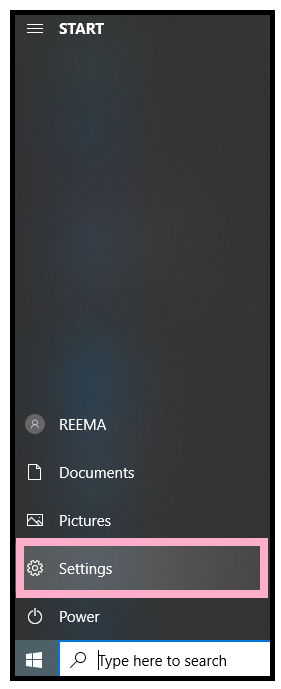
- From the settings window, go into the system located on the top left side of the window.
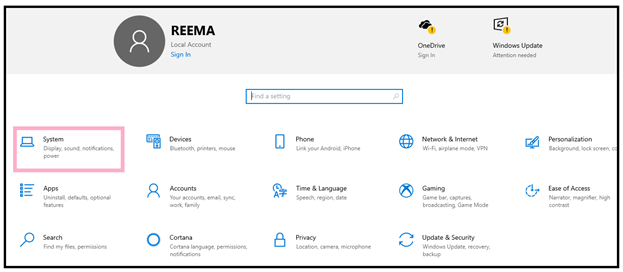
- In the upcoming window, go way down and select the about option.
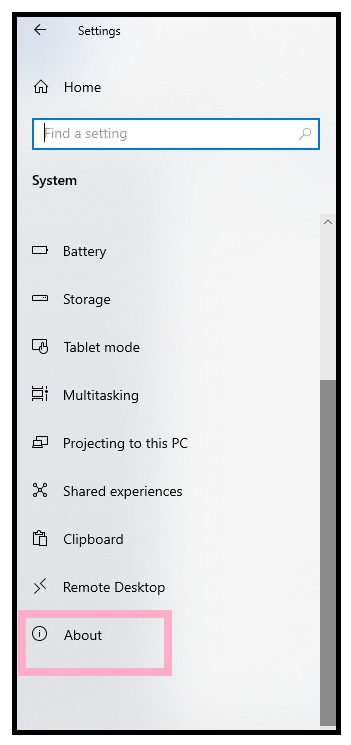
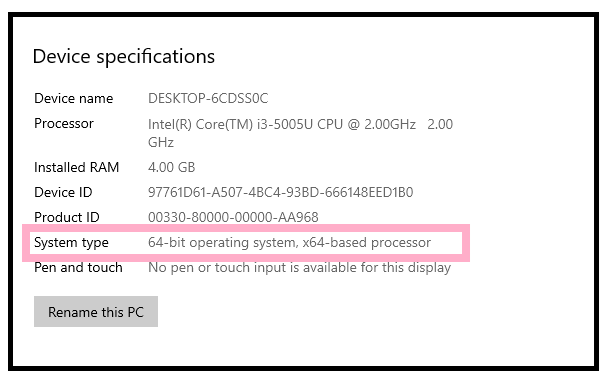
- On the right side of the window, you'll have your computer's info, including the system type (whether it is 32 or 64-bit). Here, in my case, you can see I pursue a 64-bit operating system and 64 based processor as well as it is labeled with “64-bit operating system, x64-based processor”. Note it down or remember the bit for future use.
Checking the operating system version of windows 8
If you are a user of Windows 8, you can quickly locate the system type (whether you are system is running on 32 or 64-bit processor) by using any of the following methods:
# Method 1: Control Panel’s System window
- Right-click on the bottom left corner of the screen. A menu list will pop up; select the control panel option.
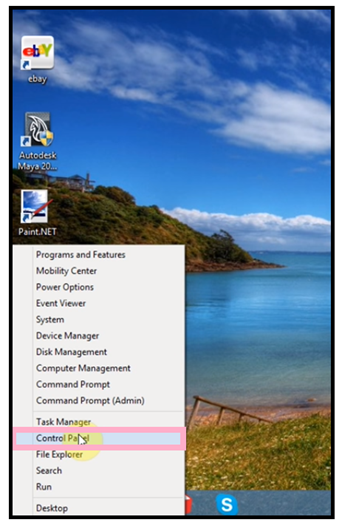
- The control panel screen will appear. Click or tap on the System and Security option.
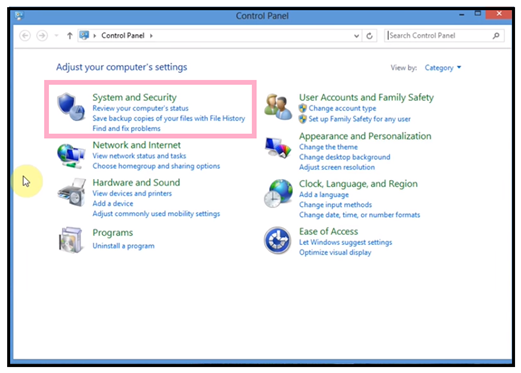
- On the new window, locate for System and click on it.
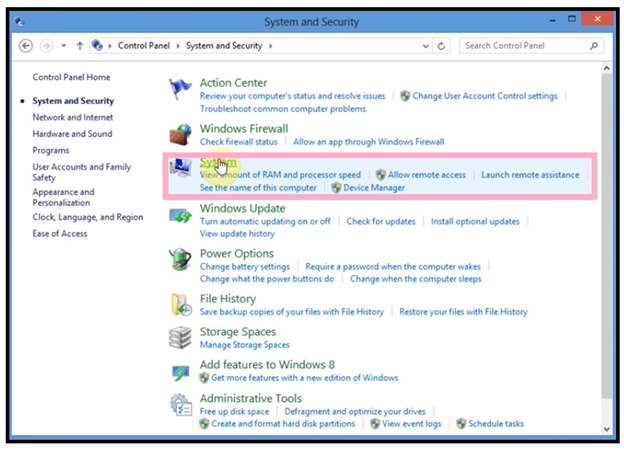
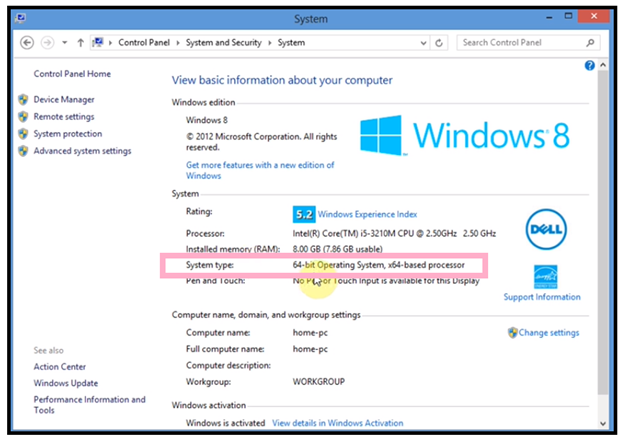
- That’s it. You will get accessed to all the system information. To figure out the system bit, locate for a system type. It will tell you how many bit your operating system is using. As you can see in the below screenshot, my PC has a 64-bit operating system type.
Checking the operating system version of windows 7 or Windows vista
If you are a user of Windows 7 or vista, you can quickly locate the system type (whether you are system is running on 32 or 64-bit processor) by using any of the following methods:
#Method 1- Control Panel System Window option
- Click on the Start menu bar located at the bottom left corner of your screen. The menu list will appear. In the start search box, type system. It will show some suggestions in the programs list but choose for System.
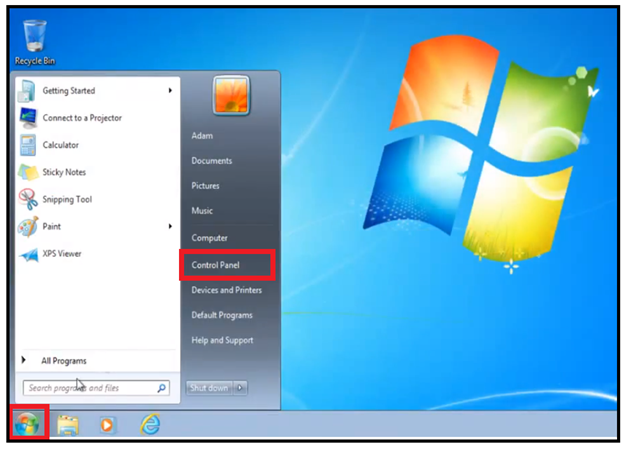
- The system window will be displayed. Here, you will catch all the essential data concerning your PC. Locate for system type to check the version of your operating system. Under the system type, it would be precisely mentioned whether you have a 32 or 64-bit operating system.