
×

What is Tray?

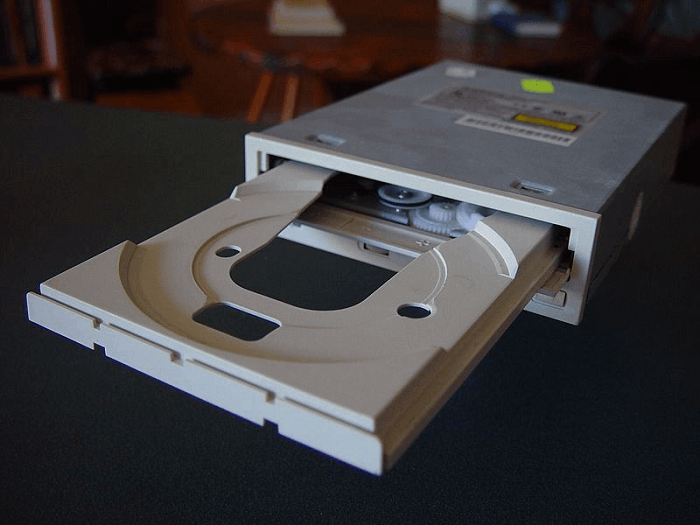
The tray is typically made of plastic and is powered by a small motor or a mechanism that pushes it out and pulls it back into the drive. The tray is also used to eject a disc when a user wants to remove it from the drive.

The tray is typically located on the front of the drive and can be opened and closed by pressing a button or using a software command. When the tray is open, a user can place a CD or DVD on it and then close the tray to begin reading or writing data to the disc. Below picture is an example of a Desktop CD-ROM tray:
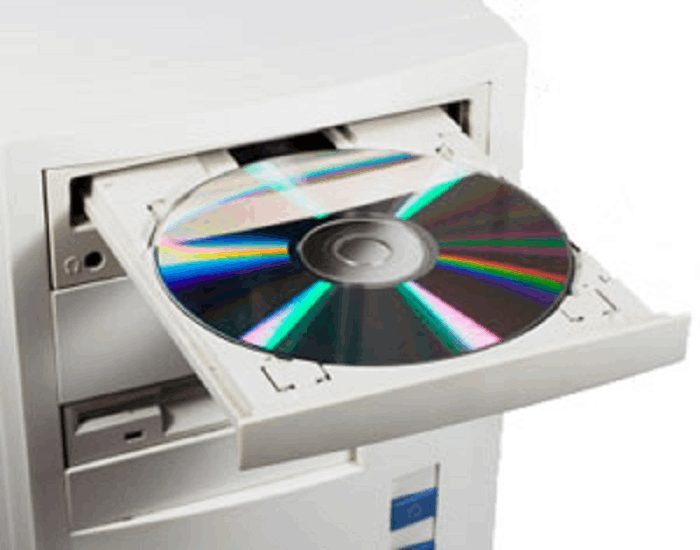
What is a Tray?

Tray-loading drives are commonly found in desktop computers and older laptops. They have a tray that slides out of the front of the drive, where the disc is placed. The tray is pushed back into the drive, where the disc is read or written. Below picture is an example of a Laptop CD-ROM tray:
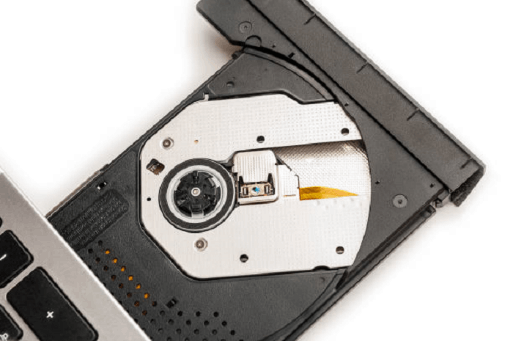
What is a Tray?

How to eject the disc tray?

  1. Using the keyboard: Most computers have a keyboard shortcut that can be used to eject the CD/DVD tray. On Windows, the shortcut is usually the "Eject" key, which is typically located next to the "F12" key. On Mac, the shortcut is typical "Cmd + E".
  2. Using the software: Many computers come with software that can be used to control the CD/DVD drive. On Windows, you can use the "Windows Media Player" to open the CD/DVD tray. Use the "Disc Utility" application on a Mac.
  3. Using the command line: On Windows, Use the command to "eject D:" (replace D with the letter of your CD/DVD drive) in the Command Prompt to open the CD/DVD tray. On Mac, you can use the command "drutil tray eject" in the Terminal to open the CD/DVD tray.
  4. Using the button: Most CD/DVD drive trays have a button on the front that you can press to open the tray. To open the tray, push the button.

If above methods do not work and the tray is stuck, you can try to manually eject it by finding the manual eject hole on the front of the drive and using a straightened paperclip to press the button inside the hole.

Note: Some PCs or laptops might not have CD/DVD drives, and the above instructions might not apply to those devices.

Why does the CD-ROM, DVD, or other disc drive tray not open?

There are several potential reasons why a CD-ROM, DVD, or other disc drive tray may not open:

  1. Mechanical failure: The tray may be stuck due to a mechanical failure, such as a broken or jammed tray mechanism. This may require repair or replacement of the disc drive.
  2. Power issues: The disc drive may not have enough power to open the tray. This could be caused by a problem with the power supply, a loose or disconnected power cable, or a problem with the drive's internal power supply.
  3. Software issue: There may be a software issue that is preventing the tray from opening. This could be caused by a problem with the operating system, a driver issue, or a problem with the disc drive's firmware.
  4. Virus: A virus may have infected the computer and may be preventing the tray from opening. Running a virus scan and removing any detected malware may fix the issue.
  5. User error: Sometimes, the user might accidentally press the button to open the tray but forget to release it so the tray will remain open.

If the disc drive tray on your computer doesn't open, there are a few things you can try to fix the problem:

  1. Check the power: Ensure the computer is properly powered and the disc drive receives power. Check the power cable and make sure it is securely connected to the computer and the disc drive.
  2. Eject the disc drive tray manually: If the tray is stuck, you may be able to eject it manually. You can usually do this on a desktop computer by finding the manual eject hole on the front of the drive and pressing the button using a straightened paperclip to the hole. You may need to consult the user manual or the manufacturer's website to find the manual eject procedure on a laptop computer.
  3. Restart the computer: A simple restart will sometimes solve the issue. Restart the computer and try opening the disc drive tray again.
  4. Check for software issues: Make sure the operating system, drivers, and firmware for the disc drive are up to date, and there are no conflicts. Also, check for any updates to your computer's BIOS.
  5. Run a virus scan: A virus or malware may prevent the disc drive tray from opening. Run a full virus scan on your computer to check for any infected files.

If the above steps don't work, it may be a hardware failure, and the drive might need to be repaired or replaced by a professional.
What is a Tray?

Related Topics

What is a Slate PC?

Slate PCs are smaller versions of Tablet PCs with screen diagonals ranging from 7 to 12 inches. It has a desktop operating system and is an IBM PC-compatible computer. The...

4 minutes read.

How to associate a file with a program?

How to associate a file with a program in Windows? By default, a particular program is selected by the Windows to open each file type, but you may re-associate a file...

4 minutes read.

How does a computer process data into information?

What is data Data is a type of information. Data can be in the form of images, integers, or strings of letters. All data must be entered into the personal computer...

3 minutes read.

What does alt + space do?

The Alt+ Space is a keyboard shortcut created by using Alt and spacebar key, and the shortcut is used to display the program's window menu that is presently opened in...

3 minutes read.

What does ALT + Q do?

It is a useful shortcut that can open the ‘tell me’ box in recent versions of the Office software. The user has to press the Alt key while holding the...

4 minutes read.

What is AM?

AM may refer to any of the following: When referring to audio or a signal, amplitude modulation (AM) is a method of transmitting information using radio waves. In AM, the information...

4 minutes read.

What is Parallelization?

Parallelization means doing multiple tasks simultaneously (in parallel) to accomplish some goal. According to Computational Science, developing a computer program or system to process data-parallel is known as parallelization or...

4 minutes read.

What is Right-Click?

The right-click, often known as RMB (right mouse button), results from depressing the right mouse button. A computer mouse's right-click function can launch extra functionality, typically in the form of...

3 minutes read.

What does Alt+R do?

Alt+ R The Alt button is adjacent to the spacebar in the keyword. The Alt key is used with many other keys to perform various functions. When the user uses R...

4 minutes read.

What is HDMI: High Definition Multimedia Interface

HDMI is one of the most frequently used audio/video interfaces, which is a connector and cable that can send high-definition, high-bandwidth audio and video streams between devices. It stands for...

3 minutes read.

Why am I unable to increase the resolution in Windows?

If you cannot raise the display resolution in Windows, take these actions. Identifying and resolving video driver issues If Windows doesn't let you raise the screen resolution, your video drivers can be...

3 minutes read.

What is the Pg Dn Key (Page Down Key)

The Pg Dn key is a computer keyboard key located on the numeric pad number 3 or between the keyboard and the numeric keypad. It can also be referred to...

2 minutes read.

What is a Start Button?

In daily life as windows users, everybody uses the start button on their personal PC. Users can access all the available apps on the system with the help of using...

4 minutes read.

How much do Computer Programmers make?

With growing technology, people are working fast to pace up with the perpetual demand. Everything which has made our life easier and comfortable has something to do with computer engineering...

7 minutes read.

What is MsConfig?

Microsoft Windows starting issues can be resolved using the system application MSConfig. In Windows Vista, Windows 7, Windows 8, and Windows 10, it is officially called System Configuration or Microsoft...

3 minutes read.

What does Alt + O do?

Alt + O is used for opening the Format file menu. Alt + O is a shortcut that can be used by pressing the "Alt" and "O" keys. As shown in...

4 minutes read.

How to fix a general protection fault?

The suggestions below may help you resolve the issue if you frequently see GPF (general protection fault) issues when utilizing an application on your computer. Errors involving the General Protection...

6 minutes read.

What is braille reader?

An electronic device known as a braille reader, sometimes known as a braille display, which enables a blind person to read the text on a computer monitor. Braille is a...

3 minutes read.

What is Line In?

Basically, Line-In is an audio jack that is present in an audio device, which is used to connect the other audio output and input devices like speakers, microphones, etc. A...

6 minutes read.

How to find out how much hard drive space is available?

A certain kind of non-volatile data storage device is a hard disc (called a hard drive, HD, or HDD). It is frequently installed inside a computer and attached directly to...

4 minutes read.