
What is Palmtop Computer?
Introduction
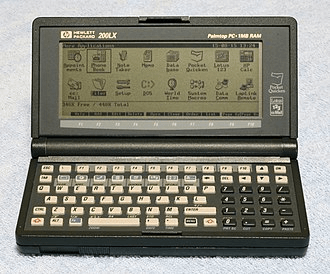
A palmtop computer is a palm-sized electronic device that is compatible with IBM systems. The clamshell-like or laptop-like form factor of these devices allows them to be used as a portable gadget or a small laptop. Many of the DOS-based palmtop computers could run applications meant for desktop computers. It had subnotebook-like functionality and was portable enough to be taken about. Nowadays, palmtop computers are no longer produced and are considered outdated. A smartphone or small tablet would be described by this phrase.
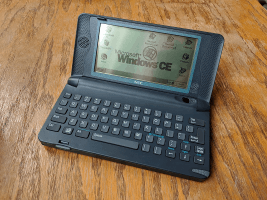
IBM Palmtop Computer
Originally meant to be personal organizers, personal digital assistants (better known as PDAs) are smaller computers that have evolved into significantly more complex gadgets over time. PDAs are sometimes known as pocket computers or palmtop computers. The palmtop PC was a battery-operated computer that was about the size of a pocket calculator. The majority of Palmtop computers were compact enough to fit in a person's jacket or shirt pocket.
The majority of palmtop computers were built using static hardware, which required no rebooting and allowed for lesser power usage and quick on / off. Depending on the model, the battery may be able to operate the device for many hours or even several days, or it may stay in sleep mode for up to a year. When combined with the instant-on/off functionality, a PDA's battery life might range from a week to many months.
Atari Portfolio
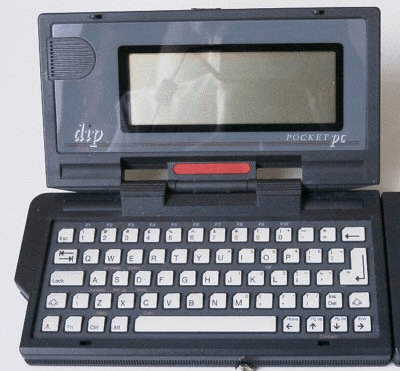
The first Palmtop PC was the DIP Pocket PC, better known as the Atari Portfolio. It was released by the Atari Corporation in 1989, making its debut as the first palmtop compatible with the IBM PC. This operated on MS-DOS, a x86-based operating system by Microsoft that was quite popular at the time.
Uses of Palmtop Computers
Palmtop computers were initially used for military purposes, to look out for terrorists and protect their country. Features like an integrated database, a smaller form factor, and geo-tracking have helped solve its purpose. They now use palmtops to keep tabs on their whereabouts as well as the code names and whereabouts of their fellow soldiers.
Types of Palmtop Computers
Palmtops are not only limited to styluses and mini keyboards but are also of various types. The main categories are as follows:
1.PDAs
2.Handheld Computers
3.UMPCs
PDAs
Personal Digital Assistants, better known as PDAs, are devices that are small-sized and personal. They have a screen and microprocessor to compute and display important information such as contacts, addresses, dates, and events. These were the devices relevant before the smartphone era, with a very similar form factor. The term PDA was coined by Apple in 1992 to include all palm-sized and mobile devices of the ‘90s decade.
Apple Newton
Apple had released their best-selling PDA, the Newton in 1993. The Newton was unique due to its handwriting recognition feature, portability, and neat interface. Ever since competitors have seen the potential of PDAs and fled into the market with their own takes.
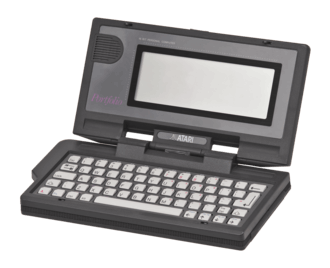
Apple Newton I
Windows CE
Windows CE, formerly known as Windows Embedded Compact, was an operating system released in 1996. It was primarily built for the integration into palmtops and PDAs, which required a few OS changes to take advantage of the entire device.
Palm OS
Also known as Garnet OS, and now webOS, Palm OS was designed by Palm, Inc. in 1996. It was an operating system specifically designed for PDAs, especially for wristwatches and wearable touchscreens. It gained popularity after it being designed for the initial GPS (Global Positioning System) devices.
Handheld PCs
Handheld PCs are usually referred to as our modern-day laptops and portables. In some cases, they might be bigger than the size of an average palm, but they are quite compact and portable. Back in the day, handhelds are primarily based on the Windows CE operating system. For a device to qualify as a handheld personal computer, it must have a keyboard, screen, PC card slot, ROM, and other OEM (Original Equipment Manufacturer) applications.
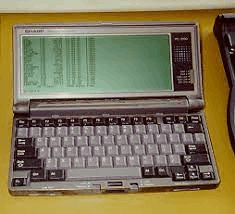
A handheld gaming PC
The definition for what a handheld is could be quite flexible. Sometimes even DOS-based systems were categorized as handhelds due to its petite nature, in contrary to Windows CE-based systems.
UMPCs
Short for Ultra-Mobile Personal Computers, UMPCs are usually referred to as our modern-day smartphones and tablets. These are defined as very small and portable computers, which are easily pocketable, and may or may not have a physical keyboard. And with foldable smartphones appearing similar to the initial palmtops, the original palmtop design has said to make a comeback (which is discussed further below).
Advantages and Disadvantages of Palmtop Computers
Just like all devices, palmtop computers had their ups and downs as well. Both are listed below:
Advantages
Portability: Laptop computers are very portable because of their small size and lightweight.
Form-factor: Its design and instant power on / off functionality made it a similar form-factor to laptops, making the learning process more intuitive.
Organizational Tools: Personal organizers such as notepads, address books, and to-do lists, along with tools for easy access, are incorporated.
Quick Information Retrieval: Due to their instant-on capabilities and intuitive user interfaces, palmtop computers are useful for rapid reference and productivity.
Battery Life: In general, palmtops have lower power consumption and longer battery life than larger devices like laptops.
Disadvantages
Advent of Smartphones: Due to the sudden rise in touchscreen smartphones, which offered a far more intuitive experience than PDA systems, the market for standalone palmtops steadily declined in popularity.
Storage Capacity: Although certain early palmtop models supported external memory cards, their overall storage capacity was very small compared to that of larger computing machines.
Input methods: Some input methods, such as small physical keyboards, may not be suitable or pleasant for all users, which might result in slower navigation and data entry. At times, a stylus may be required to operate, which may be a burden to regular users.
Limited connection: It is possible that early palmtop computers had limited connection methods compared to today’s multi-connection facilities.
Timeline of Palmtop PCs
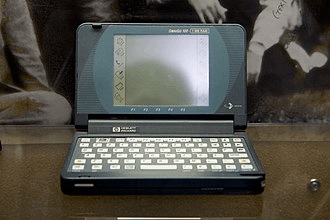
Since the debut of palmtop computers in 1989, companies have been designing these systems for over 10 years. However, palmtops have seen a huge decline in sales and popularity due to improvements in laptop portability. Some of the most popular models of their respective years are given below:
| Year | Model |
| 1989 | DIP Pocket PC |
| Atari Portfolio | |
| Poqet PC Classic | |
| Poqet PC Prime | |
| Poqet PC Plus | |
| 1991 | ZEOS Pocket PC |
| Sharp PC-3000 | |
| Sharp PC-3100 | |
| HP 95LX | |
| 1993 | HP 100LX |
| HP Palmtop FX | |
| 1994 | HP 200LX |
| HP 1000CX | |
| 1996 | HP OmniGo 700LX |
Smartphones as Palmtops
At present, we are well aware of smartphones intelligently designed to fit in one’s palm without compromising on the fundamentals. Hence, the palmtops of the ‘90s can be said to be upgraded to these touchscreen devices today. They solve all the grey areas of the previous palmtops, but most of them lack the clamshell form factor. Some modern phones, like the Samsung Galaxy Fold and Flip series, have re-introduced the clamshell concept.
Samsung Z Fold series
Samsung Z fold series is one of Samsung's most cutting-edge technology in the folding phones department. With a clamshell form factor, it appears similar to the palmtop computers. The first phone was the Samsung Galaxy Z Fold 1, released in late 2019. At the time, the concept was very new and staggering to modern smartphone users. It was initially considered a colossal flop due to its poor hinge mechanics, flimsy screen, and lack of water and dust resistance. Consecutively, the research and development put into Samsung foldables was immense, leading to the latest Samsung Galaxy Z Fold 5. The new addition includes features like a fully functional front touchscreen, better screen protection, less prone to wear and tear, and, most importantly, a stronger hinge design.
Samsung Galaxy Z Fold 5
Samsung has pushed the concept of touchscreen foldables, similar to palmtops, into the market. A new era of touchscreen mobiles was seen and embraced, leading to follow-ups by competitors. Today, the foldable market is competitive and makes it a genuine product to use as a daily driver. Mentioned below are examples of competitors attempting to disrupt the market, initially led by Samsung.
Google Pixel Fold
The first in-house Google phone ever produced was the Google Pixel 1 in 2016. However, Google has seen the potential of foldables becoming a user's daily device to use. Hence, they released the Google Pixel Fold on 10th May 2023, showcasing their own palmtop-like mobile phone. Though its dimensions have been skewed, as compared to the industry standard, the product has stolen the limelight of the tech world today. It may not seem as polished as Samsung’s, but the form factor is here to live and be relevant in the future. A further update on the Fold sequel is yet to be announced.
Microsoft Surface Duo
Microsoft, the tech giant, was also involved in the development of foldable devices. And one of them was the Microsoft Surface Duo. It was a dual touchscreen mobile phone, which held the closest resemblance to palmtop computers. It was announced in a similar timeframe as Samsung's Z Fold 1, and it had been in the talks until 2020. It showcased a sleek design and crisp hinge. However, it led to Microsoft's worst-selling device ever. Fragile displays, poor hinge quality, extremely thin flaps, and compromised batteries were the main points of concern.
Microsoft Surface Duo
They soon came out with the sequel, the Surface Duo 2, but still did not “surface” the market (pun intended). It still had issues regarding the design that ended up being discontinued very soon.
OnePlus Open
OnePlus, an enthusiast’s company, had also entered into the foldables market. They named their clamshell device the OnePlus Open. Released on 19th October 2023, it was the heat of the topic.
The Downfall of Palmtop Computers
Palmtops have been in their prime throughout the ‘90s. Even though they were well known for their small, compact, and pocketable design, the advent of smartphones and tablets led to their downfall. After PDAs have been optimized to fit in on-screen physical keyboards like the Blackberry, or even be equipped with stylus-operated touchscreens like the Apple Newton, the classical palmtop computers have become irrelevant. And, with the release of the first ever iPhone in 2007, the concept of physical keyboards on PDAs was rendered useless, further damaging the reputation of classical palmtops.
Ever since, the popularity of smartphones and tablets has risen high. Smartphones come equipped with capacitive touchscreens as standard, making the navigation process easier and intuitive. With intelligent button placements and haptic feedback, such devices truly feel “smart”. Plus, smartphones come in a variety of sizes to suit all users. Customizations have always helped make a smartphone personalized. With a lot of models to choose from, along with multiple storage and colour options, every user can find the right smartphone for themselves.
A solid form factor wasn’t the only reason that led to the downfall of palmtops and the rise of smartphones. PDAs, in general, were known to have limited battery capacity. Not at all petite or pocket-sized. Smartphones have even optimized the overall charge capacity by reducing the size of input ports, de-cluttering the internals, and reducing the processor size. Some smartphones even have a dual battery system to compensate for quick charging systems. And speaking about charging systems, the time taken to completely charge a smartphone has significantly decreased, and at times even completing the process under 20 minutes. This is great progress, considering the older generations taking hours to do the same. Overall, the combination of a big battery and quick charging system has completely wiped out the existence of older PDAs.
However, palmtop computers have helped in shaping the design of today’s modern smartphones. The introduction of a full-sized physical keyboard on a portable device has led to devices like the Blackberry including it within its compact form factor. Continuing the trend, Apple introduced the on-screen keyboard on its first iPhone in 2007, keeping the full-sized keyboard relevant. Modern foldable smartphones like the Samsung Galaxy Z Fold and many more appear similar to the first iteration of the palmtop computer. Screens have become wider, taller, sharper, and brighter. PDAs are still very relevant to date and will continue to stay in the market.
Conclusion
In conclusion, palmtop computers are palm-sized and portable electronic devices that gained popularity in the late 1980s. The Atari Portfolio was the first of its kind, compatible with the IBM systems, and ran on MS-DOS. Initially, palmtops were relevant in the field of military due to their pocketable size and GPS capabilities. The types of palmtops include PDAs (Personal Digital Assistants), Handhelds, and UMPCs (Ultra-Mobile Personal Computers). PDAs are compact and personal devices, some of them including the Apple Newton and the Garmins. Operating systems like Windows CE and Palm OS were made exclusively for PDAs. Handhelds are similar to laptops with more ports and screen real estate. UMPCs are similar to modern-day smartphones, which are small enough to be carried anywhere. Portability, form factor, organizational tools, quick IR, and battery were some of the pluses of palmtops. However, the downsides of these devices include the advent of smartphones, storage capacity, input methods, and limited connection. Overall, palmtops have proved to shape the very idea of modern smartphones that we all use and cherish every day. Prachet Yerramalla