
Computer: Registers Memory
Registers in Computer
The Registers are the type of computer memory, which is used to accept, store quickly, and transfer the data and instructions that are immediately used by the CPU (Control Processing Unit). The processor registers may hold an instruction, a storage address, or any data. It is high-speed computer memory.
The register is the group of flip-flops with each flip-flop capable of storing one bit of information. An n-bit of the register has a group of n flip-flops, and these registers can store the binary information of n-bits.
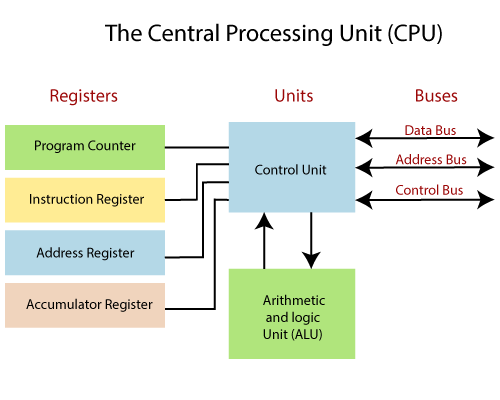
The register consists of a group of flip-flops and gates. The flip-flops hold the binary information and gates control. The registers are used for performing the several operations; while we are working on the computer system, then these registers can be used by the CPU for performing the operations.
If we give some input to the system, then the input will be stored into registers. When the system provides us results after processing, then the result will also be stored in the registers. So that the registers are used by the CPU processing the data which is given by the user. Registers can perform the various task, which is given below:
1. Fetch operation
The Fetch operation is used to take the instructions which are provided by the user, and the instructions which are stored into the main memory will be fetched by using the Registers.
2. Decode process
The Decode operation is used to interpreting the instruction means that the CPU will find out what operation is to be performed on the instructions.
3. Execute process
Execution is the process performed by CPU, such that the results produced by CPU (central processing unit) are stored into the memory, and then they are displayed on the user’s screen.
Types of register
Various types of Registers are used for different purposes. The processor operation mostly involves processing data, and this data can be stored in memory. The processor contains several kinds of registers which can be classified according to their content.
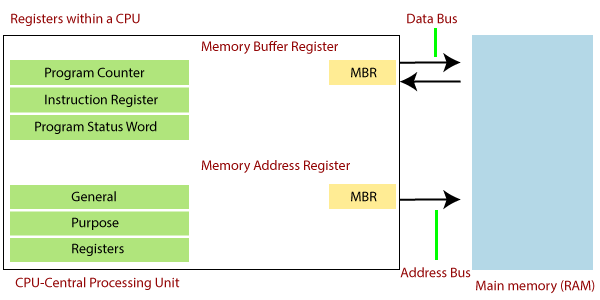
The processor register is the quickly accessible location available in the computer's central processing unit. The brief discussion of the types of registers is given below:
1. MAR (Memory Address Register)
The memory address register is the CPU registers, which either stores the memory address from which the data will be fetched from the CPU. In other words, the memory address register holds the memory location of data that needs to be accessed.
It is one of the registers located in the computer’s processor. It is a volatile storage component that temporarily stores the address of the data sent by the memory.
2. Program Counter
The program counter is the register in a computer processor which contains the address of the instruction being executed at the current time. The program counter increases its stored value by 1 when each execution gets fetched. The address is the specific location in memory or storage.
The program counter is commonly known as the instruction pointer in Intel x86 and Itanium microprocessor, and sometimes it is known as an instruction address register. It is the CPU register in the computer processor which has the address of the next instruction to be executed from memory.
3. Accumulator Register
The Accumulator register is a short term register and immediate storage of arithmetic and logic data in the computer’s CPU. In today’s computers, any register can perform like an accumulator. The most elementary use of an accumulator is adding the sequence of numbers.
4. Memory Data Register
The memory buffer register commonly refers to the memory data recognizer, which is the register in the computer's processor. This register can store the data being transferred to and from the immediate access storage. It is mainly used for holding the information that is in the process of being relocated from the computer memory to the processor, or vice versa.
5. Index Register
The index register in the computer's CPU is the processor register, which is used for modifying the operand addresses during the run of a program. The contents of the index register are added to the immediate address to form the effective address of the actual data.
The index register is a circuit that receives stores and gives the outputs to the instruction changing codes in the computer system. This circuit is also known as the address register or register of modifications.
The register is a data holding place in the computer processor. It can hold the instructions, the storage address, or any kind of data. The valid address of an entity in the computer system running multiple programs that comprise the base, index, and relative addresses all are stored in the index register.
The computer system contains several index registers; sometimes, these are more than a dozen. These can operate faster than primary storage (main memory), although the part of the primary storage may be assigned to index register if needed. It improves computer performance by speeding up simple operations.
Functions of Register
The registers are used to quickly accept, store, transfer data, and instructions, which are being used immediately by the CPU. There are many types of registers which are used for a different purpose. The register fetches the instructions from the program counter and holds every instruction as the processor executes it. The register is a temporary storage area built into a CPU. Some registers are used for internal processing and cannot be accessed outside the processor, while others are user-accessible.
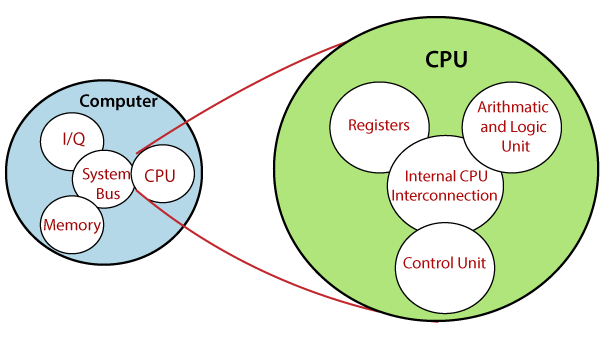
The internal registers include the instruction register, memory buffer register, memory data register, and memory address register. These instruction registers fetch instructions from the program counter and hold each instruction as the processor executes it.