
×

What is the Print Screen Key?

Print Screen is one among many keys which is present on the keyboard. It is abbreviated as PrtScr, Prsc,r, PrtScrn, PRTSC, PrntScrn, Ps/SR. When this key is pressed, it sends the image of the screen on the desktop at that moment to the computer printer or clipboard based on the operating system or program.

Print Screen

The print screen gives users a screenshot, also known as screen capture is an image that we take of a computer's or monitor's screen at that moment. The Windows operating system allows users to take screenshots in many ways using different tools.

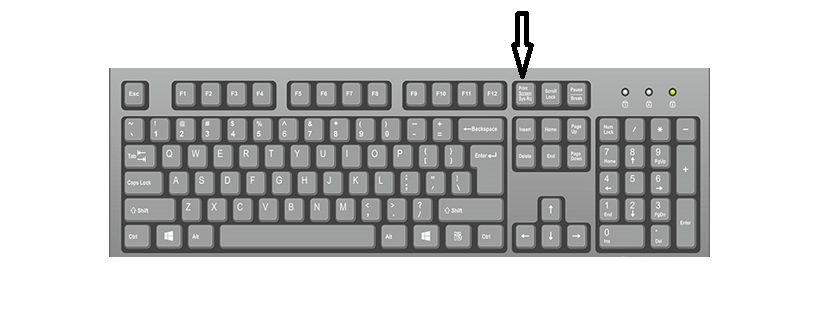
The below pointer shows the location of the print screen key on the keyboard:
What is the Print Screen Key

Location of print Screen key on the keyboard

This print screen key has other control keys like Scroll Lock, Pause, Insert, Home, PageUp, Delete, End, PageDown, etc.

Will all the keyboards contain this key?

No, all keyboards don't contain this PrintScreen key. When we look into keyboards of apple computers, this key is not present, but they will be having 'F13 function key’.

Also, not all computer keyboards have the same position for this PrintScreen key.

In the keyboard of Lenovo, this key is present between the left Alt and Ctrl keys.

In some Microsoft keyboards, this key is on top of the F8 key.

Regarding laptop keyboards, this key is present after the F12 key.

What happens when PrtScrn is used with Alt?

Computers having Microsoft Windows installed on them, the computer takes only a picture of the window, which is active at that moment instead of everything present on the screen.

If you consider an example of resizing the browser window while reading the page, if you press 'Alt+PtrScrn', this creates a screenshot of the only resized window, not the older bid window.

Can we print to the printer by using PrtScrn?

For this question, the answer is no in most situations because the PrtScrn key is used to take a screen capture and store it in the clipboard. After that, that image can be edited in the image editor. Then, you can move and print it to the printer.        

How to do printing of screen on PC?

While taking a screenshot, first of all, we have to check which version of windows is installed in our computer. If we have new versions of windows, like 8 or 10, you can take screenshots through keyboard shortcut keys, but for older versions, we require more menus to take a screenshot.

For Windows 8 or 10, do the following to take a screen capture:

  1. Select the screen on which you want to take a picture. It can be a program, browser window, or any application. The computer won't be able to take the image capture if you don't have already loaded that window.
  2. Look for the position of the print screen key on the keyboard.
  3. Then press the "windows" key and "print screen" key at the same time. This makes the screenshot of an entire window, while taking the screen capture, the screen will become dim, which makes us know that screenshot is taken successfully.
  4. If you want to check the screenshot, go to This PC > Pictures > Screenshots.

In older versions of windows (less than windows 8):

  1. Start the process by pressing the “prtscrn” button that is typically present on the upper-right-hand side of the keyboard beside the function keys.
  2. Some laptops contain the "Fn" key. Then we have to press simultaneously press the "Fn" and "PrtScrn" key.
  3. Then open "MS Paint" by clicking on the start menu. Or you can type the paint in the search box to get the paint icon directly.
  4. The screenshot taken must be pasted into MS Paint by clicking "Ctrl+V" simultaneously.
  5. Then the image will get into MS Paint, so save it into hardware of the computer.
  6. Finally, save the image by clicking "Ctrl+S", which shows the destination options where you can save it. The screenshot file type can also be chosen like png or jpeg, but for screenshots choosing "png" is the best option which will retain the image quality.

Related Topics

What is network Interface card (NIC)?

A network interface card is a hardware part of a computer, which is used to connect the internet in the system. The latest network interface card gives functionality to the...

6 minutes read.

What is Post?

POST can be used to describe any of the following: The POST, an abbreviation for power-on self-test, is a test the computer must pass to ensure that all hardware is functional...

4 minutes read.

How to open a Microsoft .wps or Works file in Word

The WPS file format is a legacy one for Microsoft Works. Until 2007, when Office 2010 took its place, Microsoft Works, the company's first office suite, was released. The .wps...

3 minutes read.

What is VDU?

In this article, we shall discuss the VDU- visual display unit. VDU states visual display unit. This is a British term. And this is used to display pictures and text on...

4 minutes read.

How to test if a Website or Web Page is down?

The web server hosting a website, the routers, and other hardware connecting your computer to the server could all fail. The web server or routers may be unavailable due to...

6 minutes read.

What is Auto Rotate?

On smartphones and tablets, the auto-rotate feature aligns the screen's alignment with the real orientation of the device. The display is switched to either portrait or landscape mode depending on...

3 minutes read.

What does Alt+D do?

Computer keyboard shortcut keys play an important role in the working of any computer user. We can do anything from the mouse and keyboard, but shortcut keys provide data in...

3 minutes read.

What is NBSP (Non-Breaking Space)?

NBSP (Non-Breaking Space), also known as Hard space or Fixed space, is an HTML entity used to add blank spaces in the content. NBSP does not allow the browsers to...

7 minutes read.

What is RJ Cable?

Registered Jack is referred to as RJ. It serves as a network interface or a telecommunications medium. RJ Cable enables voice and data equipment to interact with network devices. It is...

4 minutes read.

Characteristics of Computer

Characteristics of Computer: The computer system has a logical program to solve complex problems. The features of computer make it fast and powerful. The computer with powerful features can perform...

3 minutes read.

Internet Explorer Shortcut Keys

While using internet explorer, when we use shortcut keys, our work will be done faster when compared to the job done without using them. The reason is internet explorer is...

23 minutes read.

What is Operating System?

Operating System An operating system is an interface between a user and computer hardware. The operating system's main aim is to provide a suitable environment to a user so that a...

11 minutes read.

What is Multitasking?

Multiple programs can be run simultaneously, thanks to this logical expansion of a multiprogramming system. In a contemporary computer system, the word "multitasking" is employed. The ability to multitask in...

4 minutes read.

What is a Desktop?

Any of the following may be referred to as a desktop: 1. A desktop computer or system unit is referred to as a desktop. 2. The Desktop is the main location to...

6 minutes read.

What does Alt + O do?

Alt + O is used for opening the Format file menu. Alt + O is a shortcut that can be used by pressing the "Alt" and "O" keys. As shown in...

4 minutes read.

What is RDIMM?

Servers use the RDIMM (registered memory) kind of memory chip most frequently. By reducing the electrical strain on a memory controller, it helps systems running on a server be more...

3 minutes read.

What is the svchost.exe file used for in Windows?

Svchost.exe is a crucial Windows file that loads the DLL files necessary by Microsoft Windows and other programs that operate under Windows on your computer. Multiple Windows services can share...

8 minutes read.

What is Modem?

A modem is a device that is responsible for modulating and demodulating the signals in a computer network. The modem is an abbreviation for Modulator - Demodulator. It allows the...

7 minutes read.

Are smartphones and tablets computers

The answer is yes. In modern times, at least a laptop /tablet /desktop /smartphone will be in a home. Because they play an important and vital role in everyone’s life...

4 minutes read.

Mouse not detected or working in Windows

One or more issues could be blocking the mouse from functioning properly in Microsoft Windows if it stops moving or doesn't appear on your monitor. Solutions on this page may...

5 minutes read.