
×

What is boot menu?

When we turn on our computer, the machine goes through a process known as booting that is carried out automatically. This could be accomplished by the CPU's circuitry, software, or processes that contribute to the computer system. Rebooting a computer is another term for restarting a computer when the electricity is not cut.

A smooth boot may clear RAM to zero on certain computers. Hardware, such as a push-button, or software commands, could start hard and soft booting. When the real-time operating system, which typically includes the operating system and several programs, is reached, booting is complete. The term "boot" refers to a type of footwear.

When you switch on your desktop, a log of your computer/manufacturer laptop appears. That's the end of it. More significantly, before windows loads into RAM, when you switch on the desktop. This period is known as the booting system.

When a computer starts up for the first time, an accessible menu called the Boot Menu. It can boot to various devices, including CDs, DVDs, storage devices, and hard disk drives, as well as a LAN (network). Even if the machine already has an operating system installed, the Boot Menu enables users to load other operating systems or apps. Because the user can select which hardware to use while installing a new OS on a desktop, a Boot Menu is also important.

The moment your desktop or laptop is, the logo is displayed on the screen, and "Press F12" or "Press F2" for the boot menu is presented in the corner. When the key is pressed, a menu will be displayed. This is referred to as the boot menu. The boot menu is where you may change your bios settings.

Boot your computer from a drive or disc

Normally, you start your laptop from the primary hard drive, which is where your OS is stored (like Windows). However, there are times when you will need to boot from a CD, DVD, or USB device, such as when you are performing a recovery application or trying out a new OS like Linux.

You must tell your computer's BIOS to download the operating system from a separate location than normal in order to accomplish this. This can be accomplished in two ways:

  • In the BIOS, you may change the boot order.
  • By reaching a boot menu at opening (It will only boot from either a CD or USB once).

How to access the boot menu in Windows 7

1. Press the Power switch, click the "Shut Down" icon, followed by "Restart."

2. While the system is rebooting, before the Windows logo shows, continually click "F8." You misplayed the hotkey and should try once more if you see the Windows logo. Select the right boot zone before clicking "F8" if you're running a dual-boot computer; most users won't have to worry about it.

3. Mark a selection in the Advanced Boot Options window using the up or down arrow buttons, then hit "Enter" to choose it.

How to access the boot menu in Windows 8

To access the BIOS, go to Settings, then General. Select Restart Now from the Advanced Startup menu. This will bring up the boot menu on your machine.

Holding Shift while clicking Restart is another simple way to get to the boot menu.
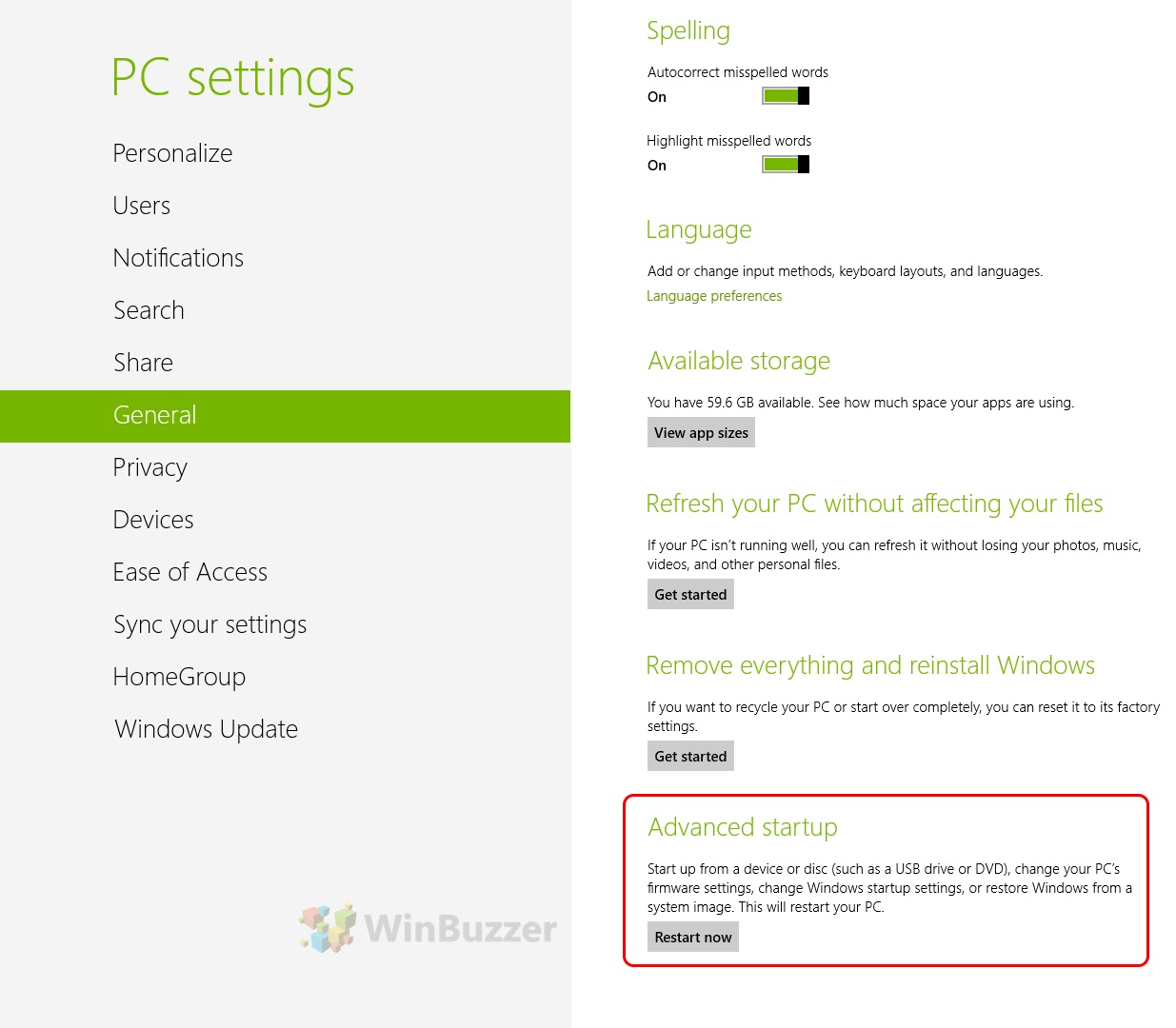
What is the boot menu

How to access the boot menu in Windows 10
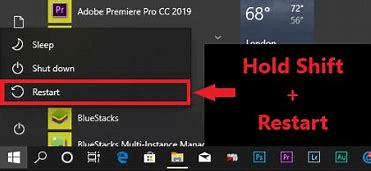
What is the boot menu

If your computer can resume Windows properly, you can rapidly access the "Advanced Options" menu with the help of pressing and holding the Shift key while selecting "Restart." This can be done on the sign-in screen (see above) or the Start menu (shown below).

Boot sequence vs Boot Menu

While the machine is booting, a Boot Menu permits the user to select, which boot drive to use. The boot sequence is a BIOS parameter that directs the desktop on how to look at possible boot devices on a desktop or laptop in what order. In other words, the boot schedule is continuously performed every time the desktop boots up without the need for user interaction. To use a Boot Menu option, the user must first enter the Boot Menu by pressing the key and then pick the boot choice.


Related Topics

What is AIMBOT?

In shooter games, an AIMBOT is any cheating software or game hack that enables a player to aim automatically and, in some circumstances, auto-shoot (trigger bot). In first-person shooter games,...

4 minutes read.

What is Meatballs Menu?

The three horizontal dots menu called as Meatballs Menu, which is an icon, that can help the user with additional options.  A menu icon in a computer indicates that there...

3 minutes read.

How to Fix a Windows CD-ROM, DVD, or Disc Drive Issue?

If your CD-ROM, DVD, or disc drive is not working properly in Windows, you can try a few troubleshooting steps to fix the issue. These steps include checking the connections,...

6 minutes read.

How to determine Which Version of Microsoft Office I'm using?

Many people who use Windows computers also use Microsoft's Office package. While it is simple to tell what version of Windows you are using just by glancing at your desktop,...

3 minutes read.

What is Access Time?

Access time is when a computer can recover data from a storage device, such as a hard drive or solid-state drive. It is an important factor that can affect the...

7 minutes read.

What does Alt + O do?

Alt + O is used for opening the Format file menu. Alt + O is a shortcut that can be used by pressing the "Alt" and "O" keys. As shown in...

4 minutes read.

What is Bracket?

A bracket is one of two large, forward- or afterwards-facing punctuation marks that is frequently used to separate a section of text or data from its surroundings. Depending on the...

3 minutes read.

What are the Advantages of Computers?

A computer is an electrical device capable of storing, processing, and retrieving data. It can usually accomplish a range of things that make life easier. Computers conduct instructions written in...

7 minutes read.

What is Optical Disk?

The optical disk is an electronic data storage medium that reads and writes data by using optical storage techniques and technology. There are mostly three types of optical disk available...

9 minutes read.

What is Binary?

There are four types of the number system in computer applications through which we represent the different numbers. Before moving to binary numbers, let's discuss the rest of the number...

5 minutes read.

Uses of Computer

What is the use of computer in our daily life? 10 uses of Computer in Different Fields 1. Education The computer is playing a key role in modern education. In these days, Students...

5 minutes read.

What is Scratch?

Scratch is a visual programming language that lets students build interactive tales, games, and animations. Students develop their creative thinking, logical reasoning, and teamwork skills as they create Scratch projects....

3 minutes read.

How to Fix PC Stuck on Verifying DMI Pool Data?

DMI means Desktop Management Interface. It is an abstraction layer that hides the actual process but gives the required information to the system. DMI is given by the system BIOS,...

3 minutes read.

How to open a Microsoft .wps or Works file in Word

The WPS file format is a legacy one for Microsoft Works. Until 2007, when Office 2010 took its place, Microsoft Works, the company's first office suite, was released. The .wps...

3 minutes read.

Quantum Computing

Topics Covered What is Quantum Computing Applications of Quantum Computing How Quantum Computing works Difference between classical computers and Quantum Computers What is Quantum Computing? We all know that quantum physics...

8 minutes read.

What is a Webcam?

Webcam is a peripheral digital camera that can be attached to the device, which allows you to click photos and record videos directly on the system. There is various webcam...

11 minutes read.

What is Protocol?

A protocol is a set of rules for formatting and processing data in networking. These rules govern the users on the network stating the instructions to format and process the...

7 minutes read.

How To Replace the CMOS Battery

CMOS(Complementary Metal Oxide Semiconductor) stores the information, including date, time, and system firmware setting. The CMOS battery is responsible for powering up the BIOS firmware in laptops, and that BIOS is...

3 minutes read.

How to install a computer processor

Installing a CPU is much simpler than many other steps in the PC-building process. There is no need to worry that you will make a mistake because we will walk...

6 minutes read.

Who invented the Internet?

Introduction of the Internet: The Internet is the foremost important tool and useful resource for any person. It connects millions of millions of computers, smartphones, web pages, servers, etc. It connects...

6 minutes read.