
×

Types of Network

“The computer network is a set of computers connected to share resources.”An internet itself can be considered the computer network.

In computer networks, the computing devices exchange the data with each other by using the connections between nodes. The data links are established over cable media such as wires or optic cables or wireless media such as Wi-Fi.

The computer network is a digital telecommunication network which allows nodes to share the resources. It is the group of computer systems and other computing hardware devices. Those devices are linked together through communication channels to facilitate communication and resource sharing among a wide range of users.
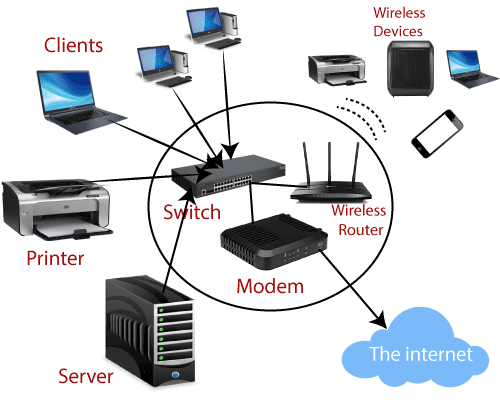
Computer Network

                                             Figure: The computer network.

There is an example of the earliest computer network that was the Network for communicating computers which are functioned as a part of the U.S. military’s Semi-Automatic Ground Environment Radar System.

Networks are used to facilitate communication via email, video conferencing, instant messages, etc. It enables files sharing across the Network. These are also used to make information easier to access and maintain among the network users.

Types of Network
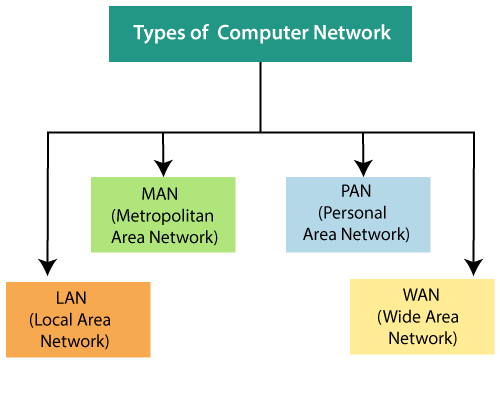
Computer Network 1

The Network is also used to enable the multiple users to share a single hardware device like the printer or scanner. It allows for sharing of software or operating programs on the remote system.

There are multiple devices or medium in a computer network, which helps in the communication between two different devices that are called as network devices.

Ex. Router, switch, bridge, hub, Gateway, Modem, Repeater. The Network is the interconnection of multiple devices and termed as hosts connected by using multiple paths to send and receive the data or media. The computer network is mainly of four types, which are given below:

  1. LAN (Local Area Network)
  2. MAN (Metropolitan Area Network)
  3. PAN (Personal Area Network)
  4. WAN (Wide Area Network)

There are several types of protocols which are used in networking. The protocol is a set of rules or algorithms which defines the way how two entities can communicate across the Network, and different protocol is defined at every layer of the OSI Model.

1. LAN (Local Area Network)

The Local Area Network is a computer network which interconnects the computer within the limited area such as a residence, school laboratory, university campus or office building. LAN (Local Area Network) spans a relatively small area. In a wireless LAN, the users have unrestricted movement within the coverage area.

 The wireless networks become popular in the residences and small businesses just because of their easy installation. The network topology describes the layout of interconnections between devices and network segments. The wide varieties of LAN topologies are used at the data link layer and physical layer.
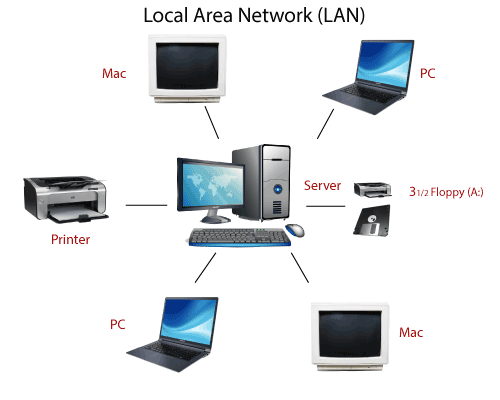
Computer Network 2

2. MAN (Metropolitan Area Network)

The Metropolitan Area Network is a computer network which is similar to the Local Area network but spans an entire city or campus.
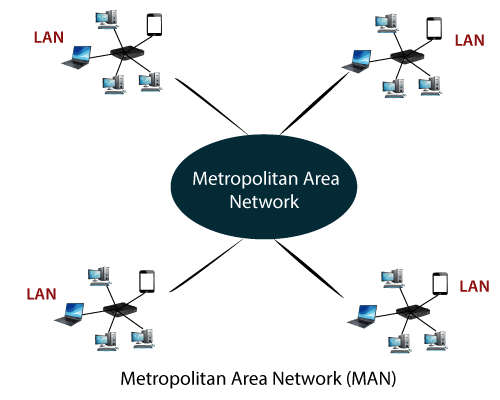
Computer Network 3

In Metropolitan Area Network, we interconnect the user with computer resources in a whole geographic area or region. This Network is larger or broader that the Local Area Network.

3. PAN (Personal Area Network)

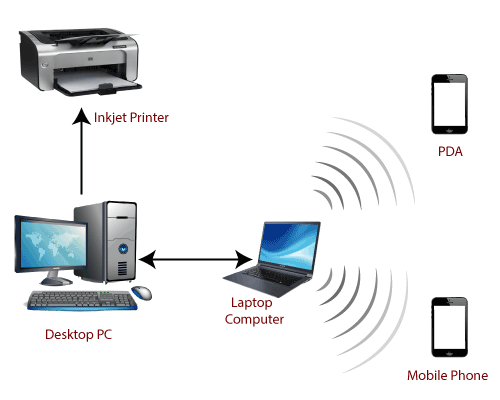
The Personal Area Network is used for interconnecting the devices which are centered on a person’s workspace. This Network provides data transmission among devices such as computers, smartphones, tablets, and personal digital assistants.  
Computer Network 4

                                 Figure:  The Personal Area Network.

4. WAN (Wide Area Network)

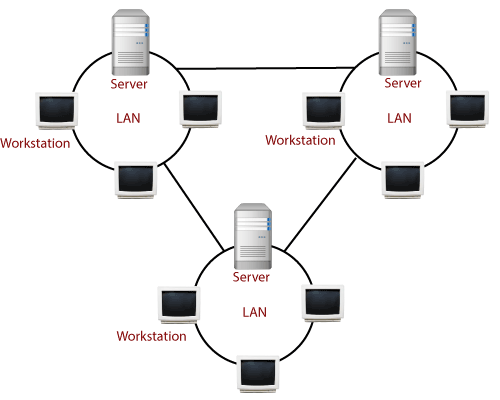
The Wide Area Network is the telecommunication network which extends over the large geographical area for the primary purpose of computer networking. These networks are often established with leased telecommunication circuits. The WAN connects different smaller networks, including the Local Area Network.
Computer Network 5

The computers connected to the Wide Area Network are often connected through public networks, such as telephone systems. This Network can connect through the leased lines or satellites.


Related Topics

How to hack a computer?

How to hack a computer? The human species are very inquisitive, and with the popularity of the Internet and modern technologies, they are becoming highly tech-savvy. The digital world is evolving...

7 minutes read.

What is a Program

A program can be defined as an application used to perform a specific function. It constitutes stepwise instructions to perform a dedicated task. Multiple programs working together can form a...

4 minutes read.

How to fix a CD-ROM, DVD, or disc drive not working in Windows?

If your CD-Rom or DVD-ROM disc driver is not reading your discs correctly, then follow the following tips that may help to fix your problem. Bad or dirty CD Make sure you...

7 minutes read.

How to determine Which Version of Microsoft Office I'm using?

Many people who use Windows computers also use Microsoft's Office package. While it is simple to tell what version of Windows you are using just by glancing at your desktop,...

3 minutes read.

What is a Server?

The computer which processes the request and delivers the data to the other client over any network is called a Server. The server could be local or internet. These are specialized...

6 minutes read.

Input devices of Computer

Computer Input Devices : The input device is the hardware device that connects to the computer system. The user can give the instructions to the computer with the help of...

11 minutes read.

Smart Devices

Smart devices are all everyday objects made intelligent with, for all intents and purposes, advanced computing, including mostly AI and machine learning, and networked to form the internet of things,...

3 minutes read.

What is Select All?

Selecting everything in a list or display means choosing all of the text, files, or other items. Ctrl+A selects (highlights) everything in the active window in the majority of apps....

3 minutes read.

Computer Virus

"The computer virus is a malicious code that replicates by copying itself to another program."  It can destroy a single program or the whole software of the computer system. In...

3 minutes read.

What are Toggle keys?

keys that are used to turn on or off a function or the keys used to switch between two functions is called the Toggle key. The caps lock key, scroll...

3 minutes read.

What is Cache Memory? Types of Cache Memory

Cache Memory in Computer Cache memory is a semiconductor chip used to retrieve data from a computer's memory efficiently. Generally, cache memory is much costlier than main memory or any other...

4 minutes read.

Difference between Desktop and Laptop

What is Desktop? A Desktop Computer is designed for steady use at a particular location near a desk due to its huge size and power requirement. It uses devices for...

7 minutes read.

What is Cyber Warfare?

Cyber warfare is the use of technology, which is used to attack the enemy state. It is a hacking technique mainly used by military forces to target foreign countries' key...

7 minutes read.

What is Post?

POST can be used to describe any of the following: The POST, an abbreviation for power-on self-test, is a test the computer must pass to ensure that all hardware is functional...

4 minutes read.

What is a Kensington Lock?

A Kensington Lock is a security device similar to the lock, which is used to secure bicycles. Kensington Lock consists of a metal cable insulated with rubber. One end of...

4 minutes read.

How to Identify problems in the Windows Device Manager?

When you run the Device Manager, a screen shown in the example display below. Next to each gadget category, arrows are pointing to the right. No other devices or Unknown...

6 minutes read.

Difference between Optical Fibre and Coaxial Cable

What is Optical Fibre Cable? Optical fibre cables are thin, transparent glass or plastic strands that transmit data through light signals. They are commonly used in telecommunications and internet infrastructure, as...

7 minutes read.

Augmented Reality

Augmented reality, or simply AR, is an alternate or enhanced version of the world we see around us with the help of some technologies. AR is like a new trend...

3 minutes read.

What is Thermos flask?

A vacuum flask sometimes referred to as a Dewar flask, Dewar bottle, or Thermos is an insulating storage container that considerably extends the amount of time that the contents of...

6 minutes read.

How to fix a general protection fault?

The suggestions below may help you resolve the issue if you frequently see GPF (general protection fault) issues when utilizing an application on your computer. Errors involving the General Protection...

6 minutes read.