
What is EHCI?
EHCI stands for "Enhanced Host Controller Interface." It is a specification that defines the interface between a host controller (such as a computer or other device) and a device controller (such as a USB device) in a Universal Serial Bus (USB) system. The EHCI specification ensures that different types of USB devices can communicate with each other and with the host controller consistently and reliably. EHCI is commonly used in computers and other devices that support USB devices, such as printers, keyboards, and storage devices.
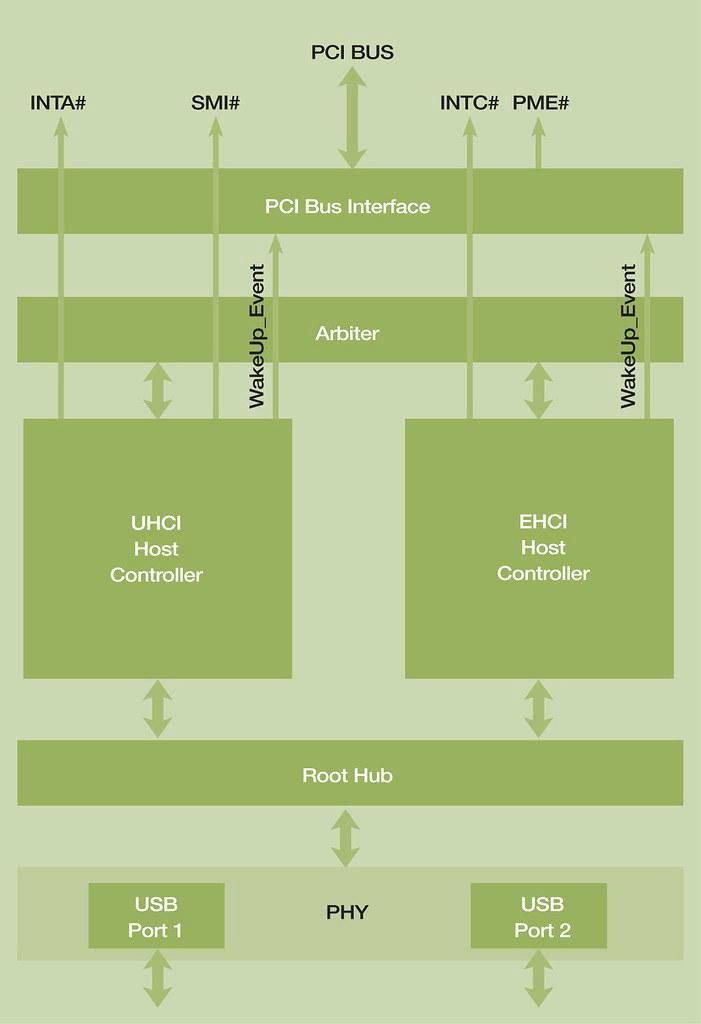
Types of EHCI
There are two main types of EHCI controllers:
- EHCI controllers for USB 2.0: These are designed to support USB devices that use the USB 2.0 specification. These controllers can transfer data at up to 480 megabits per second (Mbps).
- EHCI controllers for USB 3.0: EHCI controllers for USB 3.0 are designed to support USB devices that use the USB 3.0 specification. These controllers can transfer data at up to 5 gigabits per second (Gbps).
In general, EHCI controllers for USB 2.0 are compatible with USB devices that use USB 2.0 and 1.1 specifications. In contrast, EHCI controllers for USB 3.0 are compatible with USB devices that use the USB 3.0, 2.0, and 1.1 specifications.
Applications of EHCI controllers in computers
EHCI controllers are used in computers and other devices to enable communication with USB devices. Some common applications of EHCI controllers in computers include:
- Connecting USB devices: EHCI controllers allow computers to connect and communicate with a wide range of USB devices, including printers, keyboards, mice, storage devices, and more.
- Transferring data: EHCI controllers enable fast data transfer between computers and USB devices, allowing users to quickly and easily transfer files, documents, and other data.
- Powering devices: EHCI controllers can provide power to certain types of USB devices, such as smartphones and tablets, allowing them to be charged while connected to the computer.
- Virtualization: EHCI controllers may be used in virtualization software to enable communication between virtual machines and USB devices.
Overall, EHCI controllers enable computers and other devices to connect and communicate with a wide range of USB devices, making it easier for users to access and use these devices.
Versions of EHCI:
There are two main versions of the EHCI specification:
1) EHCI 1.0: EHCI 1.0 was the first version of the specification, released in 2001. It defined the interface between a host controller and a device controller in a USB system and was designed to support USB devices that use the USB 2.0 specification.
2) EHCI 2.0: EHCI 2.0 was released in 2007 and is an updated version of the EHCI specification. It includes features and improvements over EHCI 1.0, including support for USB devices that use the USB 3.0 specification.
Note: EHCI 2.0 is backward compatible with USB devices that use the USB 2.0 and 1.1 specifications, so EHCI controllers that are compliant with EHCI 2.0 can work with a wide range of USB devices.
Advantages of the EHCI specification
Here are a few advantages of the EHCI specification:
Improved performance: EHCI controllers allow for faster data transfer between computers and USB devices, improving the performance of USB devices and enabling users to transfer large amounts of data quickly and efficiently.
Compatibility: EHCI controllers are compatible with a wide range of USB devices, including those that use the USB 3.0, 2.0, and 1.1 specifications. This makes it easy for users to connect and use various USB devices with their computers.
Power management: EHCI controllers can support power management features, allowing them to optimize power usage and conserve energy. This can be particularly useful for devices that use USB connections to charge, such as smartphones and tablets.
Virtualization support: EHCI controllers may be used in software to enable communication between virtual machines and USB devices. This allows users to access and use USB devices from a virtual environment.
Improved reliability: The EHCI specification includes features and protocols designed to improve USB connections and communications reliability. This can reduce the risk of data loss or other issues when using USB devices.
Misuse of EHCI
Misusing the EHCI specification itself is not possible, as it is simply a set of technical standards and guidelines for the interface between a host controller and a device controller in a USB system. However, users can misuse USB devices or the EHCI controllers that enable communication with these devices.
For example, users may intentionally or unintentionally install malware on a USB device and then connect the device to a computer, potentially compromising the computer's security. Users may also misuse USB devices by using them to access or share copyrighted or illegal material or by using them in a way that violates the device's terms of use. Users must follow best practices and guidelines for the safe and responsible use of USB devices and EHCI controllers.