×

What is open with?

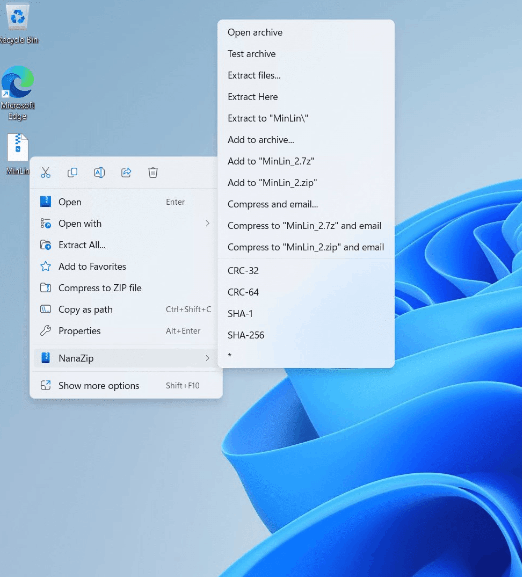
You can open a file with your chosen program by using Windows' Open With function. The software that opens those files may not be the normal Windows program. When you right-click (or press and hold) a file you wish to open, the Open With feature appears. The option to "Open with" is available in the right-click menu. When selecting or highlighting the Open with entry, a submenu with numerous choices is displayed.

You can select what program should be connected to a certain file type using the Open with function in Microsoft Windows. The Open with window, for instance, appears whenever a file with the.log file extension or any other file type that Windows doesn't recognize is opened. The choice of software to view the file's contents is, entirely up to you.
What is open with

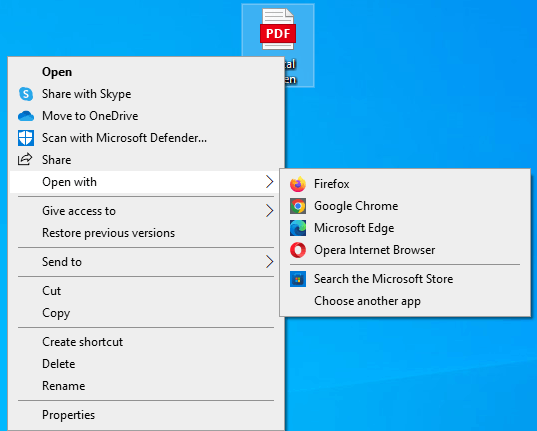
Let’s see what open with looks like in 2 different operating systems, i.e., Windows 10 and Windows 11.

Windows 10
What is open with

Windows 11

What is open with

The options for the Open With feature are the same in both operating systems, despite the little visual differences.

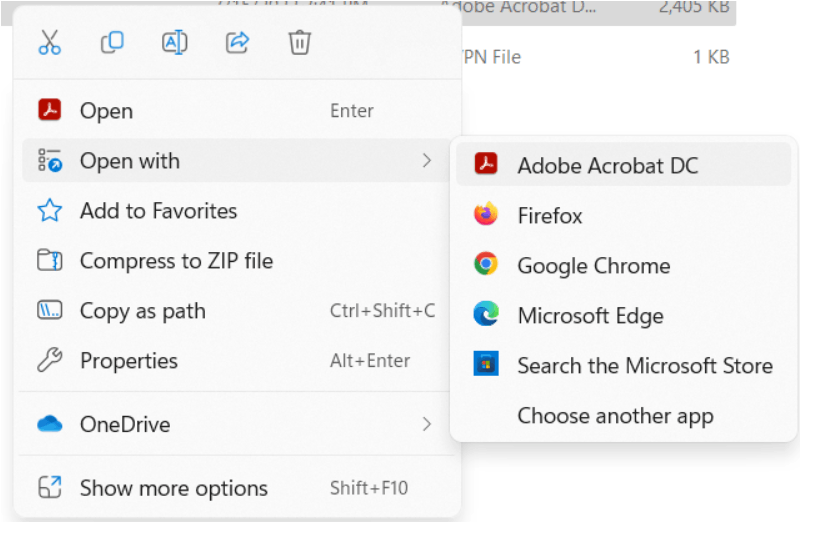
Let's take windows 11 as a guide to understand how open with works. If you are using windows 10, everything works the same, even if circumstances may appear slightly different.

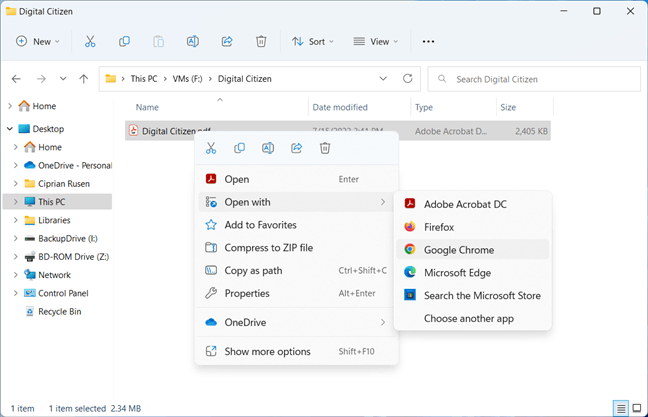
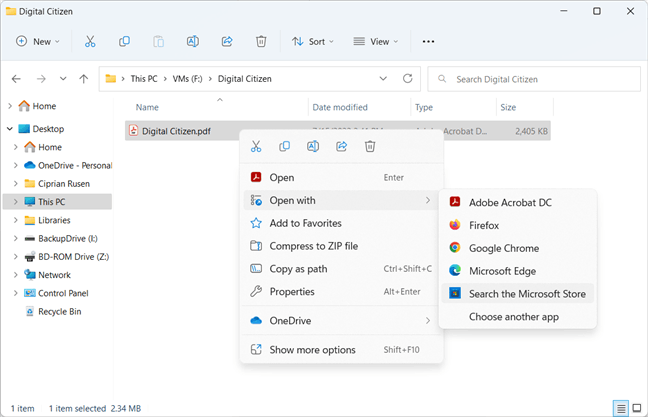
You always see one or more apps shown in the Open with menu. The default program for opening files of your file type is listed first. For instance, we are attempting to open an a.pdf file in the screenshot below. Since Adobe Acrobat DC is already set as the PC's default application for opening.pdf files, it is the first choice. Then, because they can also open files of this type, we can also see web browsers like Google Chrome in the Open with menu. Any listed programs can be clicked to open the file in that app.
What is open with

If the Open with menu alternatives don't suit your needs, you can select "Search the Microsoft Store." This operation launches the Microsoft Store search page and searches for a program that can open similar files. Here it involves.pdf files. This can be useful when you need to open a file with an unknown extension.
What is open with

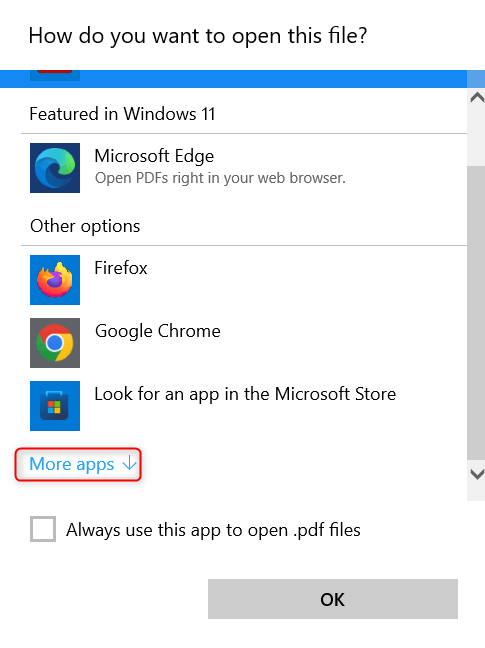
It would be wiser to select "Choose another app" when returning to the Open with menu. That's because Windows then shows you several programs compatible with the file you wish to open. The default app set comes first on the list, followed by the Microsoft-recommended app and any additional apps installed on your PC.

Choose the program you wish to use to open your file by scrolling down the list until you see it, then click or tap OK. Selecting More programs may further expand the Open with the list.
What is open with

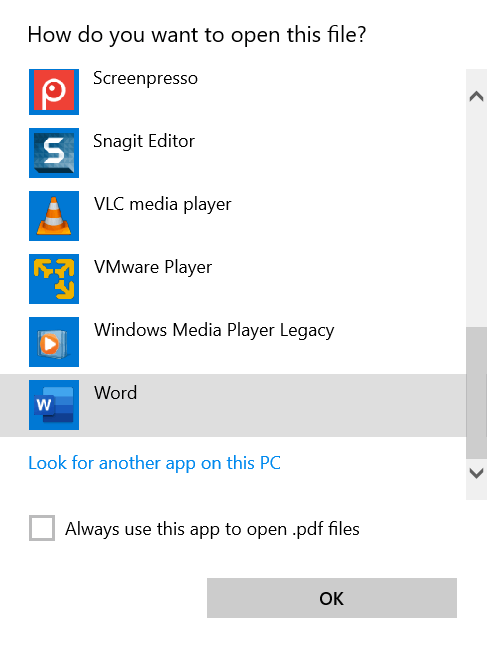
By choosing a program from the list, selecting the "Always use this app to open..." box, and clicking OK, Windows will no longer use that app by default to open files of that kind. Windows will now be forced to show all the programs it believes can open your file. Though, apps that don't function with your file type are included in this long list. If the app you wish to use to open the file is not included in the extended list but is still installed on your computer, select "Look for another app on this PC" by clicking or tapping.
What is open with

You can browse your PC and choose the executable file of the app you wish to use to open your file. The Open with dialogue is displayed when you take this action. Click or touch Open after that. Your file is now open in the application you choose.

In some circumstances, the Open With feature is highly beneficial. It can be extremely useful when you wish to view a file's contents rather than run it. For instance, the Registry Editor will run a .reg or .key file if you double-click it. Use Open With and choose a program like Notepad if you want to read a .key file's contents to ensure nothing malicious is within. Double-click on the file will allow you to see what is within it before running it.

Security certificates work the same way. Before Windows executes them, you can use the Open With the command to see what's inside. Or, if you're a software developer, you might need to utilize Open With to open a code sample kept in an a.py file in Python, for instance, without altering the default program for editing code that you frequently use, which might be different from Python's IDLE.


Related Topics

How to fix a not a valid Win32 application error

The “not a valid Win32 application” error occurs on Windows. Users get confused when they see it. It means our current version of windows does not support or is not...

5 minutes read.

How to fix Low Memory and out of memory errors

Rebooting the computer is required Rebooting the computer can frequently fix out of memory issues. We advise you to try resetting the computer first before attempting any of the methods below. The...

4 minutes read.

Smart Devices

Smart devices are all everyday objects made intelligent with, for all intents and purposes, advanced computing, including mostly AI and machine learning, and networked to form the internet of things,...

3 minutes read.

What is a Print Preview?

Print Preview is one of the functionalities that helps users to see the pages layout before printing. It gives the users an idea of what pages look like when printed....

3 minutes read.

What is Parallelization?

Parallelization means doing multiple tasks simultaneously (in parallel) to accomplish some goal. According to Computational Science, developing a computer program or system to process data-parallel is known as parallelization or...

4 minutes read.

What is a Dual-boot?

A dual boot system is a computer configuration that allows users to install and run two or more operating systems (OS) on a single machine. This setup can be useful...

6 minutes read.

Fourth Generation of Computer

The period of the fourth generation was from 1971- 1980. The (VLSI) huge scale integrated circuits are used in the computers of this generation. These circuits have 5000 transistors and...

4 minutes read.

Advantages and disadvantages of Email

What is Email? A fast method of business communication is email. It is difficult to imagine a workplace where email is not used for internal and external communication. The advantages of...

3 minutes read.

What is a Model Number?

The Model number is a number given to each product that is assigned by the manufacturers of the product. The Model number is unique and used in all products to...

3 minutes read.

What is Protocol?

A protocol is a set of rules for formatting and processing data in networking. These rules govern the users on the network stating the instructions to format and process the...

7 minutes read.

What does ALT + Q do?

It is a useful shortcut that can open the ‘tell me’ box in recent versions of the Office software. The user has to press the Alt key while holding the...

4 minutes read.

Now that I’ve got a Computer, what can i do?

Most often, people buy a computer to do their job, like students buy a computer to learn, code, etc. But all the users will need to learn their computer's complete...

4 minutes read.

Computer Cleaning Information and Steps

Clean computing refers to the upkeep of a clean computer, including its hardware and software. According to one estimate, a computer's average age is five and a half years. During that...

9 minutes read.

What is Keyboard?

In modern times, computer is one of the most important digital technologies for any human being. People will also efficiently correlate these new technologies with the increasing daily-by-day technology. Today’s environment, all...

7 minutes read.

Version Control System

There are many problems that are faced by a multinational organization. These problems are the backup of data, storing several versions of files and collaboration of employees. All these problems...

6 minutes read.

Windows 7 Alt+Tab won’t stay on top or stick

One of the most helpful keyboard shortcuts is Alt+Tab, which makes switching between numerous open windows a breeze. You save time and effort by not having to move the mouse....

3 minutes read.

How Much is 1 Byte, Kilobyte, Megabyte, Gigabyte, etc?

In this article, we will discuss some of the data-storing units, which are helping to store data in the memory of the device. They are all types of memory units...

6 minutes read.

What is Cache Memory? Types of Cache Memory

Cache Memory in Computer Cache memory is a semiconductor chip used to retrieve data from a computer's memory efficiently. Generally, cache memory is much costlier than main memory or any other...

4 minutes read.

How to use Computer Keyboard?

A computer keyboard is an essential input device for any computer. It allows users to type characters, numbers, and symbols into your computer and includes special keys that are used...

8 minutes read.

Memory Hierarchy

Memory Hierarchy: In computer architecture, the Memory Hierarchy separates computer storage into the hierarchy based response time. It is developed to organize the memory in such a way that it...

5 minutes read.