
Fourth Generation of Computer
The period of the fourth generation was from 1971- 1980. The (VLSI) huge scale integrated circuits are used in the computers of this generation. These circuits have 5000 transistors and other circuit elements. The computers of the fourth-generation become more powerful, compact, reliable, and affordable.
There are various advanced features such as time-sharing, real-time networks, distributedoperating systemwere used in the fourth generation. All high-level language likeC,C++,Java,PHPare used in this generation.
These computers are also used in the LSI (large scale integration). The fourth generation is the extension of the third generation. The computer of the first generation filled the entire room space, but these computers can fit in the palm.
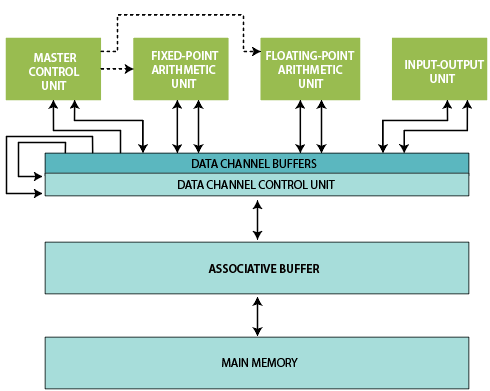
Fig: Architecture of computer.
The microprocessor chips are used in thisgeneration of computers. Theobject-oriented programmingwas used in thefourth generation of computer. Various types of language exist in object-oriented programming such as Java, Visual Basic, etc.
These object-oriented programs are designed to solve specific problems and require little specialized user training. This includes query language and application generators. The Intel was the first company which can develop the microprocessors.IBMdeveloped the first personal computer related to the fourth generation. These computers required a minimal amount of electricity to run. The fourth generation of the computer had the first supercomputer that was able to perform many calculations accurately. These supercomputers are also used in networking. The storage capacity increased up to several gigabytes or even terabytes.
Features of the fourth generation
- The vast scale integrated circuits are used in the fourth generation of computer.
- The computers become easily available in this generation.
- No AC required when we use the computer of the fourth generation.
- We have great development in the field of computer network during the fourth generation.
- These computers are very small in size.
- The computers of the fourth generation were portable and reliable.
- These computers are very cheap.
- The computers of the fourth generation were used in pipeline processing.
- The concept of the internet was introduced in this generation of computer.
- We can use personal computers in the fourth generation of computers.
Some computers of this generation are given below:
- DEC10.
- STAR 1000.
- PDP11.
- CRAY-1(Supercomputer).
- CRAY-X –MP (supercomputer).
STAR 1000 computer
The CDC Star 100 is the type of STAR1000 computer, which was vector supercomputer. These computers were designed, manufactured, and marketed by the control data corporation. That was one of the first machines to use the vector processor to improve the performance on scientific applications.
These computers were the first supercomputers which can use the integrated circuits. The name STAR has constructed the words Strings of binary digits that made up of arrays. The speed of these computers was 100 million floating-point per second.
The series of STAR computer is similar to CDC's earlier computer. The pipeline connected to the functional units from memory was massive in these computers. There were very few programs can be effectively vectorized into a single series of instructions.
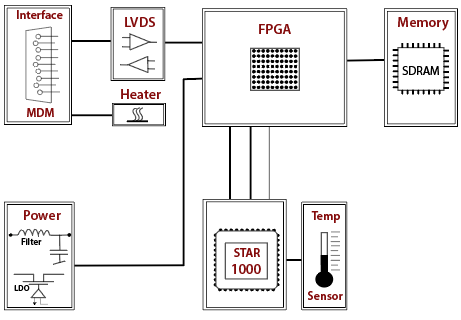
Fig: Block Diagram of STAR 1000 computer.
These computers support virtual memory capabilities. The main addition in the innovation of STAR computer was an instruction to the vector processing. The simple CPU in these computers can support the number of peripheral processors.
PDP 11 computer
The PDP 11 was a series of 16-bit minicomputers, which are sold by the digital equipment corporation. Some experts considered the PDP 11 as the most popular minicomputer ever. This type of computer included several innovative features in its instruction set and many additional general-purpose registers.
These computers use memory-mappedInput/Output. Mostly operands can apply anyone from eight addressing modes. The addressing modes provide register, immediate, absolute, and index addressing.
There are various types of real-time applications created by PDP-11 so that this computer replace the PDP-8 computers. The programming ease of PDP-11 computers made it very popular for general-purpose computing.
The PDP-11 computer was the smallest system that can run onUNIX. The newer microprocessor such as Motorola 68000 and Intel 80386 also included 32 –bit logical addressing. These computer systems also run theUNIXderivatives. These computers were designed to the ease of manufactured by semiskilled labor. The dimensions of these computer parts were non-critical.
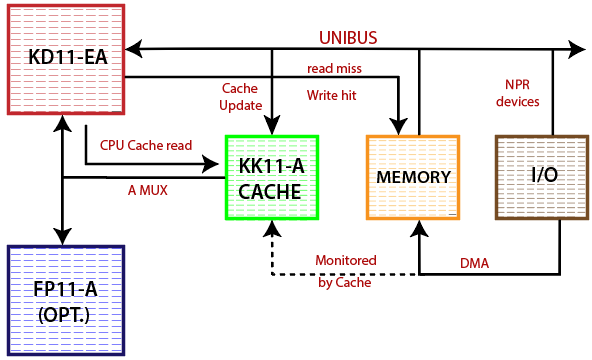
Fig: Cache Diagram of PDP-11.
The processor architecture of PDP-11 has orthogonal instruction set. The PDP-11 supports the hardware interruption at the four priority levels. In these computers, the interruption vectors are blocks of two 16-bit words each in low kernel address space. The first word of the interruption vector contains the address of the interrupted service routine, and the second word of interruption includes the value to be loaded into the priority level.
The Advantages of the fourth generation
- These computers are used for the general purpose.
- There is no need for the air conditioner when we use the computer of the fourth generation.
- The computer of the fourth generation was more reliable than the previous generation.
- These computers can perform the calculation of data in picoseconds.
- The computer of the fourth-generation consumed less electrical power as compared to the previous generation of computer.
- The heat generation is less as compared to the previous computer.
- The maintenance cost is very low in the fourth generation of computer.
- These computers are microprocessor-based systems.
- The memory storage is increased in the computers of the fourth generation.
- The processing power and speed have increased in these computers.
- The size of peripheral devices become small in the fourth generation.
- The networking features were developed in the computers of the fourth generation.
- The output was more reliable and accurate now in these computers.
- These computers are less need to repair.
- The computers of the fourth-generation are mainly used for commercial production.
The disadvantage of the fourth generationThe latest technology is needed for the manufacturing of microprocessors.
Related Posts:
- Second Generation of Computer
- Third Generation of Computer
- Fifth Generation of Computer
- Middle-level language in Computer
- Low Level Language in Computer
- High-Level Language in Computer
- Generation of Computer
- Characteristics of Computer
- Who invented Computer?
- How does a Computer work?
- What is Quantum Computing?