
×

What is HDMI: High Definition Multimedia Interface

HDMI is one of the most frequently used audio/video interfaces, which is a connector and cable that can send high-definition, high-bandwidth audio and video streams between devices. It stands for High-Definition Multimedia Interface. This can be acceptable for computer displays, video projectors, digital television, or digital audio device. The digital HDMI standard has taken the role of analog video standards.

Although they all share the same cable and connection, several variants of HDMI have been deployed and developed since the technology's first debut. Newer versions have better audio and video capacity, performance, quality, and color spaces. More latest versions have 3D, Ethernet data connections, and CEC (Consumer Electronics Control) extensions as optionally available advanced features.
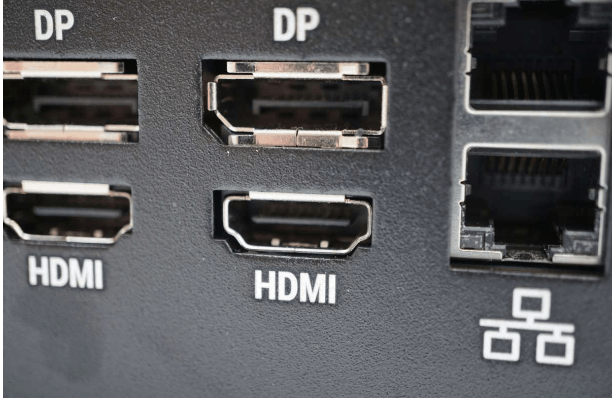
What is HDMI (High Definition Multimedia Interface)?

The advantages of HDMI include communication between the video sources and the DTVs, uncompressed digital videos, bandwidth up to 5 gigabytes per second, a single connector that can oppose several cables and connectors, and many more.

Communication channels

The DDC, TMDS, and optional CEC are three physically independent communication channels on high-definition multimedia interface.

1. Display Data Channel (DDC)

A communication channel built on the I2C bus specification is called the Display Data Channel (DDC). A prerequisite of HDMI is the Enhanced Display Data Channel (E-DDC), which the HDMI source device uses to read the E-EDID data from the HDMI sink device to ascertain what audio/video formats it may accept. The E-DDC must implement I2C in standard mode (100 kbit/s), but HDMI also allows it to implement fast mode (400 kbit/s).

Protection of High-bandwidth Digital Content is a current DDC channel (HDCP) usage.
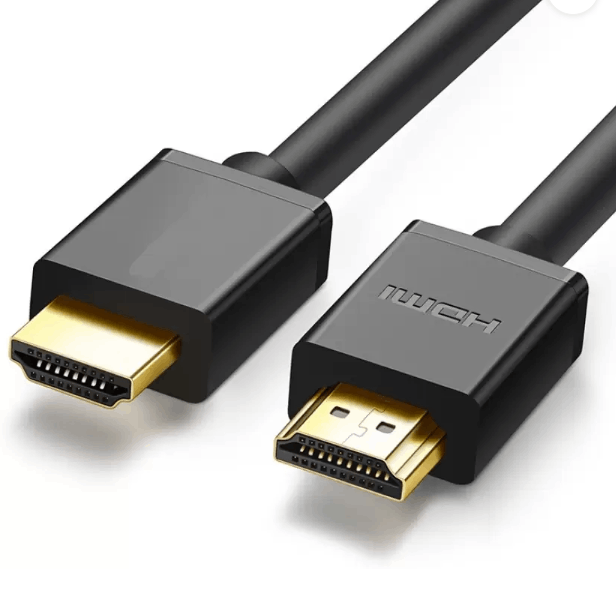
What is HDMI (High Definition Multimedia Interface)?

2. Transition – minimized differential signalling (TMDS)

In addition to other digital communication interfaces, the DVI and HDMI video interfaces use a high-speed serial data transfer technique called "transition-minimized differential signalling" ( TMDS ). A Sophisticated coding method is included in the transmitter to decrease electromagnetic interference across copper cables and enable reliable clock recovery at the receiver to provide high skew tolerance for driving longer, shorter, less expensive wires.

3. Consumer Electronics Control (CEC)

Consumer Electronics Manage (CEC) is a feature of HDMI that enables users to command and control up to 15 CEC-enabled devices connected through HDMI using only one of their remote controllers (controlling a television set, set-top box, and DVD player using only the remote control of the TV are some examples cec). Additionally, CEC enables individual CEC-enabled devices to communicate with and control one another without human input.

Different HDMI Cable Types

  1. Standard connections, sometimes called Category 1 HDMI cables, operate at 75 MHz pixel rates and offer 2.23 Gbps bandwidth. They are capable of carrying a 1080i signal uncompressed with ease.
  2. High-speed connections, called Category 2 HDMI cables, may handle a bandwidth of around 10.2 Gbps at pixel rates of 340 MHz. They can support the most recent 1440p and WQXGA resolutions.

Benefits of utilizing HDMI

  • Unique audio connections are not required because HDMI transmits TV and audio signals.
  • HDMI makes various connections possible with only a few wires, streamlining the connection procedure and removing excess cable clutter.
  • Many modern laptops and PCs include an HDMI port, so you can use this cable to convert your TV into a computer display.
  • Additional connection possibilities are made possible by converting HDMI cables to DVI using a specialized adaptor.

Drawbacks of HDMI

  • The maximum cable length for HDMI Cat1 cables is 35 meters, whereas the maximum cable length for HDMI Cat2 cables is 10 meters. More than this, extenders are required.
  • Sometimes switching delays, also known as authentication delays, might result in blank displays. There may also be issues with the screen flashing.
  • There are restrictions on how HDMI cables may be terminated in the field since they are more difficult than analog equivalents.
  • The cost of HDMI cables is higher than those of analog cables.

Applications of HDMI

  • Particularly in Computers
  • Gaming systems
  • Computer tablets
  • Mobile devices
  • Compatible computer displays and camcorders
  • Digital televisions

Conclusion

A more recent version of HDMI improves video and audio transmission by adding multiple channels, a higher data rate, and a higher resolution. Additionally, it improves visual clarity ten times more as compared to older VGA and earlier HDMI versions.


Related Topics

How to Connect and Install a Computer Keyboard?

The wired keyboards used nowadays are linked to the computer using the USB interface. The older computers used the Personal System/2(PS/2), also called the mouse or keyboard port, to connect...

7 minutes read.

What is Windows?

Microsoft created the desktop operating system called Windows. An operating system is a type of software that acts as an interface between the user and the hardware of a computer....

18 minutes read.

What is Sound Card?

What is a Sound Card? A sound Card is an interior expansion that is utilized to input and output audio from a machine under the authority of a computer program....

9 minutes read.

What is Auto Rotate?

On smartphones and tablets, the auto-rotate feature aligns the screen's alignment with the real orientation of the device. The display is switched to either portrait or landscape mode depending on...

3 minutes read.

What is a Webcam?

Webcam is a peripheral digital camera that can be attached to the device, which allows you to click photos and record videos directly on the system. There is various webcam...

11 minutes read.

What is Analog Monitor?

Analog monitors are primitive color monitors that were popularly used as television screens. The monitors were developed using cathode ray tubes, which were quite big. They were designed in such...

4 minutes read.

What is Clipboard?

The Clipboard is a particular location in computer, phone, or tablet memory where you can store copied text or other data. It is also known as paste-board. When you copy...

6 minutes read.

What are Recordable DVD Drives?

DVD recordable, also known as DVD-R, is a type of optical disc storage media that is used to store and record digital data. It was developed in 1997 by the...

5 minutes read.

How does a computer convert text into binary or 0's and 1's?

Before moving to know how does a computer convert text into binary, you should first know about the binary, what it is, and why it is important for a computer. When...

3 minutes read.

What is Asynchronous DRAM?

Asynchronous DRAM (Dynamic Random Access Memory) is a type of memory that operates independently of the system clock. It is not synced with the computer system clock; therefore, it is...

5 minutes read.

What Does Alt + F4 Do?

Alt+F4 is a keyboard shortcut frequently used to close active window or applications. When Alt+F4 is pressed, the operating system sends a signal to the active window or application to...

6 minutes read.

Edge Computing

What is Edge Computing? Topics Covered What is Edge Computing?Need of Edge computingBenefits of Edge ComputingPotential industries using Edge ComputingChallenges of Edge Computing We all know about data existing in the cloud, but...

10 minutes read.

How can I test how many words I can write a minute

The most used metric for measuring typing speed is WPM, in words per minute. On average, the "word" has 5 characters. To calculate WPM, multiply the number of words typed...

7 minutes read.

What is a hyperlink?

Nowadays, internet is the basic need of every human. As technology is increasing day by day, people use the latest advanced technology and try to connect worldwide in an easy...

6 minutes read.

What is Back Quote?

A back quote, also known as a grave accent or backtick, is a punctuation mark used in various programming languages to denote a literal string or command in the command...

6 minutes read.

What is boot menu?

When we turn on our computer, the machine goes through a process known as booting that is carried out automatically. This could be accomplished by the CPU's circuitry, software, or...

3 minutes read.

Autoexec.bat and config.sys Information

Basically, the Config.sys and Autoexec.bat files are made for MS-DOS and Windows 3. x to load the device and operating system to work effectively. The most recent versions of MS-DOS...

7 minutes read.

Smart Devices

Smart devices are all everyday objects made intelligent with, for all intents and purposes, advanced computing, including mostly AI and machine learning, and networked to form the internet of things,...

3 minutes read.

What is SAN?

A storage area network, sometimes known as SAN, is a specialized, quick network that provides network access to storage devices. Hosts, switches, storage components, and storage devices make up standard...

7 minutes read.

How to fix a CMOS checksum error?

A CMOS checksum error is a conflict between the CMOS and BIOS, which can occur when the computer is booting up. The CMOS is a chip on the motherboard that...

9 minutes read.