
×

What is Back Panel?

The back panel of any computer is where you can attach devices like display, microphone, keyboard, and touchpad. The back panel is on the motherboard's border, as shown in the image below. The back panel is on the device's rear side and is put into the trial's I/O plate while attaching the motherboard.

The connectors just on the back panel are depicted in the illustration below. If you have never seen a motherboard before, it's the connectors on the rear of every computer that you are looking for.
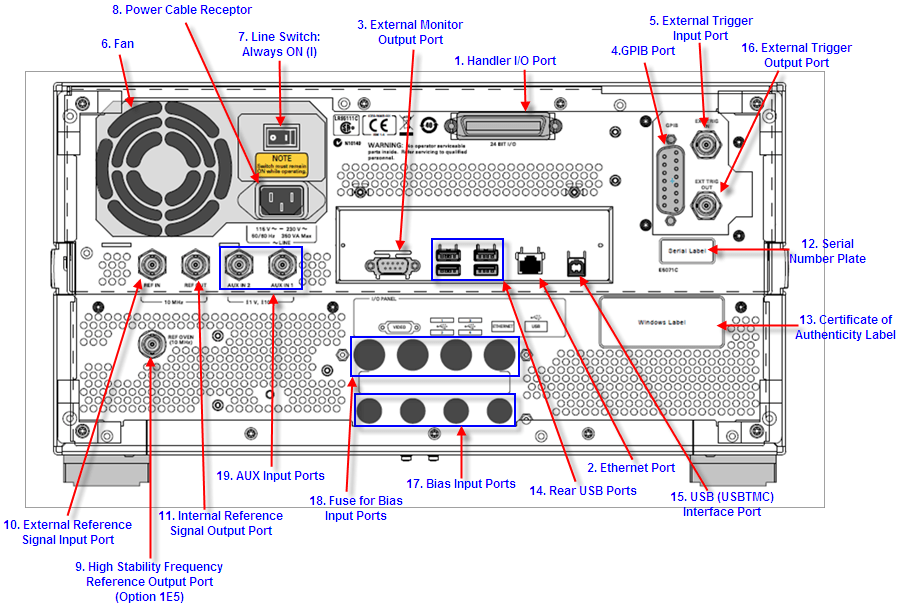
What is back panel

Back panel interfaces were often joined or removed less frequently as compared to more available front panel connectors with the devices. Speaker jacks, foot switch jacks, and charger cord connectors, for example, are usually situated on the 'back panel' of a guitar amp because they will be rarely altered once connected in unless it is transported. The inputs and working loops on the front panel are frequently used throughout each use. Everywhere from PCs to DVRs would be affected in the same way.

Different types of back panels and their functions

1. Power cable receptor

A power line is an electrical wire made up of one or even more electrical cables regularly held together by a covering. The device is utilized for power transmission.

Conductors, insulating, and a protection cover are the three main components of cables. Individual cables have different compositions depending on the uses.

Three key elements influence the structure and material, which are as follows:

  • Working voltage, which determines the insulating layer.
  • Current-carrying ability, which determines the conductor(s) cross-sectional area.
  • The shape and substance of the outer wire coat are determined by environmental factors such as temperature, moisture, chemical or solar contact, and mechanical impact.

2. External monitor output port

As previously stated, current devices come with various monitor connectors, including HDMI, DVI, VGA, Display Port (DP), USB-C, Thunderbolt, and SDI.

Monitor with HDMI

The full form of HDMI is a high-definition multimedia interface. It is the primary communication interface in current homes entertainment devices such as flat-panel TVs and Blu-ray recorders. With HDMI, like with DVI, the signal is transferred in digital format, retaining the original content. HDCP Technology was designed to stop piracy and unauthorized copying of video content.

Monitor with USB port

Using the Display Link dongle, you can link a display with a DVI / HDMI socket to the USB port of any laptop or desktop. Such ports are commonplace for joining two devices, and all producers of these products are keen to implement them.

Mouse, keyboards, printers, lasers, modems, card readers, flash drives, cameras, cell phones, players, hard drives, optical discs, and other USB devices are all connected via USB ports. This connector is required for folks who intend to work and use many displays in a global setting.

3. Handler I/O Port

The E5071C controller I/O port has four different linear ports for data I/O, as well as many control signal channels and a power line. TTL logic is used for all signals.

Two pairs of 8-bit output terminals and two pairs of 4-bit bi-directional ports make up the information I/O ports. However, those ports can work together to give the highest 16-bit output port or an 8-bit incoming port.

Negative logic runs the I/O signals, which can often be changed. The control signal lines include multiple control output values, such as estimation accomplishment or a handshaking control signal.

4. Ethernet port

An Ethernet port is, however, referred to as a LAN port. On desktops, servers, modems, Wi-Fi routers, switches, as well as other network equipment, both data refer to a certain port.

Modems, routers, servers, personal computer towers, mini PCs, laptops, access points, video gaming consoles, and smart televisions all have LAN connectors.

An Ethernet wire and two Ethernet-capable devices are required for a LAN port to function properly. Attach the Ethernet cable to the LAN port on the internet-connected device, including a modem, router, or modem-router combo, and the desktop, gaming console, or another equipment end.

5. Rear USB port

All backside interfaces used to plug-in accessories and external devices are referred to as rear ports.


Related Topics

What is Multitasking?

Multiple programs can be run simultaneously, thanks to this logical expansion of a multiprogramming system. In a contemporary computer system, the word "multitasking" is employed. The ability to multitask in...

4 minutes read.

What is SAN?

A storage area network, sometimes known as SAN, is a specialized, quick network that provides network access to storage devices. Hosts, switches, storage components, and storage devices make up standard...

7 minutes read.

What is Access Time?

Access time is when a computer can recover data from a storage device, such as a hard drive or solid-state drive. It is an important factor that can affect the...

7 minutes read.

Why my computer monitor shows no display or black screen

Often, people face the problem of getting a blank screen or no display on their computer monitor. There might be multiple causes to this, but it all lies around the...

6 minutes read.

What is a Cordless Mouse?

A wireless mouse, often known as a cordless mouse, is one that connects wirelessly to a computer. Instead, the mouse makes use of wireless technologies like Bluetooth, RF, or infrared...

4 minutes read.

How to enable or disable the preview pane of Microsoft Outlook

Preview Pane lets you preview the file's contents in the viewing pane. Users can quickly scan the contents of a selected file in the preview window without actually opening it....

3 minutes read.

Who invented Computer?

Who invented Computer? I know this is the vert standard question which we have learned at standard 2. But, it’s not a surprise that most of the people fail to answer...

4 minutes read.

What is Back Panel?

The back panel of any computer is where you can attach devices like display, microphone, keyboard, and touchpad. The back panel is on the motherboard's border, as shown in the...

3 minutes read.

Output devices of Computer

The output devices are the hardware parts which can create the whole computer system with the combination of all hardware parts. The user can get the desired output via output...

10 minutes read.

What is AM?

AM may refer to any of the following: When referring to audio or a signal, amplitude modulation (AM) is a method of transmitting information using radio waves. In AM, the information...

4 minutes read.

What is a Variable?

In our daily life, the variable plays an important role in programming as well as in mathematics for storing data or information. Most mathematicians tend to assume variables for solving...

6 minutes read.

Who invented the Internet?

Introduction of the Internet: The Internet is the foremost important tool and useful resource for any person. It connects millions of millions of computers, smartphones, web pages, servers, etc. It connects...

6 minutes read.

What is a Taskbar?

A taskbar is a graphical user interface component that serves several functions. Usually, a list of the running apps is displayed on it. The taskbar's arrangement and specific appearance vary...

4 minutes read.

How to erase my hard drive and start over

The computer is set to default settings with the help of system restore disc. The reset or format in a computer eliminates the issues related to the software installed into...

6 minutes read.

Extended Reality

The extended reality, XR, specifically, has been creeping into, for all intents and purposes, modern life for pretty many years in a particularly big way. According to statista, the global...

8 minutes read.

Edge Computing

What is Edge Computing? Topics Covered What is Edge Computing?Need of Edge computingBenefits of Edge ComputingPotential industries using Edge ComputingChallenges of Edge Computing We all know about data existing in the cloud, but...

10 minutes read.

What is a touch screen?

The touch screen has been proved a revolution for every sector, such as electronics, communication, the service industry and the daily lifestyle, etc. It is one of the types of...

6 minutes read.

Top 10 online services and applications

It can be difficult to select the best Internet service or application for your needs because there are tens of thousands of them. An online service is a business that...

4 minutes read.

What is automation?

Automation means the use of machinery and technologies to make tasks operate automatically and without human involvement. It uses electrical and computer-controlled technologies to replace manual tasks. For example, robots...

6 minutes read.

Why does my Laptop not turn on?

Your laptop's power button is pressed, but nothing happens. When your laptop doesn't turn on, there aren't many technological hiccups more annoying. You are not required to accept that your...

4 minutes read.