
×

What is a Mechanical Mouse?

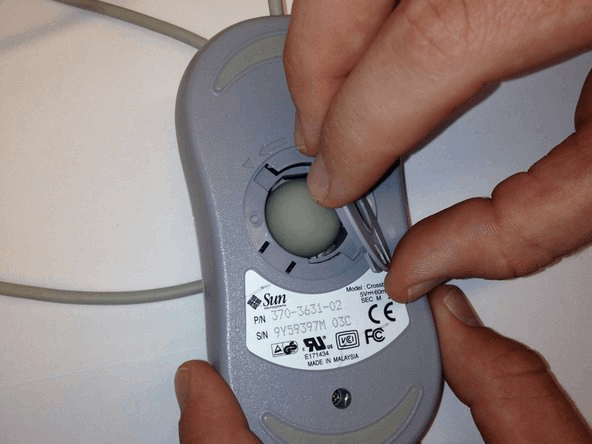
A computer mouse with a metal or rubber ball on the underside is a mechanical mouse. The mouse's internal sensors detect any movement of the ball when it is rolled, and they change the mouse pointer on the screen to correspond. The underside of a mechanical mouse with the ball removed is shown in the image as an example.
What is a Mechanical Mouse

In the modern era, the optical mouse has replaced this mouse. A mechanical mouse is vulnerable to having dust and other debris get on the ball and stop it from functioning.

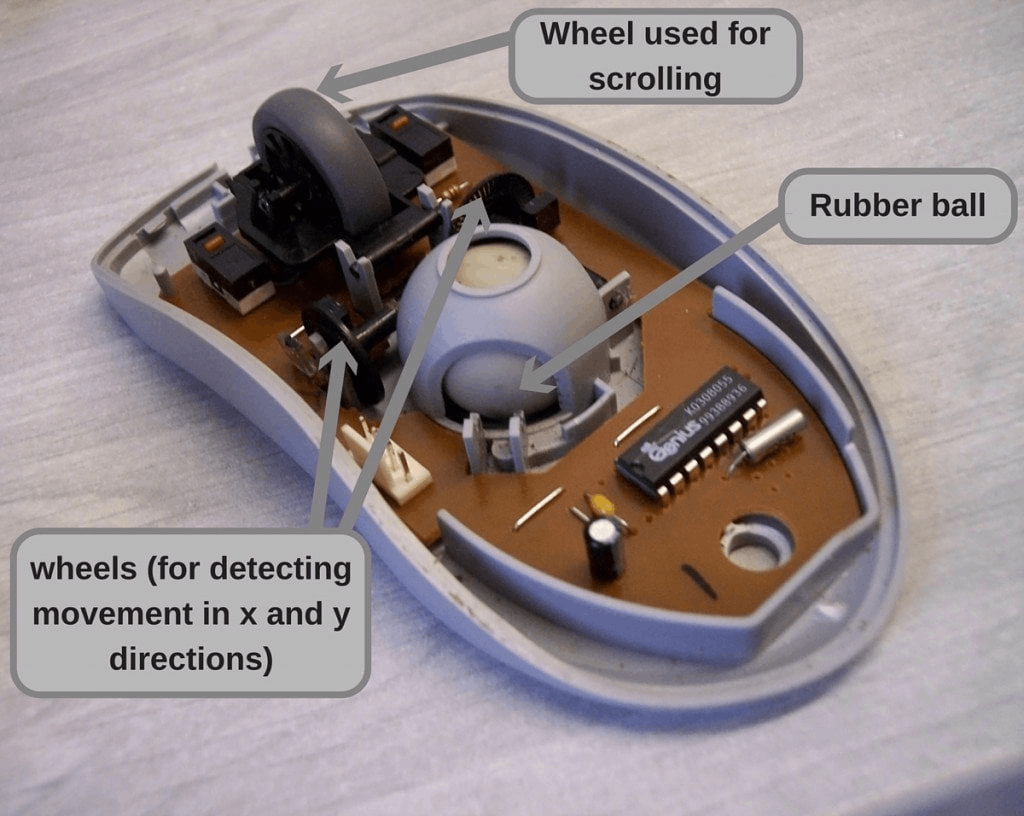
The optical mouse has largely replaced the mechanical mouse. An input computer device called a mechanical mouse has a metal or rubber ball at the bottom. When the mouse is moved, the ball rolls and sensors inside the mouse track the movement and send signals to the pointer on the screen. A mechanical mouse is sometimes known as a ball mouse. Two wheels perpendicular to one another propel a ball within a mechanical mouse. These wheels are responsible for identifying the left-right and upward and downward movement of the ball and communicating that information to the cursor on the screen.
What is a Mechanical Mouse

History of Mechanical Mouse

The mechanical mouse, which practically everyone used to interface with computers in the 1980s and 1990s, was the preferred device. In most cases, the mechanical mouse has been largely replaced as being outmoded by the portable and affordable optical mouse. They are similar in appearance and operation but rely on optical sensors instead of a ball because these are frequently more reliable.

On October 2, 1968, the German business Telefunken released a publication on their early ball mouse. The mouse made by Telefunken was offered as an add-on component for their computers. The ball mouse was developed in 1972 by Bill English, who also built Engelbart's initial mouse while employed by Xerox PARC.

The external wheels were swapped for a single rotating ball in the mouse. In the mouse's body, perpendicular chopper wheels chopped light beams as they traveled to light sensors, which detected the ball's motion. Throughout the 1980s and 1990s, this particular type of mouse resembled an upside-down trackball—it became the most frequently used with personal computers. It was included in the Xerox Alto computer's hardware bundle.

On the ball mouse, two rollers can freely rotate. They are 90 degrees apart. One roller detects the mouse's forward-backward and left-right movements. The ball is driven against the other two rollers by a third, 45-degree-angled, white roller that sits across from them and is spring-loaded. An encoder wheel with slotted edges that produces electrical pulses representing wheel movement is installed on the same shaft as each roller. On the disc of each wheel, a pair of light beams are placed so that when the other beam in the pair is approximately halfway between changes, the provided beam is interrupted or resumes freely passing light. Simple logic circuits interpret the relative time and determine which direction the wheel is rotating.

This incremental rotary encoder technique is also known as quadrature encoding of the wheel rotation due to the roughly quadrature phase of the data provided by the two optical sensors.

These signals are transmitted by the mouse through the mouse connection, as logic signals in ancient mice like the Xerox mice, and via a data-formatting IC in more current mice, to the computer system. The system's driver software transforms the signals into the mouse cursor's movement along the X and Y axes on the monitor.

The ball's surface is a precisely spherical rubber with a steel core. Given a suitable working surface beneath the mouse, the ball's weight creates a solid grip that correctly transmits mouse movement.

In 1975, Jack Hawley, doing business as The Mouse House in Berkeley, California, produced ball mice and wheel mice for Xerox. Based on another creation by Mouse House owner Jack Hawley, Honeywell created a different model of the mechanical mouse. It featured two moving wheels instead of a ball. Later, Key Tronic created a comparable product.

The "Analog mouse," a different mechanical mouse that is now usually regarded as obsolete, employs potentiometers rather than encoder wheels and is normally made to plug into an analog joystick. The most well-known example was the "Color Mouse," which RadioShack originally sold for their Color Computer (but which could also be used on MS-DOS computers with analog joystick ports, assuming the software allowed joystick input).


Related Topics

What is RJ Cable?

Registered Jack is referred to as RJ. It serves as a network interface or a telecommunications medium. RJ Cable enables voice and data equipment to interact with network devices. It is...

4 minutes read.

Characteristics of Computer

Characteristics of Computer: The computer system has a logical program to solve complex problems. The features of computer make it fast and powerful. The computer with powerful features can perform...

3 minutes read.

What is MsConfig?

Microsoft Windows starting issues can be resolved using the system application MSConfig. In Windows Vista, Windows 7, Windows 8, and Windows 10, it is officially called System Configuration or Microsoft...

3 minutes read.

My computer is running slow, what steps can i do to fix it?

It’s your time to work on your computer, and it just remains hanged, not letting you switch to other programs; in other words, your computer is in a state of...

4 minutes read.

Quantum Computing

Topics Covered What is Quantum Computing Applications of Quantum Computing How Quantum Computing works Difference between classical computers and Quantum Computers What is Quantum Computing? We all know that quantum physics...

8 minutes read.

How to fix Low Memory and out of memory errors

Rebooting the computer is required Rebooting the computer can frequently fix out of memory issues. We advise you to try resetting the computer first before attempting any of the methods below. The...

4 minutes read.

What is Optical Disk?

The optical disk is an electronic data storage medium that reads and writes data by using optical storage techniques and technology. There are mostly three types of optical disk available...

9 minutes read.

How to associate a file with a program?

How to associate a file with a program in Windows? By default, a particular program is selected by the Windows to open each file type, but you may re-associate a file...

4 minutes read.

Advantages and disadvantages of Email

What is Email? A fast method of business communication is email. It is difficult to imagine a workplace where email is not used for internal and external communication. The advantages of...

3 minutes read.

Receiving S.M.A.R.T. status bad backup and replacing error

S.M.A.R.T. or SMART stands for self-monitoring, analysis, and reporting technology. The computer hard drives, including HDDs and S.S.D.s, have a mechanism built into them. It is possible to utilize it...

4 minutes read.

How to fix a general protection fault?

The suggestions below may help you resolve the issue if you frequently see GPF (general protection fault) issues when utilizing an application on your computer. Errors involving the General Protection...

6 minutes read.

What is Thermos flask?

A vacuum flask sometimes referred to as a Dewar flask, Dewar bottle, or Thermos is an insulating storage container that considerably extends the amount of time that the contents of...

6 minutes read.

What is a Directory?

In computing, a directory is a virtual container in which a group of computer files and other subdirectories are stored, depending on their content, purpose, or any criteria decided by...

5 minutes read.

What is Cat 5?

In our daily life, every person is opted to use different technologies and is successful in implementing the new opted technologies. Every day people are interested in making new inventions...

4 minutes read.

How to view the HTML source code in Microsoft Word?

Using Microsoft Word, the document can be saved as a web page, but word does not support the feature which enables the user to view the source code in the...

3 minutes read.

What Hardware Device Drivers should be Updated?

Our recommended hardware for updates is shown below. Driver and other component updates for your computer can resolve problems, improve functionality, and boost stability. How Frequently Should Your Drivers Be Updated? Consider...

6 minutes read.

When was the first computer invented?

There is no clear account of the invention of the first computer. Several variants of the computer were developed simultaneously, so it is not easy to track the development of...

7 minutes read.

What are Recordable DVD Drives?

DVD recordable, also known as DVD-R, is a type of optical disc storage media that is used to store and record digital data. It was developed in 1997 by the...

5 minutes read.

What is Monitor?

Monitor is the display unit of the computer. It is the output device, which is responsible for displaying the content to the user. It is also called the Display terminal....

8 minutes read.

What are Storage Devices?

Computing hardware is capable of storing the information and can also be processed. Information on the storage can be stored permanently as well as temporarily. It is one of the core...

7 minutes read.