
×

How to find out how much hard drive space is available?

A certain kind of non-volatile data storage device is a hard disc (called a hard drive, HD, or HDD). It is frequently installed inside a computer and attached directly to the disc controller on the motherboard. Several platters are contained inside an airtight container. Data is written to them using a magnetic head that spins quickly across the platters. The ATA, SCSI, or SATA connection between the motherboard and the drive bays for internal hard drives. They are powered by a link to the computer's power supply unit (power supply unit). There are numerous procedures to figure out how much hard drive space is available depending on the operating system. A data cable (IDE, SATA, or SCSI) to the motherboard and a power cable to the power supply are the two ways an internal hard drive is connected to a computer.

Hard disc space and memory (RAM) are unrelated concepts.
You will wonder what is using up all the available space as the computer's hard disc fills up. This is when "Storage sense" will be useful. Most people are familiar with Windows 10's Storage sense feature as a way to clear up hard disc space. While this is true, a tool is available to examine the data on any drive to determine the space usage and where to begin removing files that cannot be removed using this function.

Your PC's hard disc uses space when downloading and installing software and photos. You can check the amount of free space on the computer to make sure it has enough space. We'll demonstrate how to carry it out with Windows 10. Only a few steps are necessary.
Activate File Explorer. You can press the folder icon in the taskbar or use the keyboard shortcut symbol Windows key + E.

From the left pane, tap or click This PC.
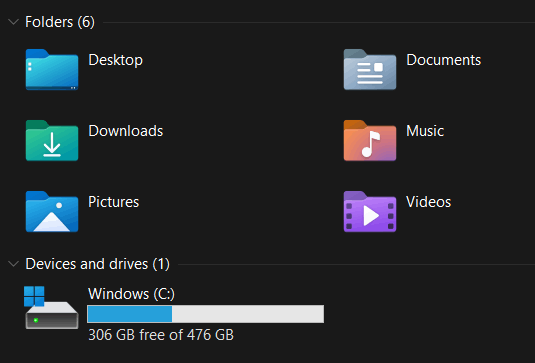
Under the Windows (C:) drive, you can view how much free space is on your hard drive.
How to find out how much hard drive space is available

You are done now! The progress meter shows you visually how much you've already consumed. Those are followed by numbers.

You may store your media on external USB drives or even microSD cards if your device, like the Surface 3 and Surface Pro 3, has a slot. You can get an Amazon 2TB portable external USB hard drive for under $100(opens in new tab).

For the users of Windows Vista, 7, 8, 10, and 11

Open File Explorer by clicking the Windows key plus E.

Click This PC in the left navigation side of the File Explorer window.
How to find out how much hard drive space is available

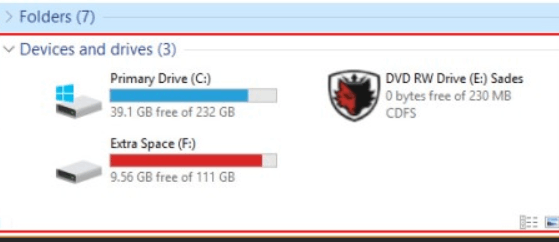
You get a section titled Devices and drives after choosing This PC.
Each storage device includes a status bar that displays the total disc space, the amount of free space, and other information.
Right-click the drive and choose Properties from the drop-down menu that displays to get further information.

For the users of Windows 95, 98, NT 4. x, 2000, ME, XP.

Click the My Computer icon twice on the Windows desktop.
Select and right-click the drive whose capacity you want to know in My Computer.
Pick Properties from the drop-down option that displays.
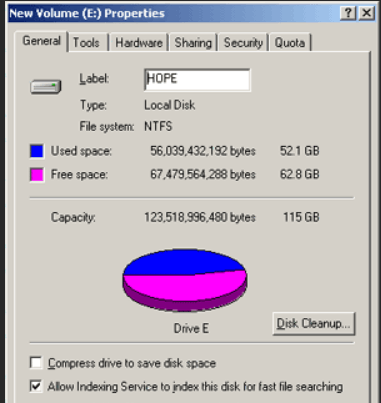
The hard drives or other drives' total capacity, available space, and utilized space are all shown in the Properties pane.
How to find out how much hard drive space is available

For the users of Windows XP and Windows 2000

The whole size and free space for each drive are also shown in the main window of My Computer if you are using Windows 2000 or XP. The steps above can obtain more details and a graph of the available space.

Through MS-DOS, you may also see the available space.

Open the MS-DOS prompt for Windows and MS-DOS users.
We advise using the dir command to check the amount of space on a hard drive running MS-DOS.
Type: at the MS-DOS prompt.

dir <press Enter>

You can find information like that shown in the example at the end of the directory listing.
3 file(s)                       588 bytes
12 dir (s)               16,784.78 MB free
The hard disc contains more than 16 GB of free space, as seen above. Use the commands below to examine all files and how much space they are using.

cd\
dir /s

macOS

Follow the instructions below to determine how much space in the drive is left on your MacBook or iMac.
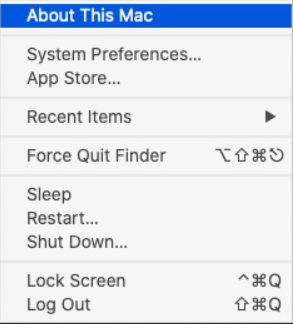
To access the Apple menu, press the Apple menu icon on the bar at the top of the screen.
How to find out how much hard drive space is available

Choose About This Mac from the Apple menu.
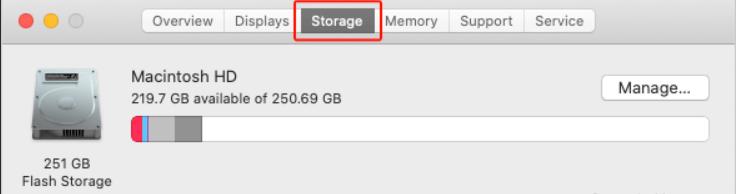
Click the Storage tab in the top-left corner of the System Information window that appears.
How to find out how much hard drive space is available

Related Topics

What is Hybrid Topology?

A hybrid topology is also called network topology. Topology can be defined as the physical and logical arrangements of computer networks. We can say that topology is nothing, but how...

6 minutes read.

What is a Variable?

In our daily life, the variable plays an important role in programming as well as in mathematics for storing data or information. Most mathematicians tend to assume variables for solving...

6 minutes read.

How to shut down a computer

Whenever the Shutdown is done, all the programs, software, files, and operating system are shut down. The RAM is cleared, so before shutting down the device, the user should ensure...

4 minutes read.

What is a TAB stop?

The place where the cursor stops after pressing the Tab key is known as a tab stop. The carriage moves to the next tab stop when you click the tab...

3 minutes read.

What is Asynchronous DRAM?

Asynchronous DRAM (Dynamic Random Access Memory) is a type of memory that operates independently of the system clock. It is not synced with the computer system clock; therefore, it is...

5 minutes read.

What is the Print Screen Key?

Print Screen is one among many keys which is present on the keyboard. It is abbreviated as PrtScr, Prsc,r, PrtScrn, PRTSC, PrntScrn, Ps/SR. When this key is pressed, it sends...

3 minutes read.

What is a CSV file?

A plain text file known as a "Comma Separated Values" (CSV) file holds data by separating data items with commas. When data has to be interoperable with a wide range...

5 minutes read.

What is a cable?

A cable is one or more wires covered in plastic and can connect the computer system. It is also referred to as a cord, connector or plug. Cables are also...

6 minutes read.

What is RDIMM?

Servers use the RDIMM (registered memory) kind of memory chip most frequently. By reducing the electrical strain on a memory controller, it helps systems running on a server be more...

3 minutes read.

Windows 7 Alt+Tab won’t stay on top or stick

One of the most helpful keyboard shortcuts is Alt+Tab, which makes switching between numerous open windows a breeze. You save time and effort by not having to move the mouse....

3 minutes read.

Is my computer 64 bit?

While using computers and smartphones, we have often heard the term ’32-bit’ or ‘64-bit’. But many of us do know what these terms mean. And the first question which arises...

5 minutes read.

What is Device Driver?

Device Driver A device driver is a specific type of programming application that permits one equipment device (like a PC) to interface with another equipment device (like a printer). A device...

6 minutes read.

What is an AC Adapter?

An AC adapter is an external power source that changes the direct current (DC) required by an electronic device from the alternating current (AC) supplied by a wall outlet. So,...

4 minutes read.

Parts of Computers Names, Definitions and Images

Computer: A computer is an electronic device, which is made up of using various hardware. The computer processes data, performs calculations, and communicates with other devices and systems. Hardware refers...

14 minutes read.

What is Google Chrome?

Google Chrome, released on December 11, 2008, is a free Internet browser. The benefits of Chrome include synchronization with Google service and accounts and automated translation and spell checking. It...

6 minutes read.

How to edit the registry from the command line

Editing from the command line is one of the ways of editing the registry. Still, before editing the registry, it is always recommended to back up the registry and computer...

4 minutes read.

Are smartphones and tablets computers

The answer is yes. In modern times, at least a laptop /tablet /desktop /smartphone will be in a home. Because they play an important and vital role in everyone’s life...

4 minutes read.

Uses of Computer

What is the use of computer in our daily life? 10 uses of Computer in Different Fields 1. Education The computer is playing a key role in modern education. In these days, Students...

5 minutes read.

ROM and its Types

What is ROM? ROM stands for “Read Only Memory”. It is a type of non-volatile memory that is used to store data that cannot be modified or written to by a...

4 minutes read.

Why can’t I open any web pages when connected to the internet

You can follow the instructions below if you are able to connect to the Internet, you are unable to access any websites. Ping an Internet Address You need to open the Command...

4 minutes read.