
Computer Ports | Computer Fundamentals
What is a Port?
A port is a physical connection on a computer or another electronic device that allows users to connect a device. There are several types of ports available on personal computers that allow computers to access external devices such as printers, modems, mice, and other peripheral devices. Generally, all personal computers contain a parallel port for connecting a printer or other peripheral devices and a serial RS-422 or RS-232C port for connecting a modem or mouse.
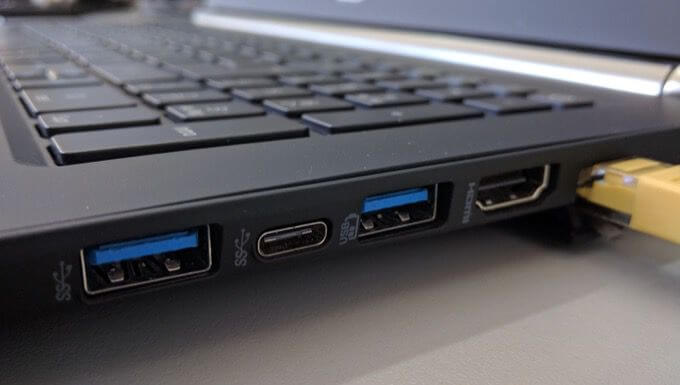
A port is also used to move a program to another operating system that has been written for particular operating systems. For instance, move a program to the Linux operating system that is written for Microsoft Windows.
Types of Computer Port
- Serial port (DB9)
- USB port
- VGA port
- Gamepad / Joystick port
- HDMI port
- AT port (old keyboard port)
- Display Port
- DVI port
- LPT port (printer port)
- Modem or phone port (RJ-11)
- PS/2 port (keyboard port and mouse port)
- Firewire port (IEEE-1394)
- LAN or network port (RJ-45)
Serial port: On the computer, a serial port is used to transmit or receive data one bit at a time. It is one of the oldest types of an asynchronous port that is commonly found on IBM compatible computers as communications ports. Usually, it was used to connect printers and external modems to a PC. It uses a 25-pin (DB-25) connector or a nine-pin (DE-9) connector.
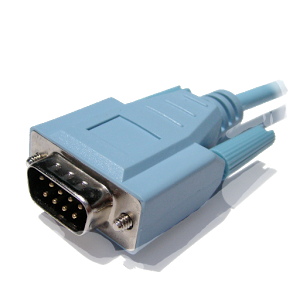
The RS-232 is a serial port standard that uses 25 pins. It is used to transmit serial communication between devices, which are usually known as data terminal equipment (DTE) and data communications equipment (DCE).
Use of serial port
There are several hardware components that can be used with the serial port; such are as follows:
- Modem: It is a commonly used device for serial ports and is widely used with older computers. However, it was popular as its use is very easy.
- Mouse: It is also a widely used device for serial ports. It is mainly used with computers that have no specialty mice and PS/2 or USB ports.
- Printer: It is not a widely used device for serial ports. Mainly, it was used with older plotters and printers.
- Network: The serial port is most widely used in the network that enables two computers to connect with each other. Also, the large files can be sent transferred between the two networks through a serial port.
USB port: A USB stands for the universal serial bus that is a standard cable connection interface that allows a computer to communicate with peripheral and other devices. USB ports allow digital transfer data over USB cables and connect the USB devices together, and they also have the ability to supply electric power to certain devices, such as tablets, smartphones, including charging their batteries.
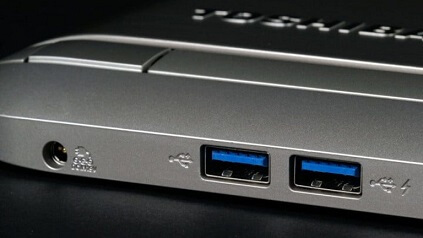
In January 1996, the first version 1.0 of USB was released, which was quickly followed by Microsoft, Intel, Compaq, and other companies. Its length is from around 3 feet to a slight over 16-feet. The 16 feet 5 inches is the maximum length of a USB port for high-speed devices and 9 feet 10 inches for low-speed devices. Also, by using USB hubs, you can extend the distance between the two connected devices by connecting two USB cables. Furthermore, there are several types of USB devices, such as a keyboard, digital camera, external drive, or other MP3 players, microphone, mouse, keypad, and more.
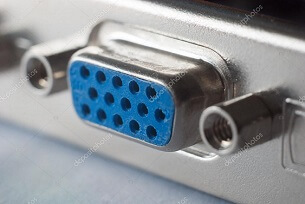
VGA port: VGA stands for Video Graphics Array that is a popular display standard. In 1987, it was developed and introduced by IBM. It is a three-row 15-pin DE-15 connector, which offers 640 x 480 resolution color display screens with a rate of 60 Hz and 16 colors displayed in one go. Many video cards, computer monitors, laptop computers, projectors, and HD television sets included a 15-pin VGA connector. Sometimes, a mini-VGA port was used on small devices like a laptop in the place of the full-sized VGA connector. Although VGA is still in use, the newer interfaces like HDMI and DVI are replacing it rapidly.
Gamepad / Joystick port: It is a 15-pin connector port that is also known as Analog-to-digital port, game port, joystick port, or game control adapter. In 1981, it was found on IBM computers. It is mainly found on the backside of the computer. It is managed by the SIO that provides users the option to connect joysticks, steering wheels, gamepads, or other devices to offer additional functionality to the computer.
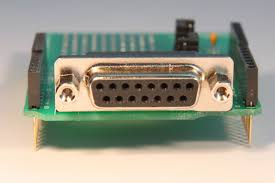
The production of game ports was decreased with the advent of a universal serial bus. Hence, it has been discontinued in most laptops and personal computers. It never requires mapped memory or interrupt requests and uses only one input/output base address. It can be classified into two categories; single and dual port. A single port supports only two-axis game controllers and does not support joystick2 functions in case of joysticks. The dual-port is capable of supporting both functionalities joystick1 and joystick2.
A game port provides a built-in control panel for the purpose, which has the ability to test the port in Windows-based systems. It also has a limitation that it can only support up to four buttons on any controller. Also, the CPU has to check the game port continuously to detect any pressing of buttons or joystick movement, because it is not interrupt-driven.
HDMI port: It stands for High Definition Multimedia Interface, which is a connector and cable that is found on around all modern pieces of home theater gear. It can transmit high-bandwidth and high-quality streams of audio and video between devices. The cable would be useless without these ports and the attached electronics.
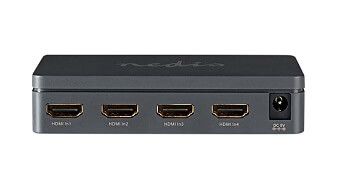
The devices such as DVD player or Blu-ray player, HDTV, Projector, use the HDMI technology. The multiple companies, including Sony, Philips, Toshiba, and Hitachi, jointly developed the HDMI cable. The three-composite audio/video cables can be replaced by a single HDMI cable, which makes it easier to transmit audio and video signals by offering connectivity between two devices.
Furthermore, this cable is capable of transmitting up to 8-channels of digital audio signals, standard, enhanced, and high-definition video signals. The length of the HDMI cable can run from one foot up to 50 feet. But it may result in signal degradation or loss. Therefore, it is not recommended that users buy more than 25 feet. The HDMI ports are mainly found on the motherboard or video card on the backside of the computer. It is not that all computers have HDMI ports; your computers may use VGA, DVI, or Display Port technology.
AT port: It is the older keyboard port used to connect AT keyboard. IBM introduced the AT keyboard in 1986, which is also known as the Model F keyboard. Its initial version contained 84 keys; then, it was enhanced and replaced by the 101-key keyboard. The AT keyboard does not have the additional three Microsoft Windows keys (founded on many IBM compatible keyboards), unlike modern keyboards.
Display Port: It is a digital audio and video interface that is used to connect a video source to a display device. For instance, a computer monitor may be connected to the PC with the help of DisplayPort. A consortium of PC and chip manufacturers developed the DisplayPort and standardized by the VESA (Video Electronics Standards Association). It has two types of connection; standard and smaller Mini DisplayPort. Both of the connection types are capable of transmitting identical signals, despite the difference in size.
DVI port: It is a video display interface, stands for Digital Video Interface. Digital Display Working Group created it, and it was developed as an industry standard to transmit video content to display devices at high resolutions (2560 x 1600). Computer monitors and projectors are the common devices that utilize the DVI connection. Most of the DVI ports are capable of supporting analog and digital displays.
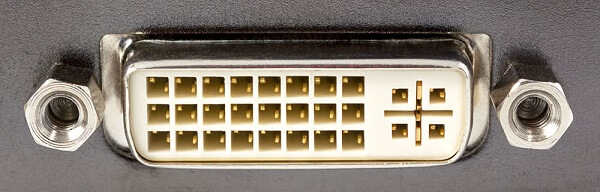
The DVI connection works to converts the digital signal to an analog signal for analog display, and no conversion is necessary for digital display. Although HDMI cable is more appropriate to use with TVs, some televisions also used DVI. But it is used with TVs in fewer numbers as some DVI cables are only able to transmit audio signals. It supports three types of signals, such as DVI-A (analog only), DVI-D (digital only), and DVI-I (integrated, for both analog and digital). The digital video interface can be used for high-resolution displays like HDTV and UXGA. DVI ports may found on video cards in a computer, including high-end televisions.
LPT port: It stands for a line printer terminal, which is the usual designation for a parallel port connection to a printer on IBM compatible computers. It is commonly used by IBM compatible computers as LPT1, LPT2, or LPT3. Most computers come with an LPT1 connection, but you can add another LPT port by adding a parallel port adapter card to your computer.
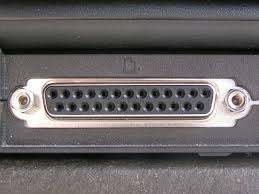
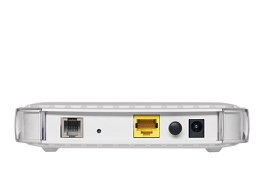
Modem port (RJ-11): It is a telephone interface that is widely known as a phone connector, modem port, phone line or phone jack. It uses a modular jack and a cable of twisted wire pairs with four or six contacts. In the US, it is also used as a connection for telephone and Modem connectors. It is commonly used to connect telephones to wall plates and plug the handset into the telephone.
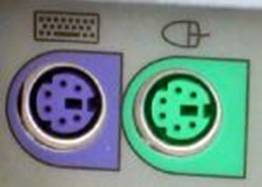
PS/2 port: It is also known as a keyboard or mouse port and introduced by the IBM computer in 1987. It is developed by IBM for connecting a mouse or keyboard to IBM computers. Sometimes it is still found on all IBM computers, and it is a mini-DIN plug containing just six pins. It had a bidirectional 8-bit port and included improved feature graphics, a 3.5-inch diskette drive. Additionally, it also had a proprietary bus to prevent the clone maker's competition.
Firewire port: It is also known as IEEE 1394 that is a digital bus with a bandwidth of 400-800 Mbps and more. In 1995, it was first developed by Apple. It is a standard connection for some printers and scanners, digital video cameras, external hard drives, and other different types of electronic devices.
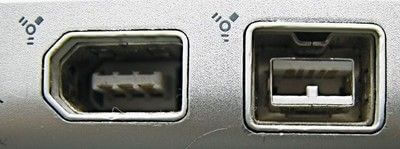
When a device is plugged in, the operating system automatically finds the device and asks to install a driver if needed, as it supports plug-and-play. Firewire is supported by all types of Windows from Windows 98 to Windows version 10, including Linux, Mac OS 8.6, and other most operating systems. Additionally, Firewire is very similar to USB, including some similar
features. Like USB, it has various devices such as cameras and removable drives.
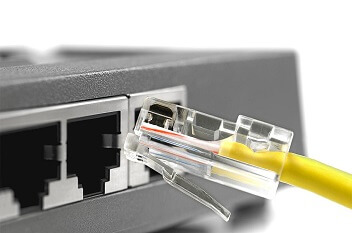
LAN or network port: It is an 8-pin connection, used for an Ethernet network, which is also known as Ethernet port, the network adapter, the network jack or the RJ45 jack (Registered Jack-45). It is mainly connected to the end of Cat 5 cable that is connected between a network device like a network router and a computer network card. Furthermore, it is a standardized networking interface, which contains eight separate wires as each RJ45 connector has eight pins.
What is the Port number?
A port number is the logical address of each application that communicates over a network or the Internet. A port number is a 16-bit integer that is put in the header appended to a message unit for the Transmission Control Protocol (TCP) and the User Datagram Protocol (UDP). It is able to uniquely identify a network-based application on a computer. For allocating each application/program, a 16-bit integer port number is assigned by the operating system or set as a default for some popular applications by the user.
For instance, in an incoming message or packet, the IP address is used to identify the destination computer/node while the port number further recognizes the destination application or program on that computer. Similarly, in the packet header, all outgoing network packets have application port numbers to enable the receiver to separate the specific application. Mainly, port numbers are used in transmission control protocol and user datagram protocol-based networks.
What is port forwarding?
A technique that allows a gateway or similar device to transmits all the incoming traffic from the particular port to the same port on any internal network node is known as port forwarding or tunneling. An external source network can be connected to an internal source port or node with the help of port forwarding. Mainly, it is used to optimize network speed, separate network traffic, and assign the network path permanently for a particular protocol or network service. Commonly, it uses well-known port numbers, in which services are assigned permanently.
Typically, it is implemented at a gateway router to automate the process of identifying and forwarding network packets to a destination port. For example, in the packet header, a router accepts a packet with a port number and an IP address. If the router is configured with port forwarding, automatically it will transfer the packet to the destination node, and if not configured, before transmitting the packet, it will first identify the port.
What is a port knocking?
Port knocking is an authentication technique that is used by network administrators to improve the security of a webserver. It works with the help of a firewall, and this technique helps to identify valid users and block unauthorized users. On the firewall, these ports will be closed by default. The Port knocking technique is implemented by a pre-defined sequence. It includes an advantage that ports, which have protected by port knocking, will be shown unavailable for a usual port scan. It uses a daemon that helps to monitor for the correct connection request sequence of the firewall's log files.
What is Port triggering?
Port triggering is a process in which outbound traffic sends inbound traffic on predetermined ports to specific incoming ports. It is a technique that opens the internal port for the duration of the session and when it is needed. It is more secure as compared to port forwarding as incoming ports are open only when a program is active with the help of a trigger port; they are not open all the time.
The port triggering has an advantage that behind a NAT-enabled router, it allows computers to offer services that would normally need a static host. It also has a disadvantage that it enables only one client to use a particular service on the network, which occupies a particular port.