
What is a Start Button?
In daily life as windows users, everybody uses the start button on their personal PC. Users can access all the available apps on the system with the help of using this button. We cannot access this start button on MacBooks. We see this start button in the taskbar, and this taskbar also consists of applications that are used to access the applications so fast. The start button in windows 7 is a small button that displays the windows logo and is always displayed at the left end of the taskbar. You can click on the button in windows 7 to display the start menu or the start screen. For a computer, an operating system should be a must for the operations that are to be performed.
An operating system (OS) is the software that controls all other application programs in a computer after being installed into the system first by a boot program. Through a specified application program interface, the application programs seek services from the operating system.
Beginning with Microsoft Windows 95, the Start or Start button has been a part of every version of Windows thereafter. By using the Start menu, you may quickly set up Microsoft Windows and access your computer programs.
Every computer has a visual component of an application or device that controls how a user interacts with it and how information is shown on the screen is known as the user interface (UI).
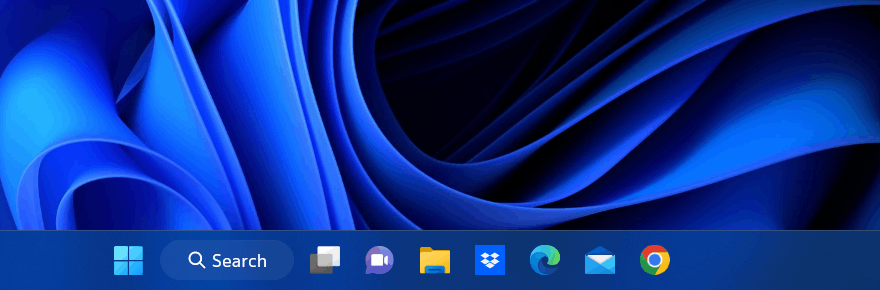
Where does the start button locate?
The Windows Start button is located in the bottom left corner of the desktop screen in Windows 10 and prior versions. By repositioning the Windows taskbar, Start may be found at the top-left or top-right of the display. The Start is situated in the center of the taskbar in Windows 11. Except in Windows 8, clicking Start brings up the Start menu, where you may access all the installed apps and other Windows features. An illustration of the Start button in Windows 7 may be seen below.
A button with a label that opens a directory containing a computer's software applications and other files in various versions of the Windows operating system.
In mobile phones, we do not have start buttons, whereas we have the logos of the apps, which means the applications. In past years we have had phones like Nokia Lumia, where we have seen the windows operating system, there is no start button in this phone also, but for windows users, the phone is somewhat familiar.
How to access the start button?
On our phones, we can directly click on the windows logo on the screen. On our PC, we can access the start button by clicking the windows logo on your keypad or by navigating with the mouse on to the logo on the screen. There is another method most of them are not familiar with, and that is by clicking the control along with the escape button on your keypad.
When you right-click on Start in the newer versions of Windows, like Windows 8, Windows 8.1, Windows 10, and Windows 11, you might get access to the Power User Task Menu.
This power user task menu has installed apps, mobility center, power options, event viewer, System, device manager, network connections, disk management, computer management, terminal, task manager, settings, file explorer, search, run, shutdown, or sign out and desktop.
To close the start interface, we need to click on escape on the keyboard or move the mouse pointer anywhere outside of the Start menu, and clicking closes the Start menu.
The Start menu was first made available to users in Windows 95 and Windows NT 4.0, but it had been in development at Microsoft since 1992 and was first known to testers as System. It was developed to fix the problems with the Program Manager in earlier operating systems. Users could open different "programme groups" using Program Manager's straightforward multiple-document interface and then run the shortcuts to the programs they contained. It was unable to nest groups inside of other groups.
Start button in windows 10
The Start screen, an improvement to the Start menu, was first presented with Windows 8 and Windows Server 2012. The right column is gone, and it fills the full screen. It behaves like a widget by showing significantly bigger tiles for applications and, when feasible, displaying dynamic material provided by the program right on the tile itself. For instance, the live tile for an email client may show how many emails are unread. Users may uninstall their apps from the Start screen by right-clicking on them and choosing Uninstall. Apps that have been pinned can be grouped.
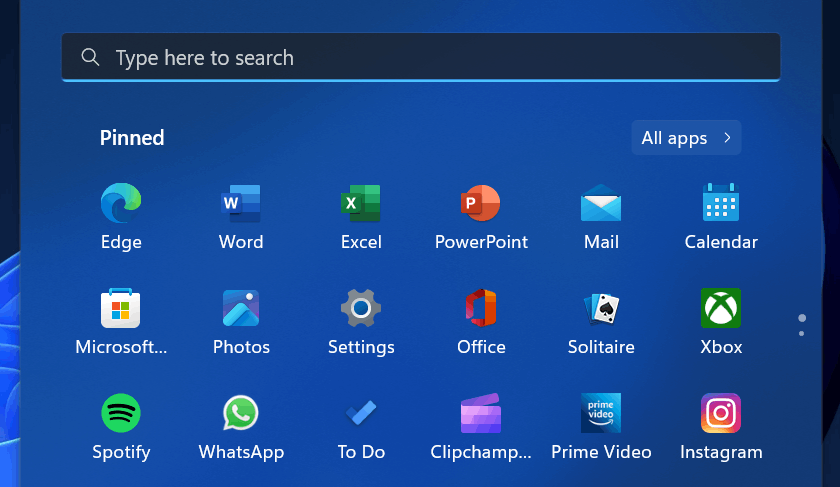
Start button in windows 11
Another significant update to the start menu in Windows 11 is the addition of a search box at the top of the menu and the replacement of tiles with a grid-based space for pinned application shortcuts and a part for recommended programs and folders. The header for pinned applications has an All-apps button next to it. Live tiles are no longer used in Windows 11 since their functionality has been transferred to the dedicated Widgets section of the taskbar.