
×

How to find similar images using Search by Image

Google is well recognised for its search engine that uses keywords. By entering terms in the search bar, users can locate content or photos associated with a topic. However, there are situations when your sole search option is an image. Google offers the option to search using a picture, allowing users to find relevant information or photos that are similar to ones they have saved on their computer.

You can use Google Search to identify photos or websites that match a specific image by entering it in the manner described below. You can use this online tool to do an image search by simply uploading the desired image from the local storage of your device. In an effort to make things simpler for its users, this programme now allows you to drag and drop images to perform a reverse image search.

The reverse picture search feature works with cloud storage (Google Drive and Dropbox). Because of this, if your photo is in your cloud account, you may quickly import it to search by photo. The application will employ its cutting-edge CBIR technology to provide the results in conjunction with leading image search engines like Yandex, Google, and Bing as soon as you are through uploading a picture.

  1. Check out the Google Images webpage.
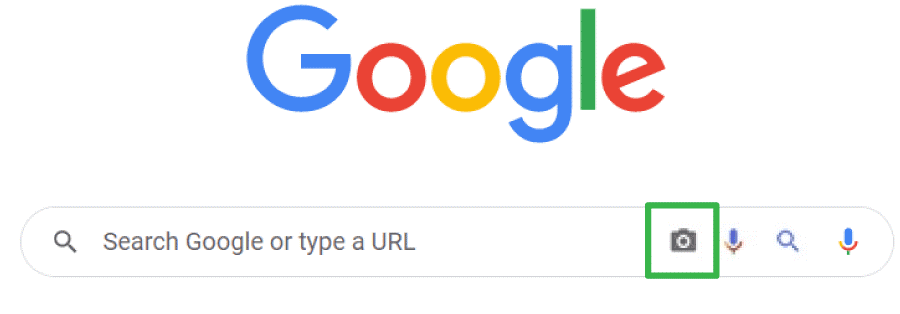
  2. To access Search by image, click the camera symbol on the search bar.
  3. Select the tab for image uploads.
  4. To select a file, click the button.
  5. Choose Open after you have located the file on your computer.

Once the chosen image has been uploaded and the search results have been shown, the search runs automatically.
How to find similar images using Search by Image

Search on Google using an image

With Google Lens, you may discover more information about a picture or the surroundings' items. Take a picture of a plant, for instance, and use it to look for information or other pictures that are similar.

What you discover after searching

Your outcomes might be:

  • The outcomes of a search for the image's items.
  • The same pictures.
  • Websites displaying the image or one that is comparable.

Suitable web browsers

On most browsers, you may use Lens to conduct a visual search, such as:

  • Chrome
  • Edge
  • Safari
  • Firefox

Upload a picture

  • Open a web browser on your computer.
  • Access Google Images
  • Click Google Lens Search by image.
  • To upload a file, click.
  • Choose a picture.
  • Choose or click Open.

Drag and drop an image

  • Open a web browser on your computer.
  • Access Google Images
  • Locate the file containing the image you wish to search with on your computer.
  • Select the picture.
  • Drag the image into the search box while continuing to hold down the mouse button.

Use a URL to search

  • On your PC, launch a web browser, andnavigate to the website that contains the image you wish to utilise.
  • Copy image address by doing a right-click on the picture. to copy the URL.
  • Access Google Images.
  • Paste the image link after selecting Search by an image with Google Lens.
  • Into the text box, paste the URL select Search.

Search using a website's image

  • Open the Chrome browser on your PC.
  • Visit the website where the image you want to utilise is located.
  • Click the image with your right mouse button.
  • To see the results in a sidebar, click Search Image with Google Lens.

Use the search results' picture search feature

  • Visit Google Images on your computer.
  • Look for a picture.
  • Select the picture.
  • Click Search inside image in the top right corner.

Reverse Image Search on Google

Due to its vast database, which comprises billions of photographs posted online, Google Picture Search is the most commonly used image search engine. When looking for images that are exactly like the one you are looking for, Google image search is the greatest option. When looking for similar photographs in various resolutions, sizes, or formats, Google image search is a great tool to use.

With only one click, you may browse the Google picture search results thanks to this online tool. People frequently encounter restrictions when trying to use internet services that require a desktop. With the help of our reverse lookup tool, it is not the case. The process for conducting a search by image on the phone is very similar to that of a Google reverse image search on a computer. As a result, utilising this tool will never result in compatibility issues, regardless of the device you use for searching.


Related Topics

How to Delete Temporary Files in Windows 10?

To enhance our experience, Windows 10 produces temporary files when we use some apps (like Microsoft Word). However, our computer may load up our hard disc with hundreds of temporary...

4 minutes read.

What is a Raster?

A horizontal scan line is an image made of lines on the interior of the screen that were traced by an electron beam to generate a raster. These lines can...

3 minutes read.

What is Home Page?

The first appearance of the webpage when we search the URL inside the search bar is called the homepage. Every visitor of any website first lands on the home page....

4 minutes read.

What is a Server?

The computer which processes the request and delivers the data to the other client over any network is called a Server. The server could be local or internet. These are specialized...

6 minutes read.

What is an Octothorpe?

Octothorpe is a number sign with other names and is referred to as a hash mark or pound sign. Octothorpe is known to everyone with the hashtags that are often...

2 minutes read.

What is Tray?

The tray is typically made of plastic and is powered by a small motor or a mechanism that pushes it out and pulls it back into the drive. The tray...

4 minutes read.

What is WAP?

WAP or Wireless Application Protocol was released in 1999. This protocol allows users to communicate through a wireless network such as mobile phones, tablets, etc. This protocol became quite popular...

12 minutes read.

Computer Virus

"The computer virus is a malicious code that replicates by copying itself to another program."  It can destroy a single program or the whole software of the computer system. In...

3 minutes read.

What is Myspace?

Myspace is a social networking platform where users may create web pages, communicate with others, and share content, including music, photos, and blogs. Chat rooms, newsgroups, forums, categorised classified ads,...

7 minutes read.

How do I change my name on Google

What is the profile name on Google? Here, the name on Google refers to the Google profile name, which you have saved while creating an e-mail on Google.   Name on Google...

3 minutes read.

Receiving S.M.A.R.T. status bad backup and replacing error

S.M.A.R.T. or SMART stands for self-monitoring, analysis, and reporting technology. The computer hard drives, including HDDs and S.S.D.s, have a mechanism built into them. It is possible to utilize it...

4 minutes read.

What is Ray Tracing?

Ray tracing is a technique used in graphic design to produce graphics by following the route that light follows via individual pixels. The effects of light rays on the items...

4 minutes read.

Difference between Website and Webpage

Website A website is a collection of attached web pages, typically supplied from a single web domain, accessible via the Internet. A website is hosted on a computer system known as...

6 minutes read.

Computer: CPU (Central Processing Unit)

What is CPU? Explain its block Diagram The Central Processing Unit is known as the central processor or main processor. The CPU is an electronic circuitry within the computer which can...

5 minutes read.

What is a Variable?

In our daily life, the variable plays an important role in programming as well as in mathematics for storing data or information. Most mathematicians tend to assume variables for solving...

6 minutes read.

Are smartphones and tablets computers

The answer is yes. In modern times, at least a laptop /tablet /desktop /smartphone will be in a home. Because they play an important and vital role in everyone’s life...

4 minutes read.

How to use a computer keyboard

Alphanumeric, function, control, and arrow keys are on the keyboard. The left hand holds the "asdf" keys, while the right-hand holds the "jkl;" keys. To advance or switch between boxes,...

9 minutes read.

What is accessibility

Accessibility means that website, tools and Technologies are designed and developed so that people with disabilities can use them. We usually relate accessibility with persons with disabilities, but keeping websites...

6 minutes read.

Advantages and disadvantages of Email

What is Email? A fast method of business communication is email. It is difficult to imagine a workplace where email is not used for internal and external communication. The advantages of...

3 minutes read.

What is EHCI?

EHCI stands for "Enhanced Host Controller Interface." It is a specification that defines the interface between a host controller (such as a computer or other device) and a device controller...

4 minutes read.