
×

What is a TAB stop?

The place where the cursor stops after pressing the Tab key is known as a tab stop. The carriage moves to the next tab stop when you click the tab key. Tab stops are explicitly configured. When you press the Tab key, the cursor or insertion point moves to the following invisible tab stop. Although there are no tab stops in the text file, the word processor keeps track of them to respond to the Tab key properly. In word processors, tab stops are employed to enable user text alignment. Modern word processors expand this idea by providing tab stops with an alignment attribute, which automatically aligns the text to the left, right, or center of the tab stop itself. Such tab stops are paragraph-specific features that can be relocated or removed at any time.

 Tip

Never use the spacebar to align or position text since it can mess up the formatting. The text should be aligned using one of the alignment options or the Tab key and tab stops.

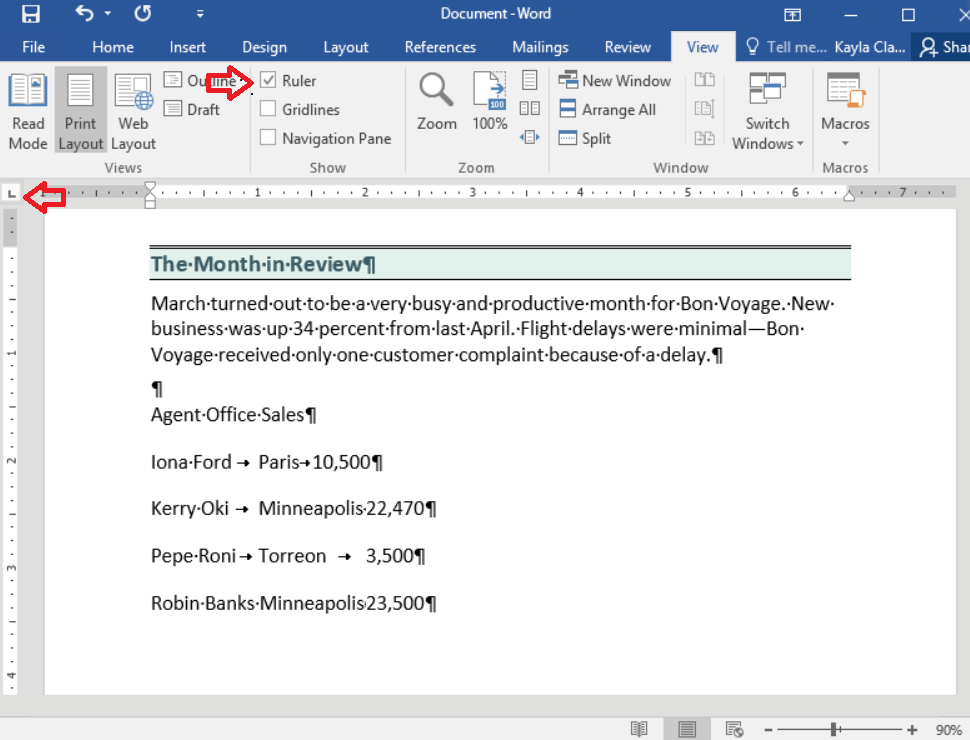
The tab selector, also known as the tab indication in Microsoft Word, is a button to the Ruler's left that offers alternatives for tab markers. Each left tab stop is shown in the Ruler in the Microsoft Word image below as a large "L" sign. If these were in the right tab stops, the "L" would be in the reverse mirror image position.

What is a Tab stop

Types of Tab stops

A tab stop is a horizontal setting to align text on a page. In Microsoft Word or word processing programs, at least five types of tab stops are often used. Click the button in the image below to choose one, then keep clicking it until you find the one you want.

Let's see an explanation about each type of tab stop:

Type NameSymbolDescription
Left    Aligns the tab stop on the left side of the text.
Center  Enables the text to be centered behind the tab stop.
Right aligns the tab stop on the right side of the text
Decimal Decimal point alignment for text and numbers.
Bar  At the bar tab, a vertical line character is added.

Turn on the Ruler and Formatting Marks:

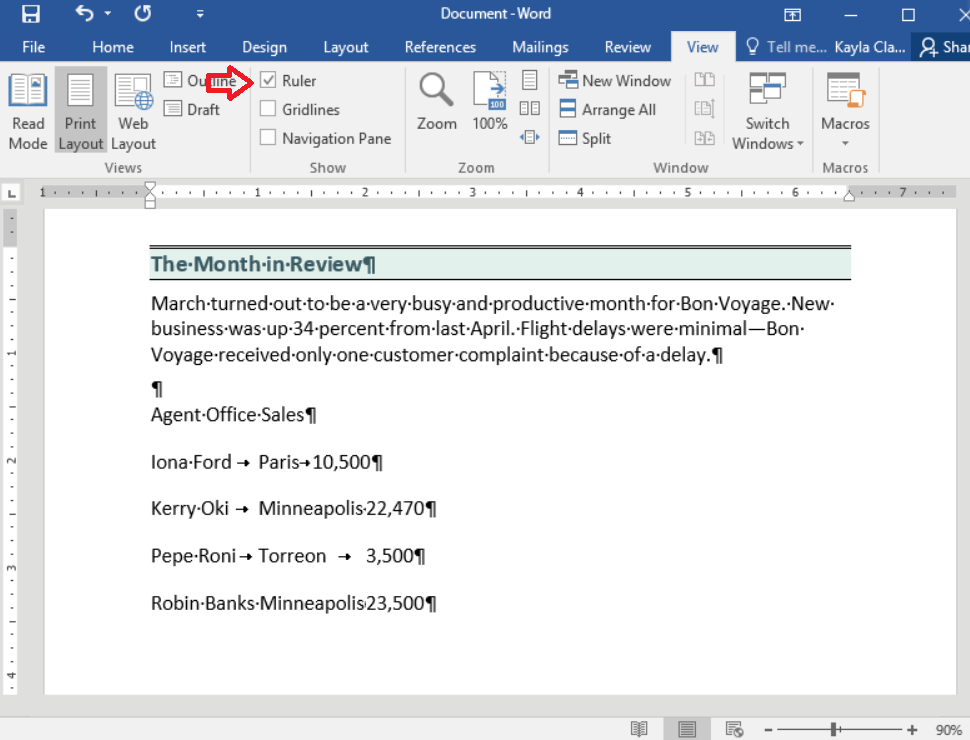
Before you begin modifying tab stops, be sure to turn on the ruler and formatting marks. It is simple to understand what is happening on your page thanks to the formatting marks, particularly regarding tabs. A ruler is required to add, move, and remove tab stops.

  • On the Home tab, select the Show/Hide button.
  • On the View tab, click.
  • Select Ruler by checking the box next to Show.
What is a Tab stop

How to create a tab stop

Using the Ruler to Set a Tab Stop:

  • Choose the text that needs to be aligned.
  • Choose the tab stop type you want to employ.
What is a Tab stop

Note: The type of active tab is indicated by the tab icon in the upper-left corner. Click the button to cycle among the various options if you want something else.

  • Wherever you want the Tab stop to be placed, click on the Ruler.

Everything is added after the tab is aligned to the tab stop.

Using The Ribbon to set a Tab Stop:

Using the Ribbon, you may also make a tab stop in Microsoft Word.

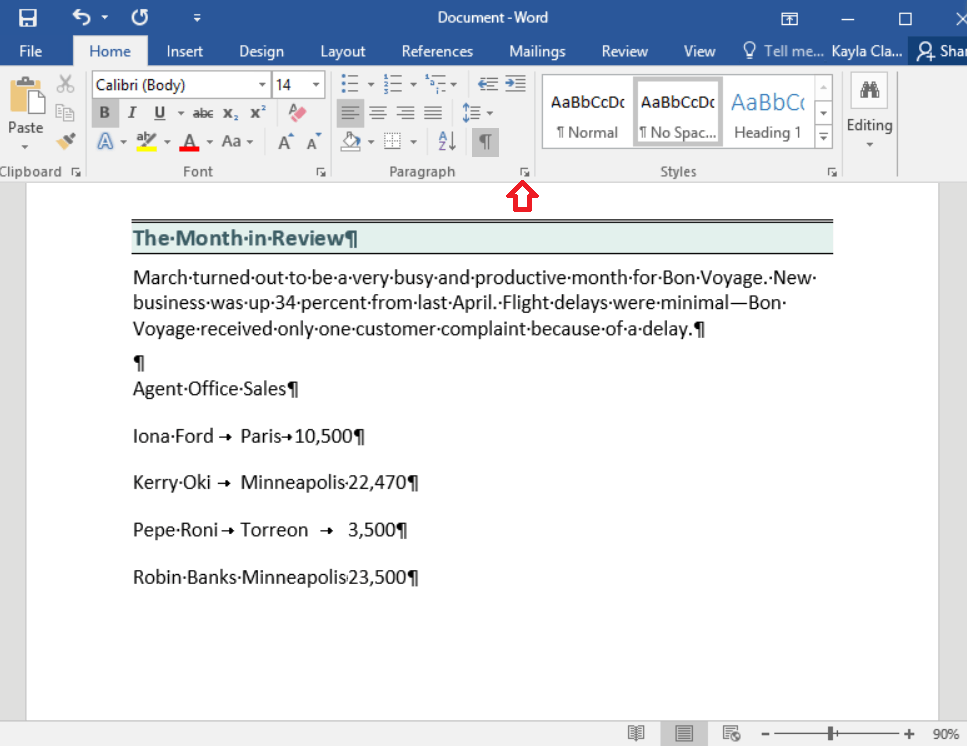
  • Use the paragraph options in Microsoft Word. Click the down-and-right arrow located at the bottom-right of the paragraph section.
  • Click the Tabs button in the lower-left corner of the Paragraph box that appears.
What is a Tab stop
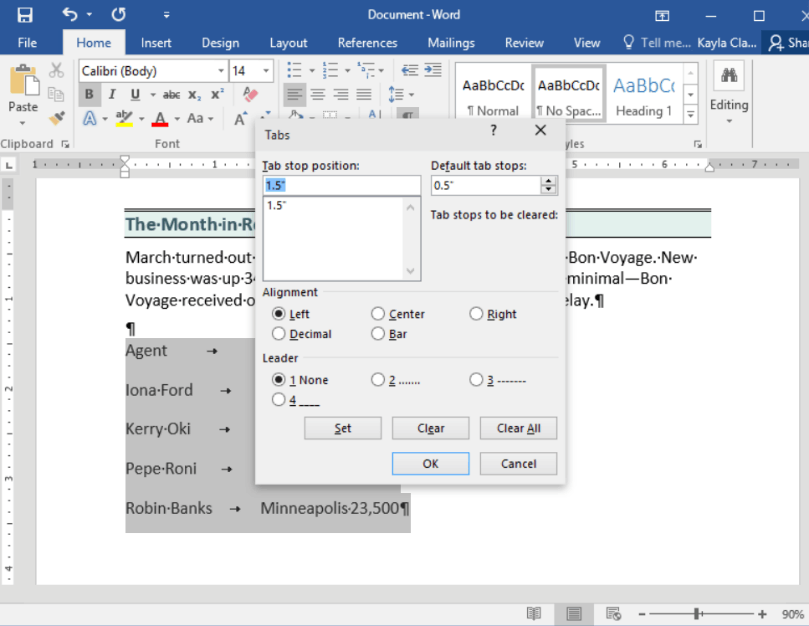
  • The window for Tabs settings appears. The tab stop's default value is 0.5. In the text field and list for the "Tab stop position," you can input or modify the settings for extra tab stops.   
What is a Tab stop

How to remove a tab stop

Directly from the Ruler, you can change a tab stop's location or remove it entirely. To move a tab stop along the Ruler, click and drag it. Place the mouse pointer above the tab stop and take the following actions to remove the tab stop from the Ruler:

  • To remove a tab stop from the Ruler, click it and drag it away.
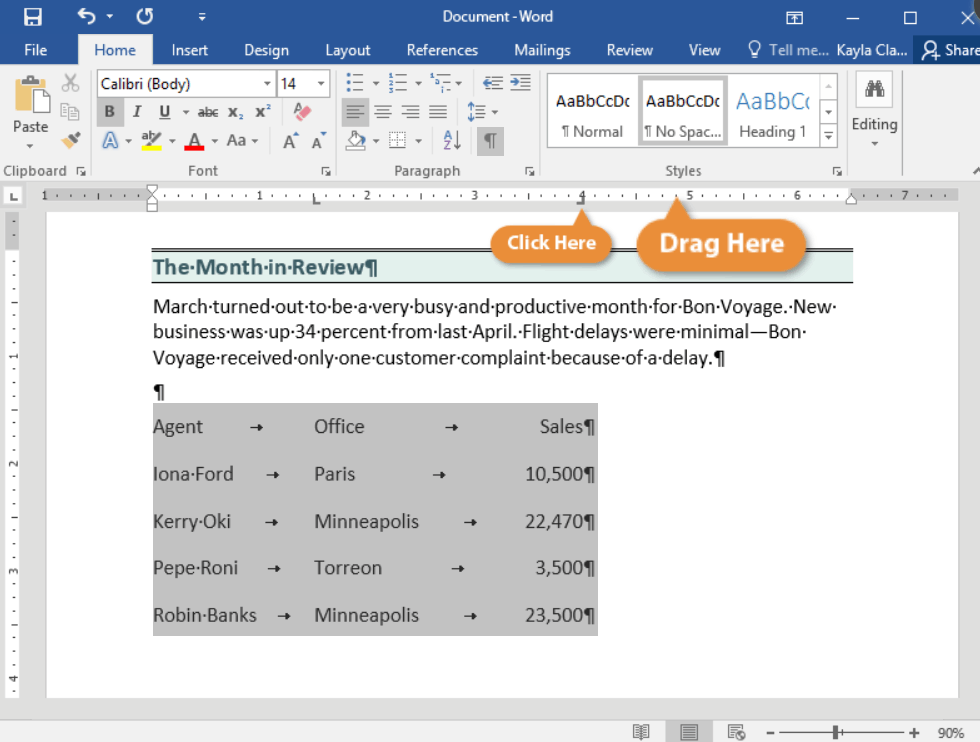
What is a Tab stop

Note: The text impacted by a tab stop will move as you drag it to a new location on the Ruler.

The text will move to the subsequent tab stop when a tab stop is removed. The text will instead use the half-inch tab spacing by default if another tab stop isn't specified.


Related Topics

What is a Dynamic Website?

There are two types of websites. First static and second dynamic website, but before we go for dynamic, we should know about the static website so that you can easily...

4 minutes read.

What is Hybrid Topology?

A hybrid topology is also called network topology. Topology can be defined as the physical and logical arrangements of computer networks. We can say that topology is nothing, but how...

6 minutes read.

What is Safe Mode?

There are various operating systems that provide multiple boot options to the users. Safe mode is also one of the boot options available for the users. It is very different...

6 minutes read.

What is A4?

A4 is a standard paper size widely used for printing documents and other materials. It is 210 x 297 millimeters or about 8.27 x 11.69 inches. It is part of...

7 minutes read.

What is flash memory?

Flash memory, commonly known as flash storage, is a non-volatile memory. In electronics products and enterprise software, flash memory is frequently used for storage and transfer. In-memory processing devices use...

6 minutes read.

What is an App Drawer?

An App Drawer is a dedicated section responsible for keeping a record of all the applications installed on your mobile phones or tablets. An app drawer consists of two words:...

7 minutes read.

What is the Pg up Key (Page up Key)

The Pg Up key is a computer key located between the keyboard and the numeric pad or on the numeric pad number 9. It can also be referred to as...

2 minutes read.

What is Hard Disk Drive (HDD)?

HDD is an electro-mechanical device that enables the user to store data for future use. The device has magnetic storage that is responsible for storing the information. And, this stored...

7 minutes read.

Where can I ask questions on the internet?

The internet is a great resource of knowledge and information where you can find all types of questions like imaginable questions, past answers, and much more. However, there are times...

6 minutes read.

What is a cable?

A cable is one or more wires covered in plastic and can connect the computer system. It is also referred to as a cord, connector or plug. Cables are also...

6 minutes read.

What is Barcode Reader?

A barcode reader is an optical scanner and handheld or stationary input device, also known as a price scanner or point-of-sale (POS). It is an input device because it brings...

5 minutes read.

What is Windows?

Microsoft created the desktop operating system called Windows. An operating system is a type of software that acts as an interface between the user and the hardware of a computer....

18 minutes read.

How to open a Microsoft .wps or Works file in Word

The WPS file format is a legacy one for Microsoft Works. Until 2007, when Office 2010 took its place, Microsoft Works, the company's first office suite, was released. The .wps...

3 minutes read.

What is an Asterisk?

The asterisk (*) is a symbol with various uses in different contexts. In mathematics, it is often used as a multiplication operator, while in computer programming, it can be used...

7 minutes read.

Microsoft Word Shortcut Keys

Microsoft word shortcut keys are the keys that are used to work rapidly. These shortcuts are used to perform major tasks quickly in Microsoft word. Users of Microsoft word have...

7 minutes read.

What is an Executable File?

An executable file (EXE file) contains a set of instructions, when the user clicks on the file icon, the system can immediately execute. The file extension for an executable file...

4 minutes read.

Version Control System

There are many problems that are faced by a multinational organization. These problems are the backup of data, storing several versions of files and collaboration of employees. All these problems...

6 minutes read.

What are the disadvantages of the Internet?

Disadvantages of the Internet Every invention has two aspects, good and bad. However, for all its advantages and positive perspectives, every technology has its obscure and nasty side.  Similarly, the Internet...

5 minutes read.

Difference between Optical Fibre and Coaxial Cable

What is Optical Fibre Cable? Optical fibre cables are thin, transparent glass or plastic strands that transmit data through light signals. They are commonly used in telecommunications and internet infrastructure, as...

7 minutes read.

What is a Login Script?

Simply, a Login Script means a Script that has all the necessary set of instructions which is run line by line by the login interpreter whenever a user logs into...

4 minutes read.