
×

What Does Alt + L Do?

The keyboard shortcut, "Alt+L"  is frequently used to open the Developer Tab in the Ribbon.

What Does Alt + L Do?
  • Open the program in which you want to use the Developer tab.
  • Press and hold the "Alt" key on your keyboard.
  • While pressing and holding the "Alt" key, press the "L" key.

This should open the Developer tab in the Ribbon, which is available in the program you are using.

Note: Not all programs have a Developer tab, hence, this shortcut may not work in all programs.

If the Developer tab is not visible in the Ribbon, you may need to customize the Ribbon to show it. Here's how:

  • Right-click the Ribbon and select "Customize the Ribbon" from the context menu.
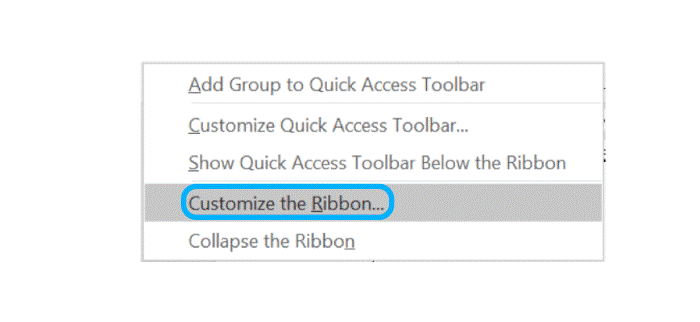
What Does Alt + L Do?
  • In the "Customize the Ribbon" window, check the box next to "Developer" in the list of main tabs on the right.
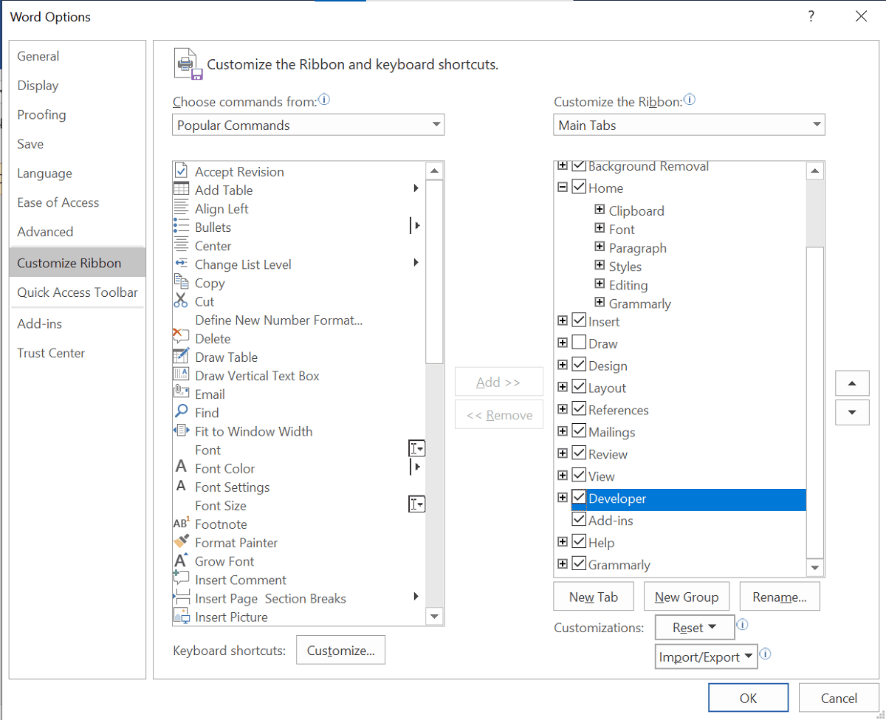
What Does Alt + L Do?
  • Click "OK" to close the window and apply the changes.

This should make the Developer tab visible in the Ribbon. You can then use the "Alt+L" shortcut to access it quickly.

What does Alt + L do in Microsoft Excel?

In Microsoft Excel, pressing the Alt+L shortcut opens the Developer tab in the Ribbon. The Developer tab provides access to tools and commands that are typically used by advanced users and developers, such as the Visual Basic Editor, macros, and controls. Once the Developer tab is open, you can use additional shortcuts to access specific options within the tab, such as Alt+L,V for Visual Basic for Applications, Alt+L,M for macro, and many more.

What Does Alt + L Do In Popular Programs?

Here are some popular programs:

Text Editing

  1. Nano: Long line wrapping enable/disable 
  2. Ace Editor: Fold selection 
  3. Notepad2: Open with 
  4. Microsoft FrontPage: Tools button: Show the Tools menu. 
  5. Metapad:  Lowercase 
  6. Notepad3 (v5.21): Open With

Imaging

  1. Node Wrangler 3.36: Clear node labels 
  2. Moho 13: Library 
  3. SketchUp: Pages 
  4. Paint.NET: Open the Layers menu 
  5. Autodesk 3ds Max 2021: Select Sub-object Loop  
  6. Toon Boom Storyboard Pro 22 (Windows): Lock layer 

System Tools

  1. i3 (window manager): Focus up 
  2. AMD Radeon Adrenalin Edition:  Toggle Radeon Anti-Lag 
  3. ZOC 7.23: Enable/Disable Log to File 
  4. AMD Radeon ReLive:  Radeon Anti-Lag 
  5. Bash (Unix shell):  Uncapitalize every character from the cursor to the end of the current word, converting the characters to lowercase 
  6. AMD Radeon Software 2019:  Toggle Radeon Anti-Lag

Developer tools

  1. Unreal Engine 5.0 (early access):  Show Landscape 
  2. RStudio:  Fold Selected
  3. Roblox Studio:  Lock tool 
  4. TouchDesigner:  Palette 
  5. pgAdmin 4.19:  Clear option dropdown 
  6. IDA Pro 7.4:  Begin the selection 
  7. jEdit:  Move caret to the next character. 
  8. SQLyog:  Close Tab 
  9. Looker 6.8 (Windows):  Collapse selected lines 
  10. EOS Family 3.0.0:  Learn 

Web Applications

  1. Trading View: Enable/disable logarithmic series scale 
  2. Webull: Switch to the Line

File Manager

  1. Putty:  Make Word Lowercase 
  2. Winrar:   Lock Archive 
  3. Midnight Commander:  If The Currently Selected File Is A Link To The Directory, Load That Directory On The Other Panel And Moves The Selection To The Next File 
  4. Q-Dir:  Screen Magnifying 

Games - PC

  1. Escape from Tarkov: Fold/unfold your stock 
  2. iRacing: Toggle telemetry logging 
  3. Warcraft III: Activate the Load menu 
  4. Warcraft III: Reforged:  Open the Load Menu 
  5. Jagged Alliance 2 (version 1.13): Quick Load 
  6. StarCraft:  Load game (single-player) 
  7. Lost Ark (PC):  Collectibles

Social & Messaging

  1. Zoom (Windows):  Switch to Portrait/Landscape View 
  2. GoToMeeting:  Lock or unlock the meeting 

Scientific

  1. GeoGebra:   lambda λ (Press Shift for upper-case: Λ) 
  2. Archicad 24:  Create Guide Line Segment 
  3. Merge PACS Workstation:  Open new Local Study 
  4. PowerScribe 360:  Make selected text all lowercase 
  5. Netcad GIS 8:  Line 
  6. Mastercam 2022:  Planes Manager  

Related Topics

What is Thermos flask?

A vacuum flask sometimes referred to as a Dewar flask, Dewar bottle, or Thermos is an insulating storage container that considerably extends the amount of time that the contents of...

6 minutes read.

How to find similar images using Search by Image

Google is well recognised for its search engine that uses keywords. By entering terms in the search bar, users can locate content or photos associated with a topic. However, there...

3 minutes read.

What is an ATX Style Connector?

ATX Design in 1995, Intel created ATX (Advanced Technology eXtended), a motherboard and power supply configuration standard to create on previous factor standards like the AT architecture. It was the...

5 minutes read.

What is Tray?

The tray is typically made of plastic and is powered by a small motor or a mechanism that pushes it out and pulls it back into the drive. The tray...

4 minutes read.

What does Alt + O do?

Alt + O is used for opening the Format file menu. Alt + O is a shortcut that can be used by pressing the "Alt" and "O" keys. As shown in...

4 minutes read.

Computer Hardware

The computer hardware includes the physical parts or components of the computer, such as to monitor, keyboard, mouse, motherboard, etc. We need software for the instructions that can be stored...

5 minutes read.

Who invented the Internet?

Introduction of the Internet: The Internet is the foremost important tool and useful resource for any person. It connects millions of millions of computers, smartphones, web pages, servers, etc. It connects...

6 minutes read.

Fourth Generation of Computer

The period of the fourth generation was from 1971- 1980. The (VLSI) huge scale integrated circuits are used in the computers of this generation. These circuits have 5000 transistors and...

4 minutes read.

What is Printer?

Printer is a hardware equipment that can be connected to a system. It can take textual and graphical content from the system and display it on a medium. It allows...

10 minutes read.

How to fix problems in Windows after installing new software

Sometimes users face problems after installing new software in the windows operating system. Go along with the below steps to correct and fix them. Uninstall the software program or reinstall it If...

4 minutes read.

What is Autofill?

Autofill is a feature that some computer programs or applications have that automatically fills out fields in forms, saving users time. Autofill is a software function that automatically adds previously...

6 minutes read.

Mouse not detected or working in Windows

One or more issues could be blocking the mouse from functioning properly in Microsoft Windows if it stops moving or doesn't appear on your monitor. Solutions on this page may...

5 minutes read.

How to choose which items show in the notification area

Icons in the notification area, also known as the system tray, contain information for users about several features of their operating system. Examples include the date and time, the state...

3 minutes read.

What is Back Panel?

The back panel of any computer is where you can attach devices like display, microphone, keyboard, and touchpad. The back panel is on the motherboard's border, as shown in the...

3 minutes read.

How to Open Safe Mode?

The Safe mode is a diagnostic mode in Windows that starts the operating system with a minimal set of drivers and files. It is designed to help troubleshoot and fix...

10 minutes read.

Uninstalling Software or Apps in Windows

How to uninstall software in Windows? Unwanted software can be removed from your computer's hard drive using several third-party programs and the built-in tools that Windows 10 and Windows 11 provide. Applications...

4 minutes read.

How to open Microsoft Paint

You can use the MS Paint feature on a Windows PC to draw on either a blank canvas or an existing image. Microsoft Paint is one of those programs that can...

4 minutes read.

What is a Memory Slot?

The memory slot, often known as a RAM slot, is what enables computer memory chips or sticks to be inserted in computer. It helps in determining the type of RAM to be used...

11 minutes read.

Data Warehouse

It is a system that consolidates the data collected from many sources into a single and central data storage. In basic terms, it is a data repository that can be...

10 minutes read.

Why has my IP address changed

IP Address: Internet Protocol address, in short form, is known as IP address. This address could pose security liability, and these addresses are building blocks of the internet. IP addresses...

6 minutes read.