
×

How does a computer process data into information?

What is data

Data is a type of information. Data can be in the form of images, integers, or strings of letters. All data must be entered into the personal computer before it can be processed. Data can be read from a file, typed in manually, or scanned with a bar code scanner. In the eyes of a computer engineer, this data is unprocessed data that needs to be transformed into information.
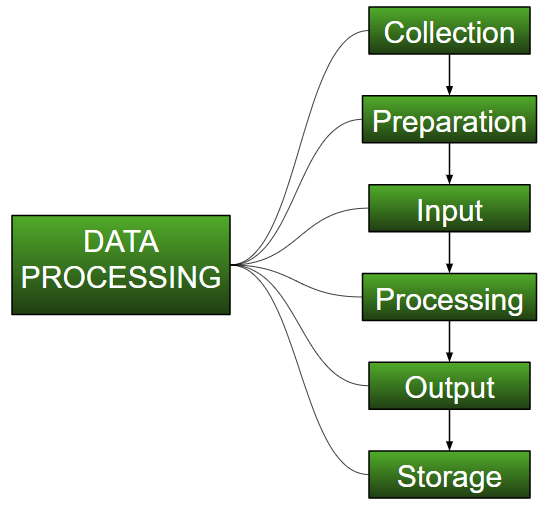
How does a computer process data into information

Information can be described as a codified version of facts, concepts, or directions good for human or electronic machine transmission, interpretation, or processing.

What is Information

Facts have been ordered or classed and have some importance for the recipient. The processed data on which choices and actions are based is known as information.

Data that has been analyzed, organized, and structured. It puts data into context and facilitates decision-making.

Content may be transported in both time and space, thanks to data processing and transmission. Information might be expressed as a message's content or as a result of direct or indirect observation.

Data and information are linked. Information, on the other hand, resolves doubt. Data can contain redundant symbols, but it approaches information by compressing it as much as possible.

Data Processing Cycle

Data processing is known as the re-structuring or re-ordering of facts by humans or machines to boost their utility and add value to a specific goal. Input, preparation, and output are the three essential phases of data processing. The process control cycle is made up of these three parts.

Collection of data

The collection of data is the process of gathering information. Collection of data can be done by various methods, like by users in online mode or from school, college, or hospital in the online form.

To find solutions to study problems, answer questions, order to make appropriate decisions, and forecast trends and probabilities, data collecting is the act of obtaining, measuring, and analyzing correct data from a number of relevant sources.

To make educated business decisions, assure quality control, and maintain research integrity, accurate data collecting is required.

Taking input of data

Before the computer can do anything, it needs data to process. Data is entered into a computer in different ways.

Different ways to take data as input:

  • Keyboards are used for data entry across wired and wireless networks. You can use a combination of alphanumeric keys or just one letter.
  • Pointing devices, either using wired or wireless interfaces, convert taps, gestures, and drawings as input.
  • Hard drives, optical drives, and flash drive all serve as both the input and the output for many computer operations.
  • Several audio-data inputs are compatible with computers. You can use a headphone to dictate audio input for text-to-speech.

Processing data

The conversion of data through is called data processing. It involves translating raw data into a machine-understandable form, data movement through the CPU and memory to output devices, and output manipulation. Processing of data encompasses the use of computers to execute prescribed data processing.

Output

When the input is translated into facts and presented to the user on a monitor, this is known as output. For example, if you use a Windows calculator, the data will be provided on your system display.

Storage

At last, the system can save the data to a device that can be retrieved later.


Related Topics

What is Firmware?

Firmware is essential software required to perform all the tasks in your device. It is present in all the hardware equipment, allowing them to perform basic input and output operations....

10 minutes read.

Augmented Reality

Augmented reality, or simply AR, is an alternate or enhanced version of the world we see around us with the help of some technologies. AR is like a new trend...

3 minutes read.

What is SAN?

A storage area network, sometimes known as SAN, is a specialized, quick network that provides network access to storage devices. Hosts, switches, storage components, and storage devices make up standard...

7 minutes read.

What is Operating System?

Operating System An operating system is an interface between a user and computer hardware. The operating system's main aim is to provide a suitable environment to a user so that a...

11 minutes read.

What is an Expansion Card?

An expansion card is also called an add-on card, or an adapter card is a Printed Circuit Board (PCB) on the motherboard and fixed into an expansion slot. An expansion...

6 minutes read.

What is a Desktop?

Any of the following may be referred to as a desktop: 1. A desktop computer or system unit is referred to as a desktop. 2. The Desktop is the main location to...

6 minutes read.

What is Keyboard?

In modern times, computer is one of the most important digital technologies for any human being. People will also efficiently correlate these new technologies with the increasing daily-by-day technology. Today’s environment, all...

7 minutes read.

What are Storage Devices?

Computing hardware is capable of storing the information and can also be processed. Information on the storage can be stored permanently as well as temporarily. It is one of the core...

7 minutes read.

Are smartphones and tablets computers

The answer is yes. In modern times, at least a laptop /tablet /desktop /smartphone will be in a home. Because they play an important and vital role in everyone’s life...

4 minutes read.

Increase or decrease font size in Word using keyboard shortcuts

Instead of using the mouse, which might take a long time to change the font size in MS-Word (Grow or Shrink Font Size), you can change the font size quickly...

3 minutes read.

Use of Internet

The Internet, sometimes known as "the Net," is a global system of computer networks. It is a network of devices that allows users at any one computer to obtain information...

13 minutes read.

What is Task View?

Task view is used to manage windows across several monitors or virtual desktops, quickly find open windows, rapidly hide all windows and reveal the Desktop, and more. Task View is...

4 minutes read.

Difference between Website and Webpage

Website A website is a collection of attached web pages, typically supplied from a single web domain, accessible via the Internet. A website is hosted on a computer system known as...

6 minutes read.

What is Account Sharing?

Account sharing is the way of allowing multiple people to use a same account by sharing their username and password with others. For instance, to avoid having to pay for...

7 minutes read.

What are the Disadvantages of Computers?

Although there are various advantages to using a computer, there are also hazards and disadvantages (like most things in life). Computers, if not used properly, can create a variety of...

6 minutes read.

How to shut down a computer

Whenever the Shutdown is done, all the programs, software, files, and operating system are shut down. The RAM is cleared, so before shutting down the device, the user should ensure...

4 minutes read.

RAM (Random Access Memory) Vs. ROM (Read Only Memory)

RAM (Random Access Memory) Vs. ROM (Read Only Memory) There are several differences between the Random access memory and read-only memory which is given below: RAM (Random Access Memory )ROM (Read Only...

4 minutes read.

What is Cat 5?

In our daily life, every person is opted to use different technologies and is successful in implementing the new opted technologies. Every day people are interested in making new inventions...

4 minutes read.

How To Replace the CMOS Battery

CMOS(Complementary Metal Oxide Semiconductor) stores the information, including date, time, and system firmware setting. The CMOS battery is responsible for powering up the BIOS firmware in laptops, and that BIOS is...

3 minutes read.

What is Line In?

Basically, Line-In is an audio jack that is present in an audio device, which is used to connect the other audio output and input devices like speakers, microphones, etc. A...

6 minutes read.