×

How to shut down a computer

Whenever the Shutdown is done, all the programs, software, files, and operating system are shut down. The RAM is cleared, so before shutting down the device, the user should ensure that all the work is saved, as after the device comes back from a shutdown, all the previous unsaved work won't be seen.

Benefits of the computer shutdown:

  • The computer or laptop runs fast as the RAM is cleared.
  • The system is being solved.
  • Battery power is not used when the system is shut down.

Methods to restart the computer are:

  1. Using windows desktop to Shut down.
  2. By the start menu.
  3. Using the shortcut of Ctrl + Alt + Del.
  4. By using the command line.
  5. Physically shut downing the computer.
  6. By Windows + X keys.

1. Using windows desktop to Shut down

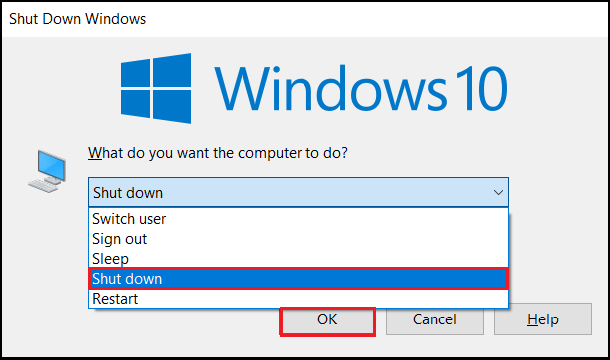
In this method of restarting the computer, get to the desktop and press Alt + F4 on the keyboard. Then a menu will appear below. Select the Shutdown option and ok.

Alt + F4 > Shut down > Ok.
How to shut down a computer

2. Shut downing by the start menu

Windows 11

The start menu of windows 11 is different from other versions. In this to restart, the steps are as follows:

  • Select Start from the taskbar.
  • Click the power option.
  • Then click shut down.
    Start > power button > shut down.
Windows 10

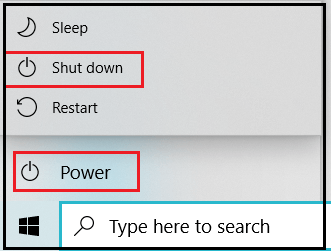
  • Select Start from the taskbar.
  • Select the power button.
  • From the power menu, click shut down.
    Start > power button > shut down.
How to shut down a computer

Windows 8 and 8.1

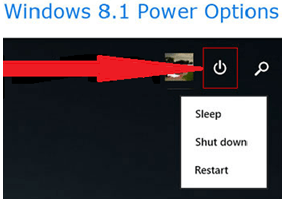
Both versions do not have a start menu, but in the 8.1 updates, the power button is placed in the upper right corner of the start screen.

Power button > Shut down.
How to shut down a computer

Windows Vista and 7

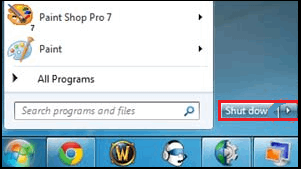
In both these versions, follow the below steps to restart

  • Select Start from the taskbar.
  • Then select shut down from the menu.
    Start > shutdown.
How to shut down a computer

Windows XP and prior versions

  • Select Start from the screen.
  • Select the Shutdown button.
    Start > shut down button.

3. Using shortcut Ctrl + Alt + Del

When the mouse is unavailable or not responding, do a restart by using the keyboard. For this, press the Ctrl + Alt + Del keys at a time, then a menu is displayed in that select power button.

Windows 10 and 11

In these windows versions, pressing the above keys redirects the user to the lock screen and restart windows.

  • Select the power icon from the lock screen
  • Then click on Shut down from the menu.

Windows 8

By clicking Ctrl + Alt + Del windows, 8 will redirect to the lock screen, then restart the windows.

  • Select the power icon in black from the lock screen.
  • Then select Shut down from the menu.

Windows Vista and 7

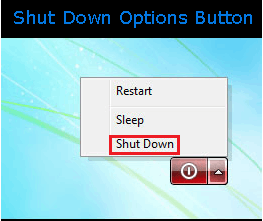
In these windows versions, pressing Ctrl + Alt + Del will redirect to the lock screen with several options. At the bottom right corner, select the arrow next to the red button. It displays a list of options to shut down.

  • Select the arrow which opens the menu.
  • Click shut down.
How to shut down a computer

Windows XP and prior

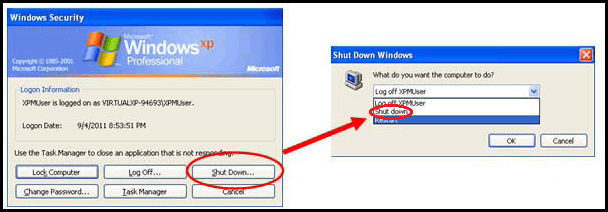
Clicking Ctrl + Alt + Del in Windows XP and previous versions gives the Windows Security screen, then shuts down.

  • Select the Shutdown button.
  • In the new pop-up, select shut down by clicking on the down arrow
  • Click ok
How to shut down a computer

4. By using the command line

With the help of the command prompt, restarting the windows is possible.

  • Open the command prompt in windows after choosing windows+R in the keyboard and then type “cmd”.
  • For windows restart, write shutdown -s and press enter key on the keyboard.

Windows + R > type cmd > type shutdown -s > enter.

Syntax:

C:\Users\apple> shutdown -s

5. Physically shut down the computer

When the Shutdown does not happen by the Shutdown options stated above, the user should physically Shutdown by pressing the power button until the device is shut down and then releasing the button. Shut down can be done when the computer is stuck or frozen and when it becomes unresponsive.

The last option must be forcefully shutting down the computer system because it can harm the operating system files and hardware drives. Whenever the user turns on the system, files could be corrupted, showing errors. Therefore, forced Shutdown should be done as a last resort.

6. By Windows + X keys

The last method of restarting the windows is by using the shortcut from the Link menu.

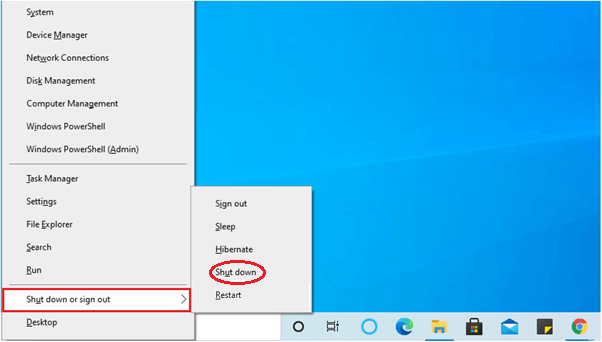
Press Windows + X keys on the keyboard simultaneously, which opens the Link menu. In the Link menu, using the cursor or down-word arrow key, traverse to the Shutdown or sign out and click on Shut down.

Windows + X > Shut down or sign out > Shut down.
How to shut down a computer

Chromebook shut down

Shutting down the chrome book is as follows:

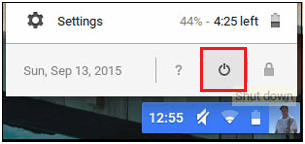
  • Select the Power button icon and click on it. On the desktop's bottom-right corner, click on the digits that show time.
How to shut down a computer

Shutting down in Apple macOS

Follow the below steps to shut down the Apple macOS

  • On the desktop's top-left corner, click on the Apple menu.
  • Then click on Shut Down.

Related Topics

How to erase my hard drive and start over

The computer is set to default settings with the help of system restore disc. The reset or format in a computer eliminates the issues related to the software installed into...

6 minutes read.

What is Safe Mode?

There are various operating systems that provide multiple boot options to the users. Safe mode is also one of the boot options available for the users. It is very different...

6 minutes read.

What is Device Driver?

Device Driver A device driver is a specific type of programming application that permits one equipment device (like a PC) to interface with another equipment device (like a printer). A device...

6 minutes read.

What does Alt+D do?

Computer keyboard shortcut keys play an important role in the working of any computer user. We can do anything from the mouse and keyboard, but shortcut keys provide data in...

3 minutes read.

What is a File System?

A file system is a method that is responsible for managing the space and the data on the system's storage unit. It is also known as the file manager. The...

10 minutes read.

Second Generation of Computer

The period of the second generation was from (1959-1965). The transistor takes the place of the vacuum tubes in the second generation. The transistor was invented at Bell Labs in...

4 minutes read.

What is a Case fan?

A case fan, sometimes known as a system fan, is a component of a computer that is attached to the front or rear of the device's chassis. Case fans aid...

3 minutes read.

What is an Elevated Command Prompt?

An elevated command prompt, also called "the command line" or "the DOS window," is a command prompt with administrator rights. The command-line interface program used to run low-level software or...

4 minutes read.

TCP Flags

In a TCP connection, flags are being used to specify a specific connection status, as well as to offer extra information that can be utilized for debugging or to manage control...

4 minutes read.

Difference between hardware and software

Computer Hardware Hardware refers to the actual parts of a PC or a machine that we can see and contact. An actual part is utilized in various ways to assemble a...

3 minutes read.

What is braille reader?

An electronic device known as a braille reader, sometimes known as a braille display, which enables a blind person to read the text on a computer monitor. Braille is a...

3 minutes read.

How do I open and edit the Windows registry

Before knowing how to open and edit the windows registry, let's understand what a registry is. The registry is a central database that consists of information, applications, hardware, and software...

4 minutes read.

What is a Card Reader?

A hardware device that can read from and write to a memory card or memory stick is termed a card reader. Its task is to transfer data to computers and...

9 minutes read.

10 Essential Examples of Web Browsers

Web browsers are important for accessing and navigating the internet, allowing us to view and interact with the vast online content available. From browsing websites and streaming video to online...

11 minutes read.

Characteristics of Computer

Characteristics of Computer: The computer system has a logical program to solve complex problems. The features of computer make it fast and powerful. The computer with powerful features can perform...

3 minutes read.

Difference between File and folder

File: A file is a unit of Storage for comparative data. A document can be a picture, video, executable record, framework, or application document. Secondary storage options include DVDs, flash drives, SSD...

3 minutes read.

What is Asynchronous DRAM?

Asynchronous DRAM (Dynamic Random Access Memory) is a type of memory that operates independently of the system clock. It is not synced with the computer system clock; therefore, it is...

5 minutes read.

What is Multitasking?

Multiple programs can be run simultaneously, thanks to this logical expansion of a multiprogramming system. In a contemporary computer system, the word "multitasking" is employed. The ability to multitask in...

4 minutes read.

What is a Header?

A document or data packet's header is a section that contains metadata or other information required for processing the main material. In information technology, "supplemental data" is frequently used to describe...

3 minutes read.

What is a hyperlink?

Nowadays, internet is the basic need of every human. As technology is increasing day by day, people use the latest advanced technology and try to connect worldwide in an easy...

6 minutes read.