
×

How to Delete Temporary Files in Windows 10?

To enhance our experience, Windows 10 produces temporary files when we use some apps (like Microsoft Word). However, our computer may load up our hard disc with hundreds of temporary files that it creates each day. Microsoft Word automatically creates a temporary copy of any open documents every few minutes. This article will demonstrate how to use Disk Cleanup, the Settings app, and straightforward instructions in the Run dialogue box to remove temporary files from your computer. Utilize the built-in Disk Cleanup tool, which is the default, to remove transient files (and hidden ones). Additionally, you can manually delete temporary files from commands and the Settings app by using the Run dialogue.

There are many methods for deleting the temporary files in windows 10. In this article we are going to know about some of the methods or ways in deleting the temporary files.

Method-1

Using the Disc Cleanup Method

Step 1

Activate Disk Cleanup. In the taskbar's search bar, type "disc cleanup," and then select the first result, which is the software. The simplest and least time-consuming technique for removing temporary files from your Windows 10 machine is to use this.If you can't find the search option in the taskbar, you may alternatively open it by pressing the Windows key + S.
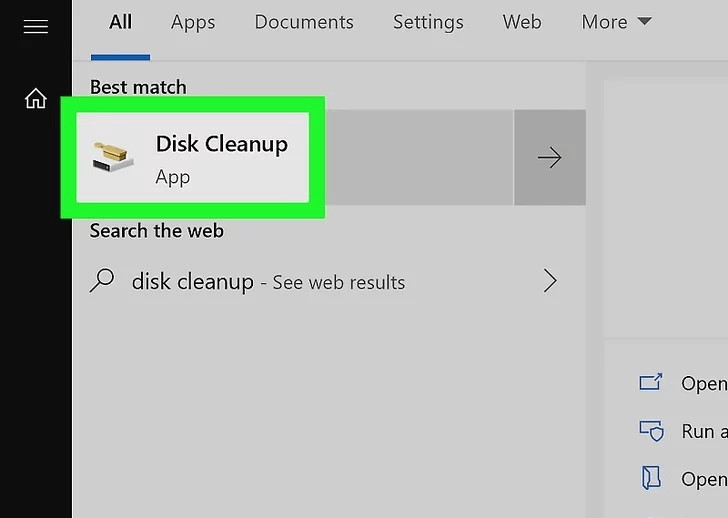
How to Delete Temporary Files in Windows 10

Step 2

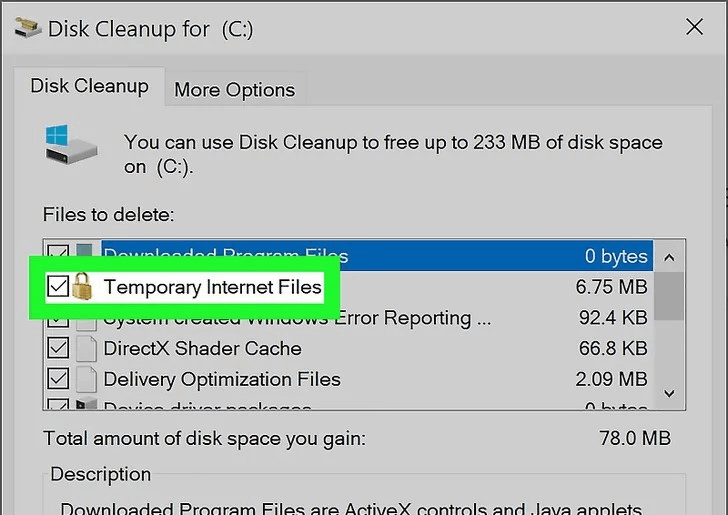
The boxes next to "Temporary Internet Files" and "Temporary Files" can be checked by clicking. As they go along the right side of the columns, you can see how much room they will create.By default, suggested boxes for deletion are selected; you can choose to leave them checked and destroy the files or click to uncheck the box and keep them.
How to Delete Temporary Files in Windows 10

Step 3

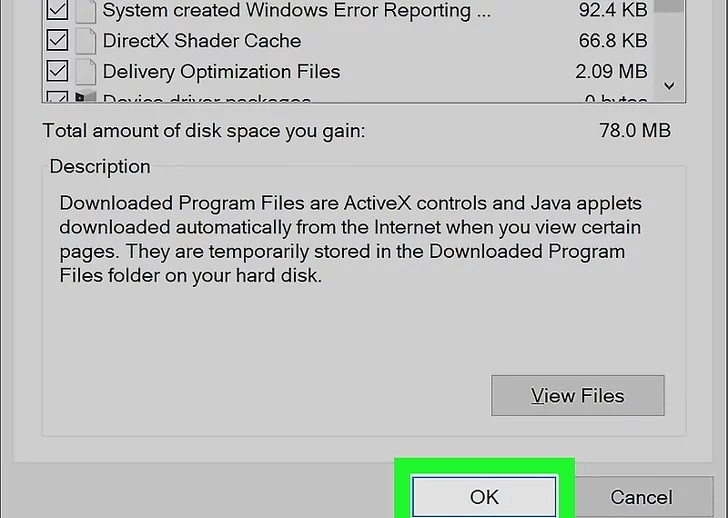
Press Delete Files. When a box appears asking for confirmation, click "OK." When you proceed, that box will vanish, and a deletion progress bar will emerge. When the deletion is finished, the bar will also vanish.
How to Delete Temporary Files in Windows 10

Method-2

Using Settings

Step 1

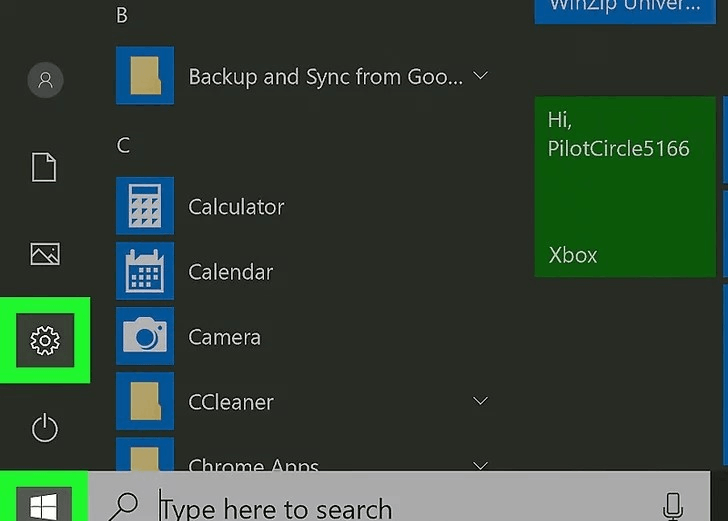
Go to the Windows Settings page. To open Settings, click the gear symbol first, then the Start
How to Delete Temporary Files in Windows 10

Step 2

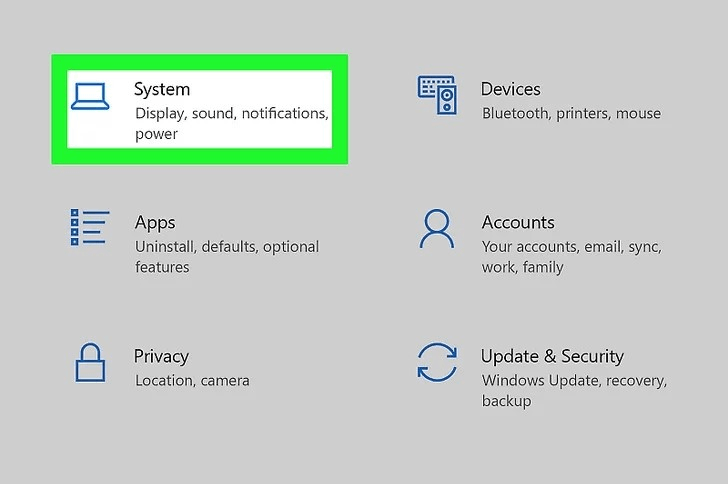
Use the System Setting to access the files. To access this, click on the System icon on the display.
How to Delete Temporary Files in Windows 10

Step 3

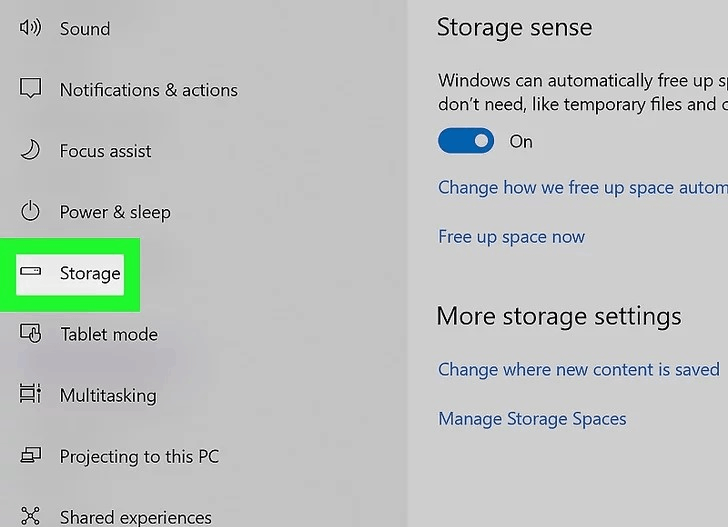
In this step we need to click on the Storage option. You can find this option on the bottom of the menu on the left.
How to Delete Temporary Files in Windows 10

Step 4

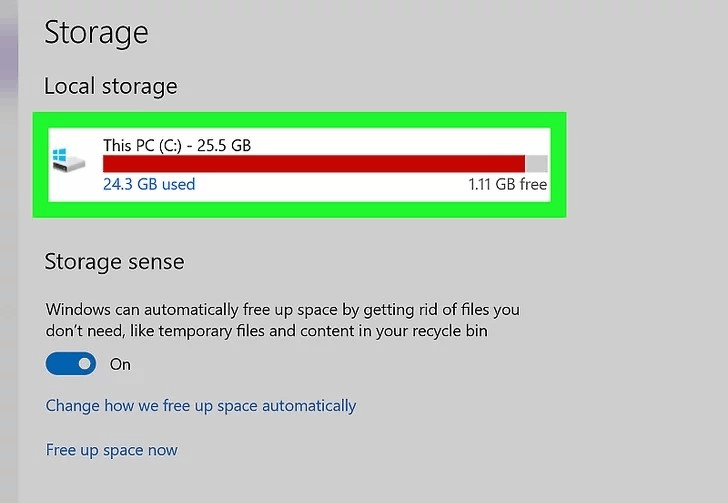
Select the drive on which Windows 10 is set up. The drive symbol is typically covered by the Windows logo, and it may be titled "This PC."
How to Delete Temporary Files in Windows 10

Step 5

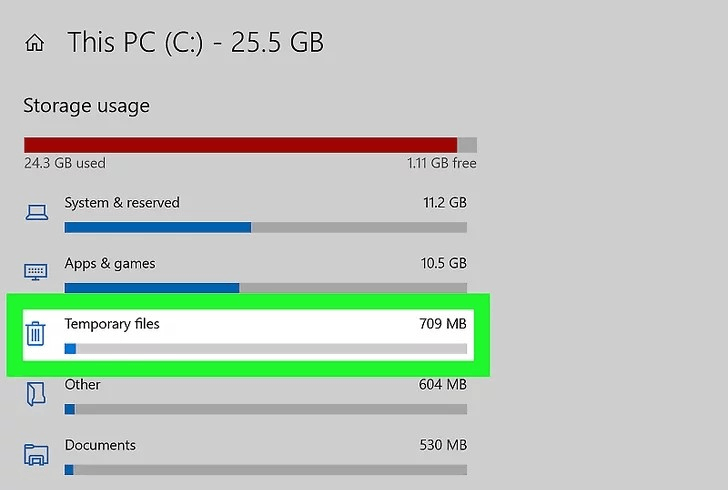
Click on Temporary files. The figure shown shows how much space the temporary files occupy. The next page allows you to view all temporary files, including those in the Downloads folder, the Recycling Bin, and thumbnails.
How to Delete Temporary Files in Windows 10

Step 6

To choose the files you want to delete, click the boxes next to them.
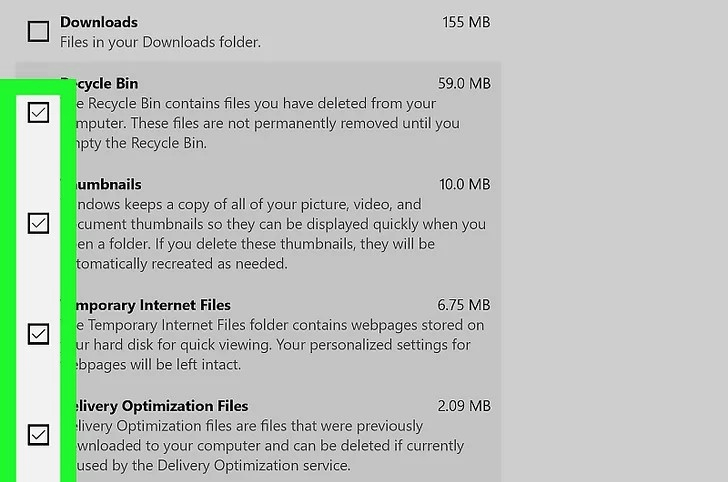
How to Delete Temporary Files in Windows 10

Step 7

Click the remove files. A delete progress bar will be visible.
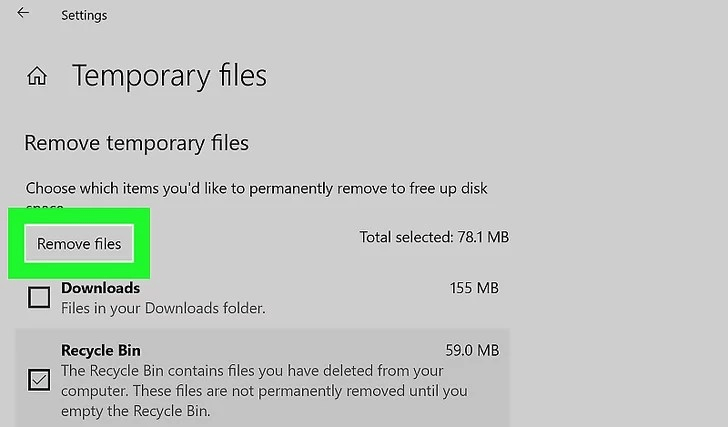
How to Delete Temporary Files in Windows 10

Method 3

Clearing Temporary Files Manually

Step 1

To open the Run box, press the Win key and R. This is the strategy that requires the most effort to delete temporary files.
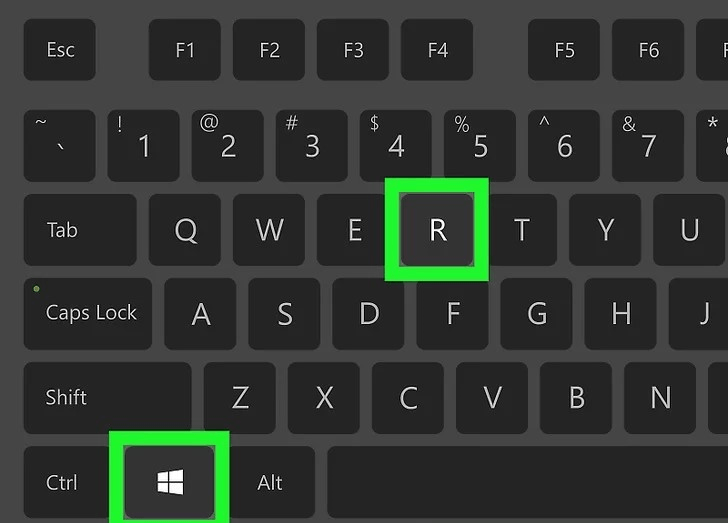
How to Delete Temporary Files in Windows 10

Step 2

Enter "%temp%" into the Run box after typing it. You'll be taken to the location of the folder containing all the temporary files.
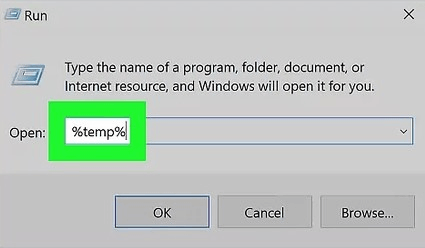
How to Delete Temporary Files in Windows 10

Step 3

Select all files and folders either click the first file, and press Ctrl key + A to select all of them, or click the first file, hold down Shift, then click the last file.
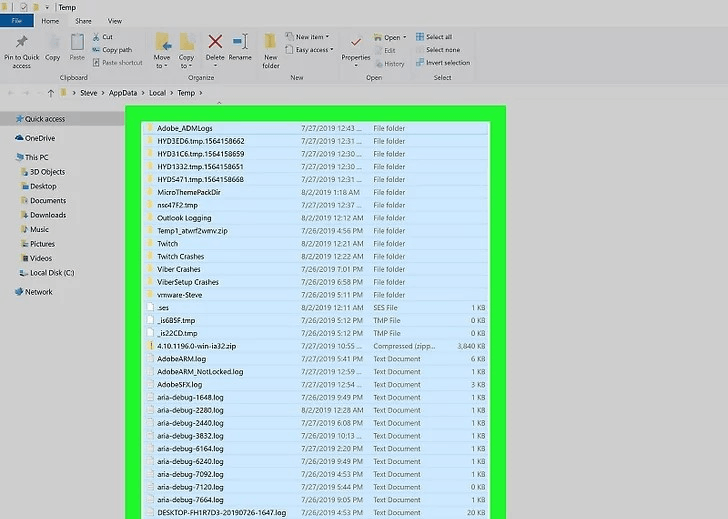
How to Delete Temporary Files in Windows 10

Step 4

Click Delete by doing a right-click anywhere in the file. To do this, you'll need an administrator account. The Recycle Bin holds all of those files, which can be
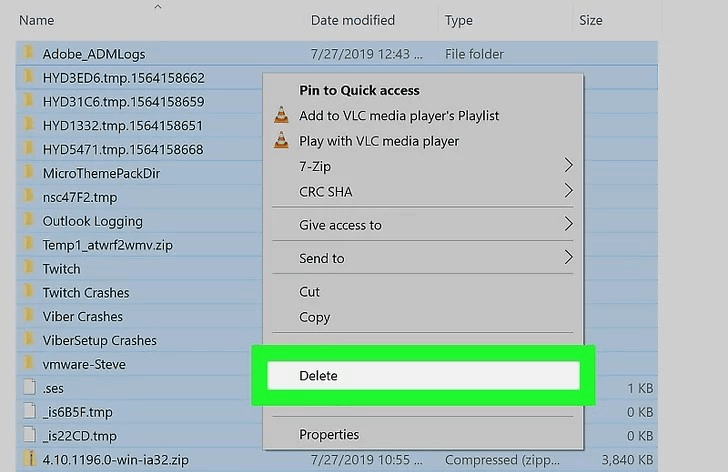
How to Delete Temporary Files in Windows 10

Method 4

Using Command line using Command Prompt or Notepad

The typical method of erasing temporary files, however it requires human labor. If you'd rather, you may create your own mini program that uses a BAT file and a simple double-click or tap to automatically clear these temporary files.

You can do this by deleting the entire folder and all its subfolders using the rd. (remove directory) Command Prompt command.

In Notepad or another text editor, enter the following command, save it as a.BAT file:

rd %temp% /s /q

The s option deletes all the files and subfolders in the transient folder, while the q parameter disables deletion confirmation prompts.

Please feel free to substitute the real folder location indicated in Step 2 above if the %tmp% environment variable is not functioning for whatever reason. Just make sure you input the proper folder path and, just to be safe, enclose the path in quotes like this

rd "C:\Users\jonfi\AppData\Local\Temp" /s /q
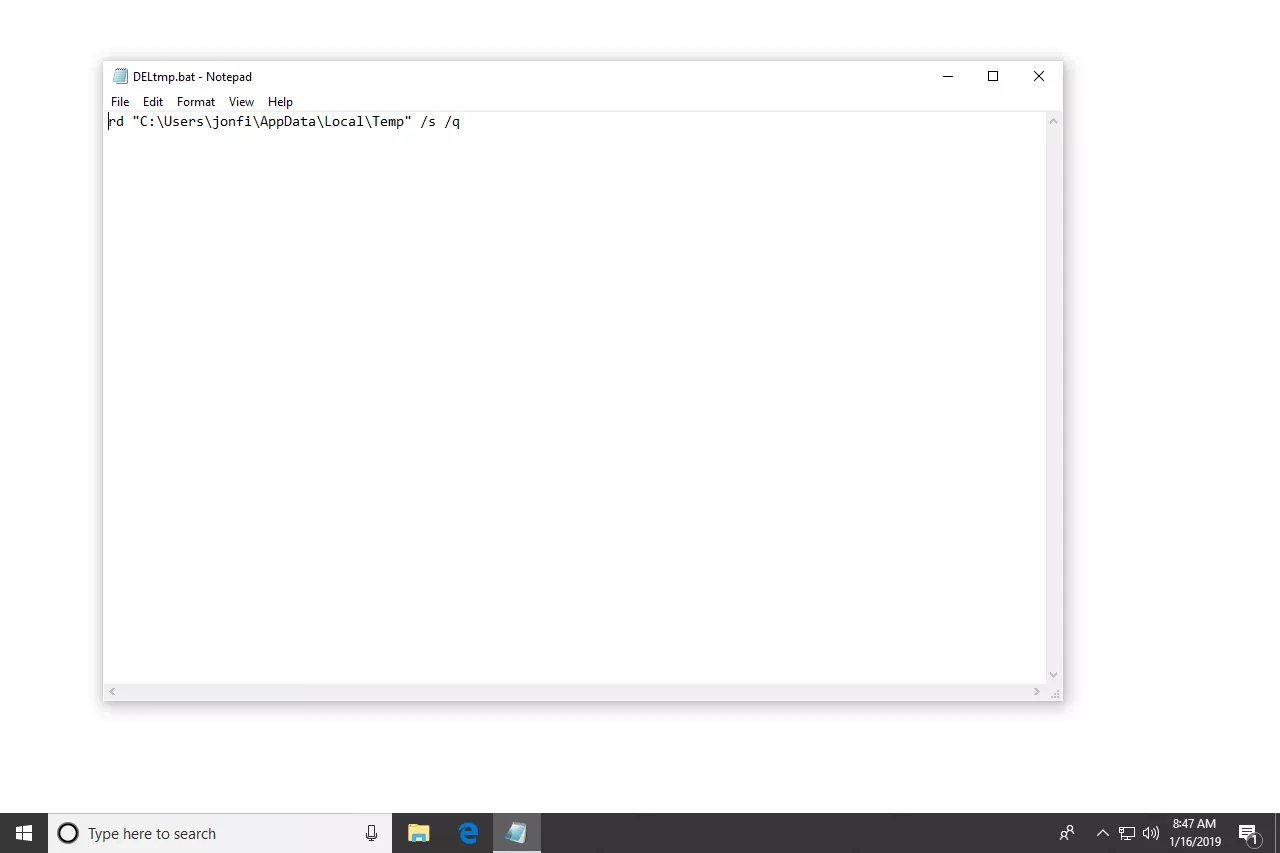
How to Delete Temporary Files in Windows 10

Related Topics

What is Back Quote?

A back quote, also known as a grave accent or backtick, is a punctuation mark used in various programming languages to denote a literal string or command in the command...

6 minutes read.

What is RDIMM?

Servers use the RDIMM (registered memory) kind of memory chip most frequently. By reducing the electrical strain on a memory controller, it helps systems running on a server be more...

3 minutes read.

What Does Alt + F4 Do?

Alt+F4 is a keyboard shortcut frequently used to close active window or applications. When Alt+F4 is pressed, the operating system sends a signal to the active window or application to...

6 minutes read.

What is the difference between multiprocessor and distributed systems

Multiprocessor A Multiprocessor is a PC framework with at least two focal handling units (CPUs) share full admittance to a typical RAM. The primary goal of utilizing a multiprocessor is to...

3 minutes read.

Types of Computers

Computers can be categorized in two ways: size and data handling capabilities. Based on the size, computers are divided into four types: 1. Super Computer The super computer introduced in the 1960s and developed by Seymour Cray,...

5 minutes read.

What is Multitasking?

Multiple programs can be run simultaneously, thanks to this logical expansion of a multiprogramming system. In a contemporary computer system, the word "multitasking" is employed. The ability to multitask in...

4 minutes read.

How to erase my hard drive and start over

The computer is set to default settings with the help of system restore disc. The reset or format in a computer eliminates the issues related to the software installed into...

6 minutes read.

How to fix a not a valid Win32 application error

The “not a valid Win32 application” error occurs on Windows. Users get confused when they see it. It means our current version of windows does not support or is not...

5 minutes read.

What is Account Sharing?

Account sharing is the way of allowing multiple people to use a same account by sharing their username and password with others. For instance, to avoid having to pay for...

7 minutes read.

Block Diagram of Computer

Computer Block Diagram System: Mainly computer system consists of three parts, that are central processing unit (CPU),Input Devices, andOutput Devices. The Central Processing Unit (CPU) is divided into two parts...

5 minutes read.

What is a Mechanical Mouse?

A computer mouse with a metal or rubber ball on the underside is a mechanical mouse. The mouse's internal sensors detect any movement of the ball when it is rolled,...

3 minutes read.

What is URL?

URL or Uniform Resource Locator provides the unique location of the resource. Any element displayed on the world wide web has a unique URL dedicated to that element only. The...

8 minutes read.

What is CAD (Computer-aided design)?

The process of modeling physical structures and material qualities in two or three dimensions using specialized software on a computer is known as computer-aided design, or CAD. Nowadays, it has...

6 minutes read.

How do I change my name on Google

What is the profile name on Google? Here, the name on Google refers to the Google profile name, which you have saved while creating an e-mail on Google.   Name on Google...

3 minutes read.

What programs can I use for speech recognition?

Since its inception, voice recognition software has advanced significantly. It can be utilised for a variety of things, such as speech-to-text software and voice commands on desktop computers and mobile...

3 minutes read.

What is a Print Preview?

Print Preview is one of the functionalities that helps users to see the pages layout before printing. It gives the users an idea of what pages look like when printed....

3 minutes read.

High-Level Language in Computer

High-Level Language The high-level language is the programming language such as BASIC,C,C++,COBOL,FORTRAN,Java, Perl,PHP,Python,Ruby, Visual Basic, and Pascal, etc. These languages have strong abstraction, the style and the context which are more...

5 minutes read.

Computing Power

Computing power comes at how fast a machine can perform a task. When a command is given to any computer, it is broken down into mathematical series of problems. A...

3 minutes read.

What is UDIMM?

An unbuffered Dual Inline Memory Module is an Unbuffered DIMM, a volatile memory chip in laptops and computers. UDIMM is a standard type of RAM. It is also part of...

3 minutes read.

What does Alt+F do?

The computer is one of the most basic needs of every user. Without a computer we cannot do anything, almost in every field. In computer, there are many file menu options...

4 minutes read.