
×

What are Toggle keys?

keys that are used to turn on or off a function or the keys used to switch between two functions is called the Toggle key. The caps lock key, scroll lock key, and number lock key are the examples of toggle keys.

How many toggle keys are there on the keyboard?

The toggle keys are four in number. They are the Caps lock key, Scroll lock key, Num lock key, and Insert key.

Caps Lock key

The caps lock toggle key is used to enable or disable the Uppercase letters. When the caps lock is enabled, the letters are typed in uppercase. When the caps lock is disabled, the letters are typed in lowercase.

Scroll Lock key

The scroll lock toggle key is used to scroll in the windows to move up or down by using the arrow keys. The scroll lock toggle key is used to scroll through the windows without a scroll bar.

Num Lock key

The Num lock toggle key takes the numbers from the numeric keyboard. The Num lock which is a toggle key is turned on by itself.

Insert key

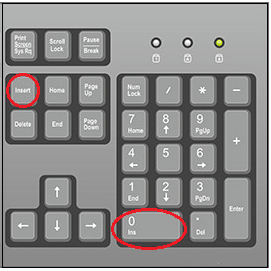
Insert toggle key is used for changing between the text entering modes. The insert key has two modes to shift. They are overtype mode and insert mode.
What are Toggle keys

The insert key is also present on the numeric keypad, in combination with the "0" key. So, for the insert key to operate on the numeric pad, the user should turn off the Num lock key.

  • Overtype mode: In the overtype mode, when the cursor is placed at some position and text is typed, the current typing text replaces the existing test.
Before: A computer is an electronic machine.
After:    Laptopmputer is an electronic machine. 

Here when "Laptop" is typed, it replaces "The" and accompanying characters and becomes "Laptopmputer”.

  • Insert mode: in the insert mode, when the cursor is placed at some position and text is typed, all the characters are placed at that cursor position by making all the characters move to one position forward.
Before: A computer is an electronic machine.
After:   Laptop The computer is an electronic machine.

           When the "Laptop" is typed, the word is inserted at the position where the

           Cursor is placed.

Once the toggle keys are in an on or off state, they need to be pressed or held down only sometimes when pressing other keys.

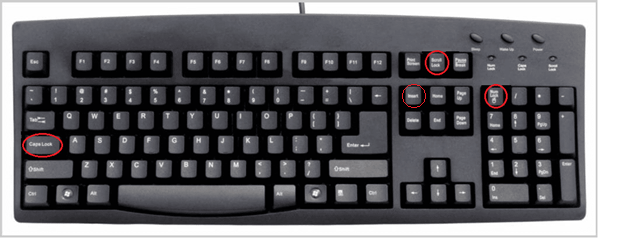
Toggle the keys located on the keyboard
What are Toggle keys

The ellipse marked in red shows the toggle key's position on the standard keyboard.

How to know whether toggle keys are in one state?

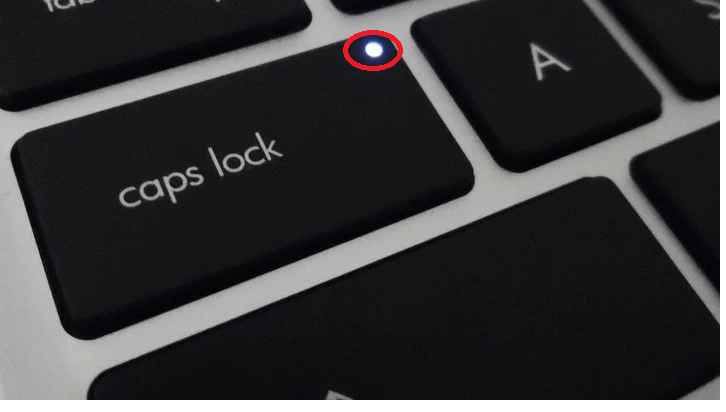
The turn-on status is shown on the desktop screen in some of the operating systems. But in most computers and laptop keyboards, the turn-on of the toggle keys is shown by the light below. When the caps lock is on, the light is in on state.
What are Toggle keys

Toggle keys are used to alter the input modes of keys, so toggle keys are utilized as an accessibility option. At the same time, the modifier keys will not have the option to alter between the modes.

This toggle key accessibility function is proposed for people with vision problems. Microsoft is the first to introduce the toggle keys from Windows 95.


Related Topics

How to fix Low Memory and out of memory errors

Rebooting the computer is required Rebooting the computer can frequently fix out of memory issues. We advise you to try resetting the computer first before attempting any of the methods below. The...

4 minutes read.

What is Borderless Printing?

Borderless printing is a printing method that allows a printer to print an image or document without any margins or borders. This means that the image or document is printed...

8 minutes read.

How to associate a file with a program?

How to associate a file with a program in Windows? By default, a particular program is selected by the Windows to open each file type, but you may re-associate a file...

4 minutes read.

How to fix a CD-ROM, DVD, or disc drive not working in Windows?

If your CD-Rom or DVD-ROM disc driver is not reading your discs correctly, then follow the following tips that may help to fix your problem. Bad or dirty CD Make sure you...

7 minutes read.

What does Alt+Esc do?

The computer is one of the most basic needs of every user. If we use some shortcut keys to do the same operation, then it will be good and time...

3 minutes read.

Input devices of Computer

Computer Input Devices : The input device is the hardware device that connects to the computer system. The user can give the instructions to the computer with the help of...

11 minutes read.

What is Asynchronous DRAM?

Asynchronous DRAM (Dynamic Random Access Memory) is a type of memory that operates independently of the system clock. It is not synced with the computer system clock; therefore, it is...

5 minutes read.

What is a Copyright?

In modern times, copyright is becoming more important because of content thieves, who steal information and uses it for the benefit of money. When the Copyright feature came into existence,...

4 minutes read.

Virtual Reality

Virtual reality is a digital experience that simulates the real world but is different from the real world. It is completely generated by the computer and does not affect the...

5 minutes read.

Uses of Computer

What is the use of computer in our daily life? 10 uses of Computer in Different Fields 1. Education The computer is playing a key role in modern education. In these days, Students...

5 minutes read.

Is my computer 64 bit?

While using computers and smartphones, we have often heard the term ’32-bit’ or ‘64-bit’. But many of us do know what these terms mean. And the first question which arises...

5 minutes read.

What is a Digital Assistant?

It is a voice assistant or a predictive chatbot that is programmed in such a manner that it can answer the queries of the user or can perform certain simple...

8 minutes read.

What is Tray?

The tray is typically made of plastic and is powered by a small motor or a mechanism that pushes it out and pulls it back into the drive. The tray...

4 minutes read.

What is Scratch?

Scratch is a visual programming language that lets students build interactive tales, games, and animations. Students develop their creative thinking, logical reasoning, and teamwork skills as they create Scratch projects....

3 minutes read.

Second Generation of Computer

The period of the second generation was from (1959-1965). The transistor takes the place of the vacuum tubes in the second generation. The transistor was invented at Bell Labs in...

4 minutes read.

What is the svchost.exe file used for in Windows?

Svchost.exe is a crucial Windows file that loads the DLL files necessary by Microsoft Windows and other programs that operate under Windows on your computer. Multiple Windows services can share...

8 minutes read.

What is an Expansion Card?

An expansion card is also called an add-on card, or an adapter card is a Printed Circuit Board (PCB) on the motherboard and fixed into an expansion slot. An expansion...

6 minutes read.

What is Bracket?

A bracket is one of two large, forward- or afterwards-facing punctuation marks that is frequently used to separate a section of text or data from its surroundings. Depending on the...

3 minutes read.

What is a capacitor?

A capacitor is a passive electrical component that stores energy in an electric field. It comprises two conductive plates separated by a non-conductive material called the dielectric. When a voltage...

6 minutes read.

Augmented Reality

Augmented reality, or simply AR, is an alternate or enhanced version of the world we see around us with the help of some technologies. AR is like a new trend...

3 minutes read.