
×

How do I change my name on Google

What is the profile name on Google? Here, the name on Google refers to the Google profile name, which you have saved while creating an e-mail on Google. 

 Name on Google

How do I change my name on Google

It’s your google profile name which is simply called the name on google.

This is what your Google profile name looks like. You can see your Google profile name from the browser page. To see your profile name:

  • First, go to the browser page
  • Then right-click there as shown in the above image

Reasons to Change Your Google Name

There is the following reason to change the Google name:

  1. Changing your name after marriage or due to any other official activity can be a reason to change your name from your google profile.     
  2. If you wish to use the beginning of your first or last name.
  3. If you wish to combine both your first name and middle name.
  4. When you want to use your mother's surname instead of your father's surname to protect your privacy.
  5. If you'd like to use your full first name instead of the abbreviation, or vice versa Such as "Ravi" in place of "Ravikant."

Now, let's see the procedure of changing this Google name:

  • First, open your browser, whichever you use on your desktop/ laptop/ Android (In android, you click on the top-right corner icon). After this, you will see your profile name, as we have seen above.
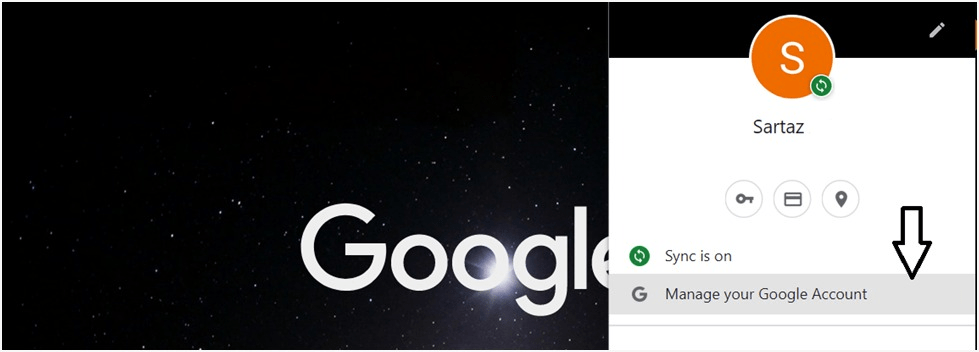
  • After this, you will see an option Manage Your Google Account like in the given figure shown.Click on it and proceed.
How do I change my name on Google

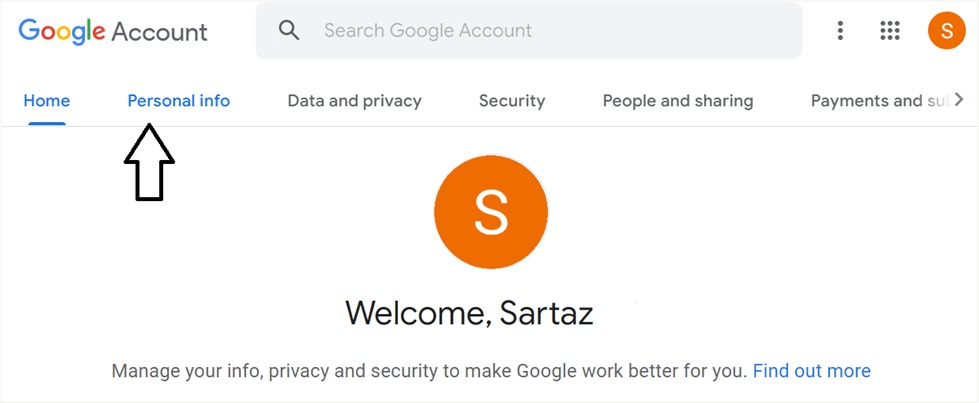
After selecting this option, you will see something like the given below.
How do I change my name on Google
  • Here, you will see an option with the personal name info. This is the place where all attribute regarding your Google profile is stored. In other words, you will get an option to change your Google profile name.

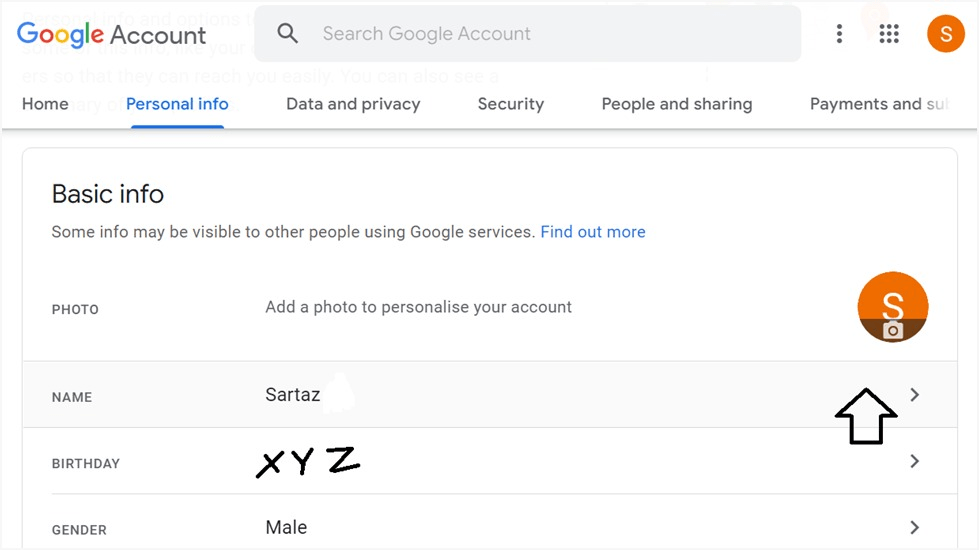
Therefore, go for it and click on personal info. As you will click on personal info, you will see your personal detail from there. One of the personal details is your name, as is shown in the given picture.
How do I change my name on Google
  • Moving ahead, click on the name as the arrow shown in the above picture.

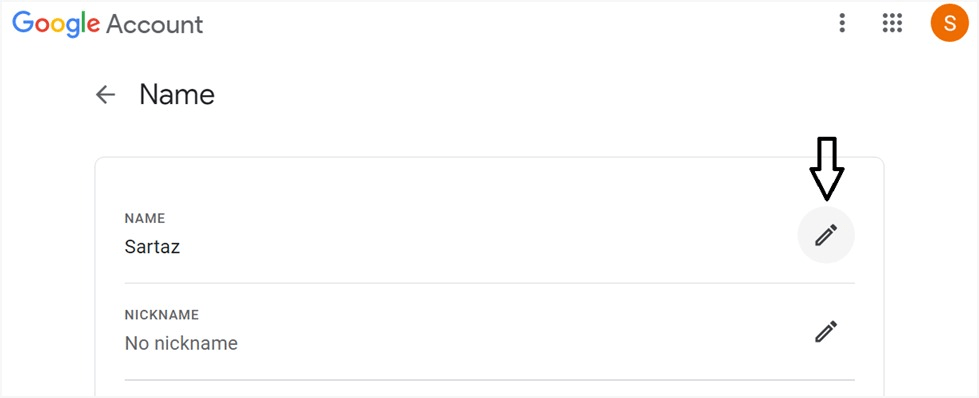
As you will click the name, another page will open. And it will be like the given below –
How do I change my name on Google
  • Now, here out of many profile attributes, your name will be shown. And along with each attribute, there will be an option to edit it or reset it.

    So, finally, to change the name, click on the edit button. And change your name from your Google profile. 

In this way, you can change your Google profile from your desktop/ laptop and android.

On an Android device, how do you change your Google name?

Here, you can change your name by going through device settings.

  • Open your smartphone's Settings application.
  • Select Accounts.
  • You may choose the account whose name you wish to modify by touching it.
  • Select Google Account.
  • Select Personal Information.
  • Select a name.
  • And at last, after putting in a new name, click Save.

Related Topics

What is an Alignment?

The phrase aligns, or alignment refers to how text is positioned on the screen. Left-aligned text, for example, Left align, provides a straight line on the left side of the...

4 minutes read.

What is UDIMM?

An unbuffered Dual Inline Memory Module is an Unbuffered DIMM, a volatile memory chip in laptops and computers. UDIMM is a standard type of RAM. It is also part of...

3 minutes read.

What is an Online Service?

An entity that offers online access to various types of data for diverse purposes is known as an online service. Online banking, education, news, shopping, dating, computer support websites, social networking...

3 minutes read.

What is Parallelization?

Parallelization means doing multiple tasks simultaneously (in parallel) to accomplish some goal. According to Computational Science, developing a computer program or system to process data-parallel is known as parallelization or...

4 minutes read.

How to use a computer keyboard

Alphanumeric, function, control, and arrow keys are on the keyboard. The left hand holds the "asdf" keys, while the right-hand holds the "jkl;" keys. To advance or switch between boxes,...

9 minutes read.

What is an Executable File?

An executable file (EXE file) contains a set of instructions, when the user clicks on the file icon, the system can immediately execute. The file extension for an executable file...

4 minutes read.

What is URL?

URL or Uniform Resource Locator provides the unique location of the resource. Any element displayed on the world wide web has a unique URL dedicated to that element only. The...

8 minutes read.

How to Fix a Windows CD-ROM, DVD, or Disc Drive Issue?

If your CD-ROM, DVD, or disc drive is not working properly in Windows, you can try a few troubleshooting steps to fix the issue. These steps include checking the connections,...

6 minutes read.

Second Generation of Computer

The period of the second generation was from (1959-1965). The transistor takes the place of the vacuum tubes in the second generation. The transistor was invented at Bell Labs in...

4 minutes read.

What is a Username?

As we know that technology is increasing day by day, so we must have to aware about this. In this modern world, everyone is using computer and the internet. So,...

4 minutes read.

What is Data?

In our daily life, you can see everybody is dealing with information and data to analyze things. Data can be of different forms and can be converted to the required...

6 minutes read.

How to Open Safe Mode?

The Safe mode is a diagnostic mode in Windows that starts the operating system with a minimal set of drivers and files. It is designed to help troubleshoot and fix...

10 minutes read.

What is RJ Cable?

Registered Jack is referred to as RJ. It serves as a network interface or a telecommunications medium. RJ Cable enables voice and data equipment to interact with network devices. It is...

4 minutes read.

History of Computers

You might think just like there were no computers available in ancient times, no people can know about computers, but at that time, they had to calculate and compute by...

6 minutes read.

Function Keys on Keyboard

The function keys are present in each keyboard. There are a total of twelve function keys labelled from F1 to F12. Each function key is designed to carry out a...

4 minutes read.

What is Overtype mode?

What is (OVR) Overtype mode? Overtype mode is a text mode, also referred to as OVR in Microsoft Word. In this mode, every word you type replaces a previous one in...

3 minutes read.

What is an Octothorpe?

Octothorpe is a number sign with other names and is referred to as a hash mark or pound sign. Octothorpe is known to everyone with the hashtags that are often...

2 minutes read.

What can I do if my computer or laptop is lost or stolen?

The computer loss might bring the owner a stressful situation because it brings a loss in financial and security to the information. But there are a few steps that one...

4 minutes read.

What does Alt+Esc do?

The computer is one of the most basic needs of every user. If we use some shortcut keys to do the same operation, then it will be good and time...

3 minutes read.

What is boot menu?

When we turn on our computer, the machine goes through a process known as booting that is carried out automatically. This could be accomplished by the CPU's circuitry, software, or...

3 minutes read.