
×

What is a Device?

Generally, when we hear this term named "Device", we have a perspective that it may either be some kind of electronic equipment or a machine built to work for a certain purpose. But the device does not only mean an electronic tool instead, it may refer to anything that people created and modified according to their needs.

A plan, a process, or a trick developed by people to achieve some specific goal also comes under the term device. For example – when people write down certain queries or suggestions to a member of parliament or to a local lawmaker is also termed as one of the prominent device to express their opinions.

Now, as this article focuses mainly on electronic technology so in the following section, we will be discussing the term “Device” sticking to its context in the computing world.

In the computing world, what does a Device mean?
What is a Device

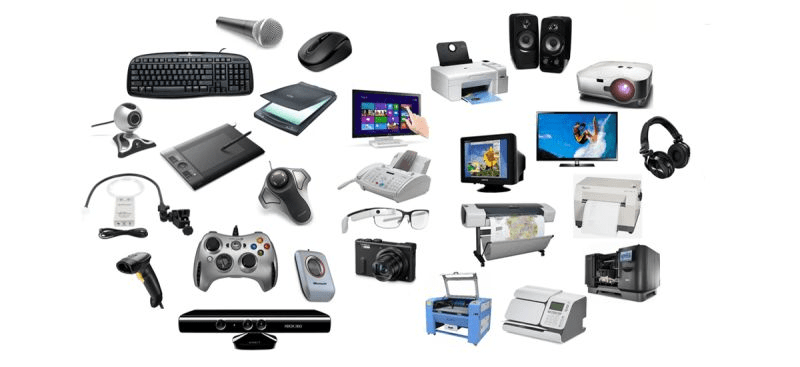
In computer technology, a device is referred to as a physical component such as hardware or some other equipment created to perform certain computing functions within the computer system. A device may perform multiple computing functions, for example, it can work to make the computer accept the user's input, or it can receive the output from the computer. There are many devices that are built so as to perform input and output both.

Any electronic element that is capable of performing computing functions and supports the installation of third-party software or firmware can be termed as a device. A device can either be present internally within the computer system, such as motherboard, RAM, etc., or it can be attached externally to the system like printers, speakers, etc.

Devices that are auxiliary in nature that is, they provide input, output, or both, are known as Peripherals. Although Peripherals are not the essential components of the computer, but they are known to provide extra functionality to the computer system. Most of the peripheral devices are inbuilt with a program known as a device driver that makes it act as a translator. This particular program called device driver converts the general commands from an operating system or an application into a specific command, or they can do the other way round that is converting specific commands to general commands.

However, peripheral devices are themselves not capable of functioning properly, so they rely on the computer system to perform their tasks.

Below are some of the examples of peripheral devices.

a) Speakers

b) Projector

c) Joystick

d) Keyboard

e) Mouse

f) Plotter

g) Display devices such as monitor

h) Scanner

i) Sound Card

j) Digital Camera

k) Tape drive

How many types of devices are there?

Devices are mainly classified into five different types that are mentioned below:

1) Input Devices – These are the types of peripheral devices used to provide input to the computer system. Input devices are of various types, such as a mouse, a keyboard, a webcam, a microphone, etc.

2) Output Devices – These are the types of peripheral devices used to accept data from the computer system. Output devices are of several types, such as a printer, a monitor, a projector, a headphone, etc.

3) IoT (Internet of Things) – These types of devices possess their own IP address and have the ability to communicate over the internet. Smart home devices such as a camera, a lightbulb, a speaker, a ceiling fan, etc.

4) Storage Devices – These are the types of peripheral devices used to provide data to the computer system as well as they are useful to store data such as music, photos, videos, etc that can be accessed later when connecting them with some other devices. Storage devices are of several types, such as a DVD, a CD, an SD card, a USB flash drive, etc.

5) Mobile Devices – These devices have the ability to connect to the internet wirelessly so as to fetch and process the data. These devices are compact and are used for multipurpose such as storing data, browsing over the internet, etc. Some of the examples of these devices are a smartphone, a laptop, a tablet, a smartwatch, etc.

What is the difference between a device and a gadget?

Device and Gadget may seem like two different words having identical meanings, but they have quite a difference.

The term Device is used to indicate equipment whose proper name is known to us, while on the other hand, Gadget is used to specify equipment whose proper name is not known to us.


Related Topics

Extended Reality

The extended reality, XR, specifically, has been creeping into, for all intents and purposes, modern life for pretty many years in a particularly big way. According to statista, the global...

8 minutes read.

How To Replace the CMOS Battery

CMOS(Complementary Metal Oxide Semiconductor) stores the information, including date, time, and system firmware setting. The CMOS battery is responsible for powering up the BIOS firmware in laptops, and that BIOS is...

3 minutes read.

History of Computers

You might think just like there were no computers available in ancient times, no people can know about computers, but at that time, they had to calculate and compute by...

6 minutes read.

What is Bracket?

A bracket is one of two large, forward- or afterwards-facing punctuation marks that is frequently used to separate a section of text or data from its surroundings. Depending on the...

3 minutes read.

What is a File System?

A file system is a method that is responsible for managing the space and the data on the system's storage unit. It is also known as the file manager. The...

10 minutes read.

What is Device Driver?

Device Driver A device driver is a specific type of programming application that permits one equipment device (like a PC) to interface with another equipment device (like a printer). A device...

6 minutes read.

What is a Calculator?

What is a Calculator? A calculator is a manufactured device that enables us to solve complex mathematics easily. It helps to save a lot of time and energy as well. They...

3 minutes read.

How does a computer process data into information?

What is data Data is a type of information. Data can be in the form of images, integers, or strings of letters. All data must be entered into the personal computer...

3 minutes read.

What is a TAB stop?

The place where the cursor stops after pressing the Tab key is known as a tab stop. The carriage moves to the next tab stop when you click the tab...

3 minutes read.

What is automation?

Automation means the use of machinery and technologies to make tasks operate automatically and without human involvement. It uses electrical and computer-controlled technologies to replace manual tasks. For example, robots...

6 minutes read.

How much do Computer Programmers make?

With growing technology, people are working fast to pace up with the perpetual demand. Everything which has made our life easier and comfortable has something to do with computer engineering...

7 minutes read.

What is Printer?

Printer is a hardware equipment that can be connected to a system. It can take textual and graphical content from the system and display it on a medium. It allows...

10 minutes read.

How to Identify problems in the Windows Device Manager?

When you run the Device Manager, a screen shown in the example display below. Next to each gadget category, arrows are pointing to the right. No other devices or Unknown...

6 minutes read.

When was the first computer invented?

There is no clear account of the invention of the first computer. Several variants of the computer were developed simultaneously, so it is not easy to track the development of...

7 minutes read.

Uninstalling Software or Apps in Windows

How to uninstall software in Windows? Unwanted software can be removed from your computer's hard drive using several third-party programs and the built-in tools that Windows 10 and Windows 11 provide. Applications...

4 minutes read.

Output devices of Computer

The output devices are the hardware parts which can create the whole computer system with the combination of all hardware parts. The user can get the desired output via output...

10 minutes read.

What is a Model Number?

The Model number is a number given to each product that is assigned by the manufacturers of the product. The Model number is unique and used in all products to...

3 minutes read.

What is an Expansion Card?

An expansion card is also called an add-on card, or an adapter card is a Printed Circuit Board (PCB) on the motherboard and fixed into an expansion slot. An expansion...

6 minutes read.

Computing Power

Computing power comes at how fast a machine can perform a task. When a command is given to any computer, it is broken down into mathematical series of problems. A...

3 minutes read.

Case Sensitive Languages

Every language, system, or program has the capability to differentiate between different case alphabets. If a programming language doesn’t work properly in upper case and lower case letters interchangeably, it...

4 minutes read.