
Computer Software
The computer software is the collection of data or instruction that tells the computer how to work. It is a set of program that enables the computer to perform a specific task. It has to be "loaded" into the computer's storage such as hard drive, memory, Ram, etc. Anything which stores electronically is known as software.
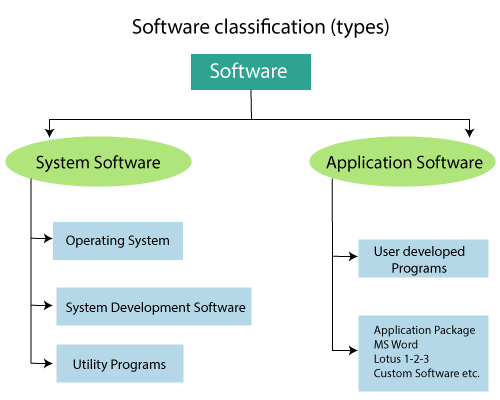
There are two types of software that exist in the computer system:
- System Software
- Application Software
The term software is the opposite of hardware. The hardware describes the physical part of the computer system, but the software refers to applications, scripts, and programs that can run on the device.
1. System Software
System Software is the collection of programs which can provide a platform for other software. There are different types of system software which includes an operating system such as macOS, Ubuntu, and Microsoft Windows, etc. There are various types of system software, which are given below:
1.Operating system
The operating system is system software that manages computer hardware, software resources, and provides common services for the computer program. It works as an interface between the user and computer hardware.
Types of Operating system
The operating system performs all the basic jobs like managing file, process, and memory. It acts as a manager of all resources, so, it is known as a resource manager. There are various types of the operating system which are given below:
A. Batch operating system
The batch operating system does not interact with the computer directly. There is an operator which takes similar tasks having the same requirement and group them into batches. The operator is responsible for sorting the tasks with similar needs.
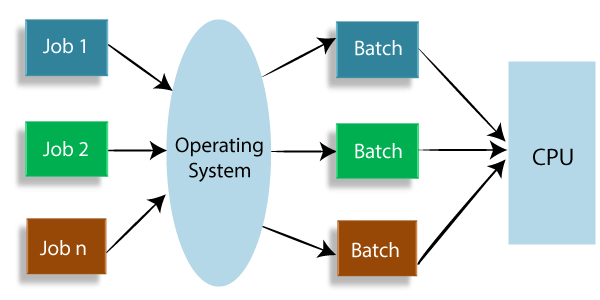
Figure: The batch operating system.
B. Time-sharing operating system
In time-sharing operating system, every task is given some time to execute, so that the entire job work smoothly. These systems are also known as the multitasking systems. The time that every task gets to execute is known as quantum. The time-sharing system uses CPU scheduling and multiprogramming to provide every user with a small portion of the time-shared computer. This system allows every user with a small portion of the time-shared computer.
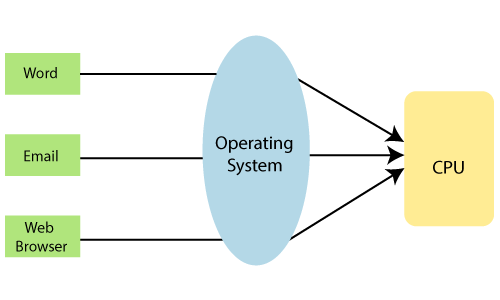
Figure: Time-sharing operating system.
C. Distributed operating system
The distributed operating system is a recent advancement in the world of computer technology. These distributed systems referred as loosely coupled. The processor of this system differs in size and function.
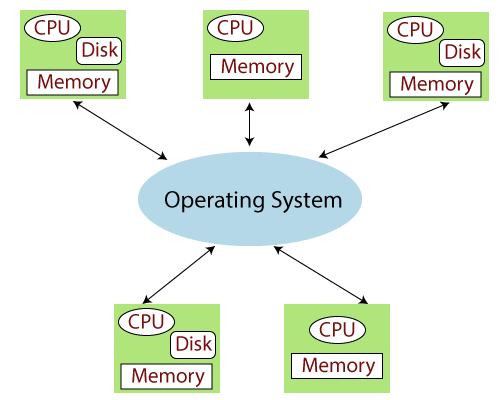
Figure: The Distributed Operating System.
D. Real-time operating system
This type of operating system serves Real-time systems. The time interval needs to process and respond to inputs is very small. This time interval is called response time. There are two kinds of Real-time operating system which are given below:
1. Hard Real-time system
The time constraints are very strict in the hard Real-time operating system. Even the shortest possible delay is not acceptable in these systems.
2. Soft Real-time system
The time constraints are less strict in these types of operating systems.
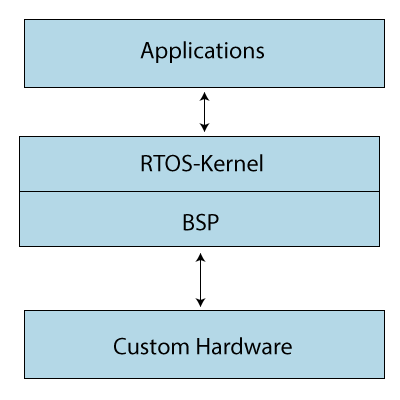
Figure: The Soft-Real time operating system.
E. Network operating system
The Network operating systems run on the server and provide the capability to manage the data, users, groups, security, applications, and other networking functions. All the users are well aware of the underlying configuration in Network Operating System. These systems allow shared access of files, printers, security applications and other networking functions over a small private network. The Network Operating system is also known as a tightly coupled system.
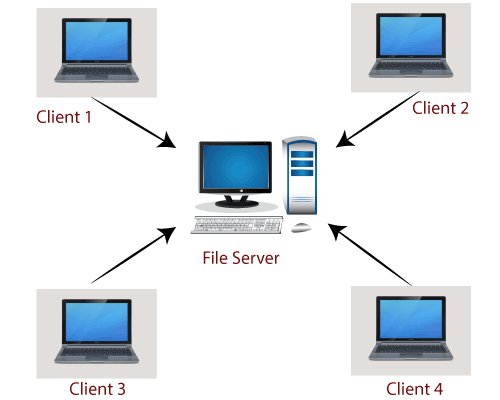
Figure: The Network Operating System
Functions of Operating system
The operating system has three main functions which are given below:
1. Manage computer resources, such as the central processing unit, disk drives, and printers.
2. Establish the User interface.
3. The Operating system executes and provides services for application software.
2. Device Driver
The Device driver is the computer program that operates or controls a particular type of device which is attached to the computer. The device drivers are hardware-dependent and operating-system-specific.
2. Application software
The Application software is designed to perform a group of coordinated functions, tasks, or activities for the benefit of the user. There is various type of application such as a word processor, a spreadsheet, an accounting application, a web browser, an email client, a media player, a file viewer, etc. The application software is a program or group of programs which is designed for the end-users. Some application software is given below:
1. Word processing software
The word processing system is used to manipulate the task or jobs and apply the basic designs to our pages. It is a computer program or device that provides input, editing, formatting, and output of text with an additional feature.
This software enables our write text, store it electronically, display it on the screen, modify it by entering commands and characters from the keyboard, and print it.
2. Spreadsheet software
The spreadsheet software is defined as a type of computer program which helps the user to perform numerical functions and analyze numbers through a computerized version of accounting worksheet.
3. Desktop publishing software
The desktop publishing software is the creation of documents using page layout software on a personal computer. There are several types of desktop publishing software such as Adobe Indesign, Microsoft Publisher, etc. This software assists in the creation of different forms of online content.