
What is NBSP (Non-Breaking Space)?
NBSP (Non-Breaking Space), also known as Hard space or Fixed space, is an HTML entity used to add blank spaces in the content. NBSP does not allow the browsers to add an automatic line break and separate the content into different lines at the position where it is used.
An HTML entity is characters that are already reserved to write source code and display it in the browser. For example- This “<” is an HTML entity used to represent less than a symbol in HTML.
The blank spaces which are added using nbsp get displayed both on the source code as well as on the browser, unlike blank spaces, which only appear on the source code when added simply by hitting the spacebar.
Using nbsp developers can add multiple blank spaces to the content but doing this may make the source code look very messed up, so instead of using  , one can use its alternatives which we are going to discuss later in this section.
Why is NBSP used?
When we want to add a space in between our content while typing on the computer, it seems really simple. You just hit the spacebar, and the space appears, but while displaying your content on the browser, you may find that the content is not displayed according to what you actually typed.
Example
<!DOCTYPE html>
<html lang="en">


<head>
    <meta charset="UTF-8" />
    <meta HTTP-equiv="X-UA-Compatible" content="IE=edge" />
    <meta name="viewport" content="width=device-width, initial-scale=1.0" />
    <title>NBSP</title>
</head>


<body>
    <h1>Lorem ipsum dolor sit amet               consectetur adipisicing elit. Excepturi hic, architecto minima ratione distinctio commodi
    reiciendis asperiores      quod magnam officiis natus ullam quisquam iste. Repudiandae       unde doloremque minus        dolorum
    tenetur?</h1>
</body>


</html>
Output

Also, talking about another scenario, suppose you want two words in your content, say a number, and its unit to remain side by side when it’s being displayed by the browser. But when the content is displayed on smaller devices, for example, mobile or tablets, the browser automatically adds a line break, and it may be possible that the words which you wanted to remain side by side get broken in such a way that the two words appear in separate lines.
Example
<!DOCTYPE html>
<html lang="en">


<head>
    <meta charset="UTF-8" />
    <meta HTTP-equiv="X-UA-Compatible" content="IE=edge" />
    <meta name="viewport" content="width=device-width, initial-scale=1.0" />
    <title>NBSP</title>
</head>


<body>
    <h1>The car was at a speed of 5 km/hr;</h1>
</body>


</html>
Output
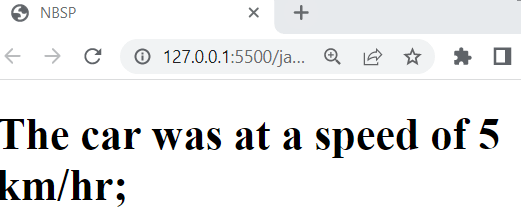
So to avoid this type of scenario, nbsp plays a very vital role where it provides liberty to the developer by allowing them to set the content according to their choice.
How to use NBSP?
NBSP can be mainly used for two purposes that are first, to add multiple blank spaces, and the next one is to prevent automatic line breaks provided by browsers.
Let’s see how nbsp can be used in these two cases separately in the following section.
1) To add multiple blank spaces
First of all, let’s see how your code will look if you try to add blank space without using nbsp.
Example
<!DOCTYPE html>
<html lang="en">


<head>
    <meta charset="UTF-8" />
    <meta HTTP-equiv="X-UA-Compatible" content="IE=edge" />
    <meta name="viewport" content="width=device-width, initial-scale=1.0" />
    <title>NBSP</title>
</head>


<body>
    <h1>Lorem       ipsum dolor sit amet consectetur adipisicing elit.                     Reprehenderit quibusdam,                                           et hic omnis explicabo ducimus
        in maxime unde </h1>
</body>
</html>
Output

By seeing the output for the source code above, it's clear that the browser ignores the blank spaces added using the spacebar.
Now let’s see how we can display the content exactly in the same way it’s been written in the source code.
To use nbsp, write “ ” at the position where you want to add a blank space. To add multiple blank spaces, write " " the number of times you want.
Example
<!DOCTYPE html>
<html lang="en">
<head>
<meta charset="UTF-8" />
<meta HTTP-equiv="X-UA-Compatible" content="IE=edge" />
<meta name="viewport" content="width=device-width, initial-scale=1.0" />
<title>NBSP</title>
</head>
<body>
<h1>Lorem ipsum dolor sit amet consectetur adipisicing elit. Reprehenderit quibusdam, et hic omnis explicabo ducimusin maxime unde </h1>
</body>
</html>
Output

Here, the output clearly shows blank spaces that are added using nbsp in the source code.
2) To prevent line break
First of all, let’s see how your code will look when the browser automatically adds a line break when showing the content on the smaller devices.
Source Code
<!DOCTYPE html>
<html lang="en">


<head>
<meta charset="UTF-8" />
<meta HTTP-equiv="X-UA-Compatible" content="IE=edge" />
<meta name="viewport" content="width=device-width, initial-scale=1.0" />
<title>NBSP</title>
</head>
<body>
<h1>Keep the goods quantity less because the maximum load it can bear is 1 kg</h1>
</body>
</html>
Output
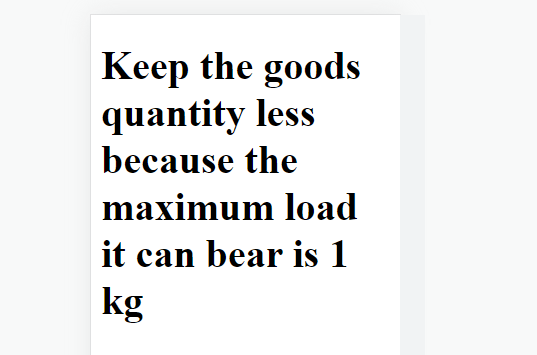
Here the output shows how the content will be seen on smaller devices where the line break added by the browser makes the two words "1", and "Kg" gets broken in such a way that it gets separated into two lines.
Now let us see how we can prevent this with the help of nbsp.
NBSP is very useful in this type of case as at the position where it is used, it makes sure that the two words have a blank space between them, but they are not displayed on separate lines.
Example
<!DOCTYPE html>
<html lang="en">
<head>
<meta charset="UTF-8" />
<meta HTTP-equiv="X-UA-Compatible" content="IE=edge" />
<meta name="viewport" content="width=device-width, initial-scale=1.0" />
<title>NBSP</title>
</head>
<body>
<h1>
Keep the goods quantity less because the maximum load it can bear is 1 kg
</h1>
</body>
</html>Output

Here the output shows the same content being displayed on the much smaller device as mentioned above, but here you can clearly see the difference of using nbsp. Using   between the two words "1" and "Kg" does not allow the browser to add a line break between them, no matter on which device the content is being displayed.
Where should   not be used?
NBSP is one of the most used HTML entities used by developers due to its nature.NBSP is very useful for making pages responsive and displaying the content according to how the developer wants it to be seen on different devices. But as everything has some positive as well as some negative aspects so using nbsp for every scenario might not be suitable.
Let’s understand it with an example say you have HTML content and you want to add multiple blank spaces between the words. You might think that nbsp would be the better option to achieve this but think a bit that to add multiple blank spaces to the content, you need to specify several times  , which would make your code look very messed up, and it would be not easy to read and understand the code for you as well as your team members if you are working on a project as a team.
Also, the screen sizes and screen resolution vary a lot depending from the device to device, so there is a chance that using multiple times   sometimes might not give you the result that you wanted and can become collapsed in an undesirable way.
NBSP is meant to keep words together and add a few blank spaces in the content. So it’s a good practice to just use it for such specific purposes only and not make it a habit of using it in order to make pages responsive.
How to create fixed space on my application program?
There are keyboard shortcuts that allow you to create a fixed space on your application program, but using one particular keyboard shortcut will not always work.
Every Operating System and application program has its own keyboard shortcuts to achieve this. According to your operating system and software, you can choose which keyboard shortcut to apply from the below section.
| Operating System and Application Program | Keyboard Shortcut |
| Microsoft Windows | Ctrl + Alt + Spacebar or Ctrl + Spacebar or Alt + 0160 or Alt + 255 |
| macOS | Option + Spacebar |
| Linux or Unix | Space or AltGr + Space |
| AmigaOS | Alt + space |
| Mac Adobe InDesign | Option + Cmd + X |
| Python | ‘\N{NO-BREAK SPACE}’ |
| GNU Emacs | Ctrl + X 8 Space |
| Vim | Ctrl + K or Shift + N or Shift + S |
| Microsoft Word | Ctrl + Shift + Space |
| LibreOffice | Ctrl + Shift + Space |
| AutoCAD | Ctrl + Shift + Space |
| Dreamweaver | Ctrl + Shift + Space |
| FrameMaker | Ctrl + Space |
| WordPerfect | Ctrl + Space |
What to use if you want to add multiple blank spaces?
As we have already discussed above that, using   is not feasible when you want to add multiple blank spaces. So in the following table, we have provided some commonly used HTML entities that you can choose according to the number of spaces you desire to add to your content.
| HTML entity | Number of spaces |
| | Use to add only one space |
|   | Use to add two non-breaking spaces |
|   | Use to add four non-breaking spaces |