
How to open the Windows My Documents or Documents folder
Documents or My Documents (known in earlier versions of Windows such as Windows XP) is basically an in-built directory provided by Microsoft Windows. This is a very valuable directory that lets the user store their private data, such as photos, videos, documents, etc., and it also acts as a storehouse for applications data.

Before Windows Vista, the Documents folder used to have various subdivisions under it, such as "My Music", "My Pictures", and "My Videos", to act as a storage for different types of files. But these subfolders were arranged alongside the Documents folder from and after the release of Windows XP.
With every new version of Windows, the process to access the Documents or My Documents folder varies. Users shifting from the older version of Windows to a newer version may have difficulty finding and opening the Documents folder.
So, in the following section, we will be discussing every possible way to access the Documents folder in all versions of Windows.
How to open the Documents folder in Windows 10/11?
Following are the several ways to open up the Documents folder in Windows 10 and Windows 11.
1) Using Search Field
Step 1 – Open up the Start Menu by either clicking on the Start button on the left-hand side of your screen or pressing the Windows logo key on your keyboard.
Step 2 – On the Start Menu, you will be able to see a search field where you need to type Documents. Select the Documents folder and hit the Enter key from your keyboard to open the folder.
2) Using Windows Explorer
Step 1 – Open up any folder you wish on your computer
Step 2 – On the left-hand side of this folder, you will find Quick Access.
Step 3 – Click on the arrow beside the Quick Access
Step 4 – Select the Documents folder.

3) Using This PC or Quick Access
Step 1 – Open This PC or use the “Windows Logo + E” key on your keyboard to open Quick Access.
Step 2 – Click on the Documents folder visible on your screen.
4) Using PowerShell or Command Prompt
Step 1 – On your computer, open PowerShell or Command Prompt
Step 2 – Type “Start%userprofile%\Documents” on the Command Prompt Window
Step 3 – Press Enter key from your keyboard to open the Documents folder
5) Using Start Menu
Step 1 – Clicking on the Start button to open the Start Menu on your computer screen
Step 2 – If you have added the Documents folder using the settings of your computer, then you will be able to find the Documents find at the bottom of the Start Menu
Step 3 – Click on the Documents folder to open it

5) Using Run Command
Step 1 – Using the "Windows Logo + R" key, open the Run Command dialog box
Step 2 – Beside the "Open:" label in the text field, type "%userprofile%\Documents"
Step 3 – Press Enter key from your keyboard to open the Documents folder
How to open the Documents folder in Windows 8?
Following are the several ways to open up the Documents folder in Windows 8.
a) Using File Explorer
Step 1 – Open File Explorer on your computer
Step 2 – On the left-hand side of your screen, double click on "This PC"
Step 3 – Click on the Documents folder shown under “This PC”
b) Browsing Windows Explorer
Step 1 – Open Windows Explorer on your computer
Step 2 – On the left-hand side, click on "This PC"
Step 3 – Various drives and folders are displayed on your screen. Click on the "C:" drive among this.
Step 4 – Click on the “Users” folder visible on your screen
Step 5 – Out here double, click on the name of your user account
Step 6 – Among the multiple files and folders, double click on the Documents folder to open it
How to open the Documents folder in Windows 7?
Following are the several ways to open up the Documents folder in Windows 7.
1) Using Start Menu
Step 1 – On your computer, open up the Start Menu
Step 2 – In the Start Menu, click on the Documents folder to open it.
2) Using Windows Explorer
Step 1 – Open Windows Explorer on your computer screen
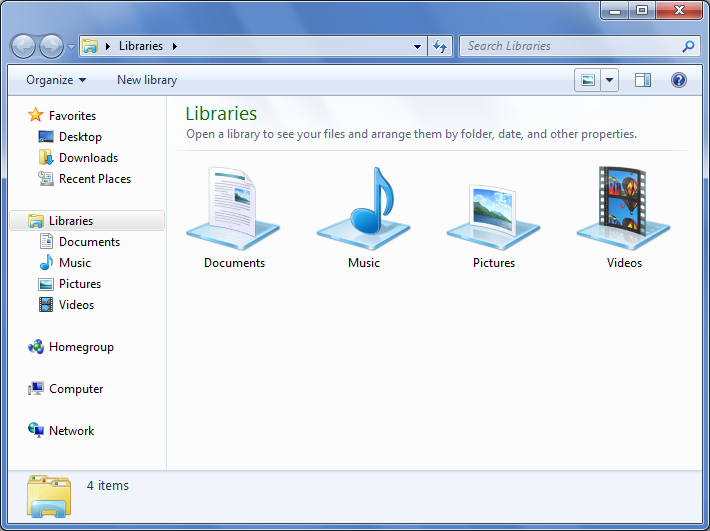
Step 2 – Among various folders visible on your screen, double click on the Libraries folder
Step 3 – Double click on the Documents folder shown up on your computer screen
Step 4 – Under the Documents folder, double click on the My Documents folder to open
3) Browsing Windows Explorer
Step 1 – Open Windows Explorer on your computer
Step 2 – Double click on the “C:” drive shown under “Computer”
Step 3 – Click on the “Users” folder visible on your screen
Step 4 – Out here double, click on the name of your user account
Step 5 – Among the multiple files and folders shown on your screen, double click on the My Documents folder to open it
How to open the Documents folder in Windows Vista?
Following are the several ways to open up the Documents folder in Windows Vista.
a) Using Start Menu
Step 1 – On your computer, open up the Start Menu
Step 2 – On the right-hand side of the Start Menu, click on the Documents folder to open it.
b) Using Windows Explorer
Step 1 – Open Windows Explorer on your computer screen
Step 2 – Double click on the name of your user account
Step 3 - Double click on the Documents folder visible on your computer screen
c) Browsing Windows Explorer
Step 1 – Open Windows Explorer on your computer
Step 2 – Double click on the “C:” drive shown under “Computer”
Step 3 – Click on the “Users” folder visible on your screen
Step 4 – Out here double, click on the name of your user account
Step 5 – Among the multiple files and folders shown on your screen, double click on the Documents folder to open it
How to open the Documents folder in Windows XP?
Following are the several ways to open up the Documents folder in Windows XP.
a) Using Start Menu
Step 1 – On your computer, open up the Start Menu
Step 2 – On the right-hand side of the Start Menu, click on the My Documents folder to open it
b) Browsing Windows Explorer
Step 1 – Open My Computer on your computer screen
Step 2 – Double click on the “C:” drive shown under “Computer”
Step 3 – Double click on the “Documents and Settings” folder visible on your screen
Step 4 – Out here double, click on the name of your user account
Step 5 – Among the multiple files and folders shown on your screen, double click on the My Documents folder to open it