
Java IO file not found exception
One of the exception classes offered by the java.io package is FileNotFoundException. An exception is raised when we attempt to access a file that isn't present in the system. It is a checked exception because it is raised by one of the following constructors and happens at run time rather than at compile time:
- Fileinputstream
- Randomaccessfile
- Fileoutputstream
Constructor of FileNotFoundException
There are two types of constructors in FileNotFoundException class. That is:
- FileNotFoundException () (default constructor)
Due to the lack of a function Object () { [native code] } parameter, it creates a FileNotFoundException and sets the error detail message to null.
The syntax for using this type of constructor
public FileNotFoundException ()
- FileNotFoundException (String s)
As we supply str to the function Object () { [native code] }, it creates a FileNotFoundException and sets the error detail message.
The syntax for using this type of constructor
public FileNotFoundException (String s)
Methods of FileNotFoundException class
Because it is a subclass of both java.lang.Throwable and java.lang.Object, it offers every method that is provided by those types.
| Methods in java.lang.Throwable | Methods in java.lang.Object |
| addSuppressed () | clone () |
| fillInStackTrace () | equals () |
| getCause () | finalize () |
| getLocalizedMessage () | getClass () |
| getMessage () | hashCode () |
| getStackTrace () | notify () |
| getSuppressed () | notifyAll () |
| initCause () | wait () |
| printStackTrace () | |
| setStackTrace () | |
| toString () |
Why does FileNotFoundException occur
There are primarily two causes for this mistake. The following are the justifications for receiving this exception:
- When we attempt to access that file, the system does not have it.
- An error may be raised when we attempt to access a file that isn't available, such as when we try to alter a read-only file.
FileNotFoundExcep.java
// all the required packages are imported
import java.io.*;   // io class for handling input stream and output stream
// Class FileNotFoundExcep main class creation.
public class FileNotFoundExcep
{
    public static void main (String[] args)
    {
         // object creation for file reader class
         FileReader fr = new FileReader("Exp.txt");
         // object creation for buffered reader class and sending fr file reader as the parameter.
         BufferedReader br = new BufferedReader(fr);
         // Declaring varible data for storing the file data
         String data = null;
         // reading the data in the file using the readLine method of br till the last line
         while ((data = br.readLine()) != null)
         {
             System.out.println(data);
         }
         // closing the br object created for bufferreader class
         try {
            br.close();
        } catch (IOException e) {
            e.printStackTrace();
        }
    }
}  S
Output
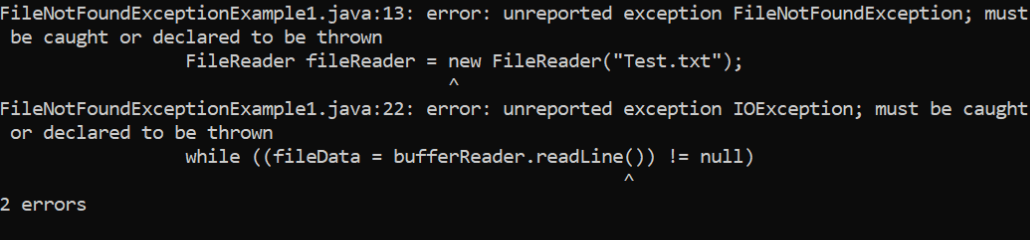
FileNotFoundExcep1.java
// all the required packages are imported
import java.io.*;
// io class for handling input stream and output stream
// Class FileNotFoundExcep main class creation.
public class FileNotFoundExceptionExample2
{
    public static void main (String[] args)
    {
        try {
            // object creation for file class as to open the file
            File obj = new File("Exp.txt");
            // object creation for print writer class
            PrintWriter PW = new PrintWriter(new FileWriter(obj), true);
            // printing the simple print line
            PW.println("Simple print");
            PW.close();
            obj.setReadOnly();
            // inserting the data into a new file
            PrintWriter pw1 = new PrintWriter(new FileWriter("Exp.txt"), true);
            pw1.println("Simple print");
            pw1.close();
        }
        catch (Exception ex) {
            ex.printStackTrace();
        }
    }
}
Output

Handling Exceptions
Use of the try-catch block is required to handle the exception. We will place the code line that potentially raises an exception in the try block. The catch block will take care of any exception that arises. The following additional methods are available for removing the FileNotFoundException:
- Suppose the error message states that the requested file or directory does not exist. In that case, the exception can be removed by re-verifying the program and determining whether the requested file is in the requested location.
- If we see the error code access is restricted, we must determine whether or not the file's permissions meet our requirements. The file's license must be changed if it does not meet our needs.
- We must also determine whether or not another software is using the file before we can resolve the access denied problem message.
- If the error message states that the selected file is a folder, we must either delete it or alter its name.
FileNotFound.java
// all the required packages are imported
import java.io.*;
// io class for handling input stream and output stream
// Class FileNotFound main class creation.
public class FileNotFound
{
    public static void main(String[] args)
    {
         // object creation for file reader class

         try {
                FileReader fr = new FileReader("Exp.txt");
                // object creation for buffered reader class and sending fr file reader as the parameter.
                BufferedReader br = new BufferedReader(fr);
                // Declaring varible data for storing the file data
                String fileData = null;
                // reading the data in the file using the readLine method of br till the last line
                try {
                    while ((fileData = br.readLine()) != null)
                    {
                        System.out.println(fileData);
                    }
                } catch (IOException e) {
                    e.printStackTrace();
                }
         } catch (FileNotFoundException ex) {
            ex.printStackTrace();
        }
    }
}
Output
Simple print